


15 Best Enterprise Data Integration Solutions in 2026
Disconnected ERP systems, CRM platforms, legacy databases, and cloud applications make it difficult for enterprises to maintain consistent information. According to Salesforce's 2026 Connectivity Benchmark Report, only 27% of enterprise applications are connected. The right enterprise data integration solutions address these gaps through data pipelines, application connectivity, and governed data access. In this guide, MOR Software will highlight 15 platforms based on their capabilities, use cases, deployment options, and pricing to help you identify the right integration approach.
Key Takeaways
- Enterprise data integration connects business systems and prepares consistent information for reporting, daily operations, and AI applications. ETL/ELT, iPaaS, CDC, and data virtualization serve different needs.
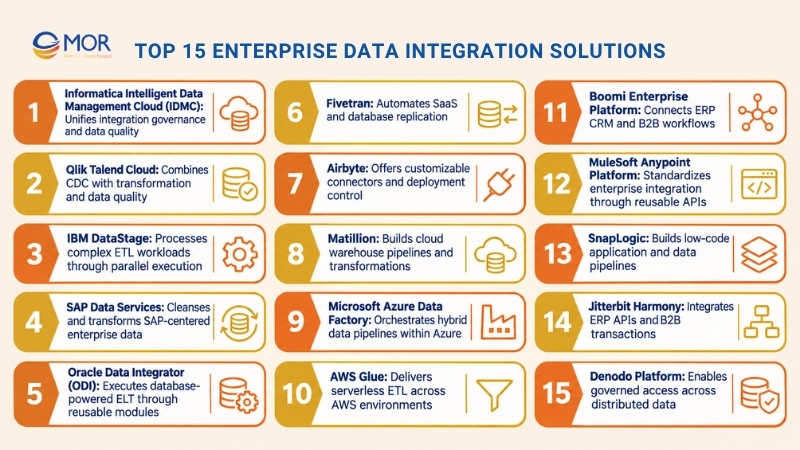
- The 15 solutions include Informatica, Qlik Talend, IBM DataStage, SAP Data Services, Oracle Data Integrator, Fivetran, Airbyte, Matillion, Azure Data Factory, AWS Glue, Boomi, MuleSoft, SnapLogic, Jitterbit, and Denodo.
- Platform selection should start with your source systems, data freshness needs, security rules, deployment model, and total operating costs. A proof of concept can reveal issues before a full rollout.
What Is Enterprise Data Integration?
Enterprise data integration is the process of connecting, combining, transforming, and synchronizing information across business applications, databases, and data platforms. Organizations use integration software, APIs, data pipelines, and shared data architectures to make information accessible and consistent across departments. These capabilities support structured data exchange without requiring every application to use the same technology.
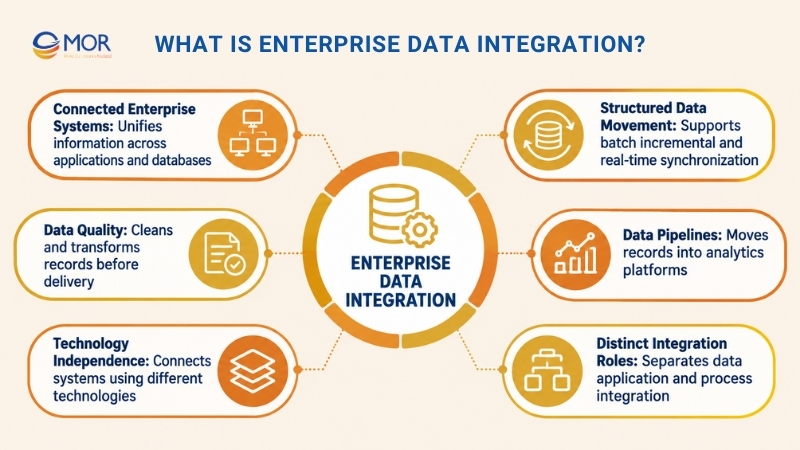
For example, an enterprise might collect records from SAP ERP, Salesforce, PostgreSQL, and legacy databases. Integration pipelines can clean and transform these records before sending them to Snowflake, Databricks, or business intelligence applications. Depending on operational needs, data movement may follow scheduled batches, incremental updates, or real-time synchronization.
Data integration differs from application integration and process automation. Data integration manages information movement and consistency, application integration connects software functions, and process automation executes business tasks across systems. Together, these approaches support reliable reporting, consistent operations, and AI-ready datasets, but each addresses a different technical requirement.
Types of Enterprise Data Integration Solutions
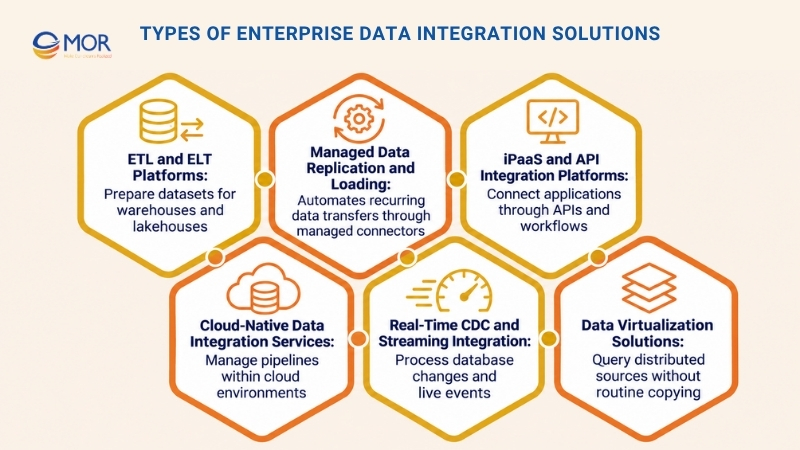
Enterprise data integration solutions fall into several categories based on how they move, process, and expose information. Understanding these differences helps you select the right architecture before comparing vendors.
ETL and ELT Platforms
ETL extracts and transforms information before loading it into a destination, whereas ELT loads data first and performs transformations within the target platform. Informatica, IBM DataStage, and Matillion support these approaches for preparing complex datasets used in warehouses, lakes, and lakehouses.
Managed Data Replication and Loading
Managed replication platforms move information between systems through vendor-maintained connectors and scheduled or incremental updates. Fivetran and Airbyte Cloud are common choices for analytics pipelines, particularly when teams want less custom connector maintenance.
These platforms are often part of automated data integration solutions enterprise teams use to keep reporting datasets current.
iPaaS and API Integration Platforms
Integration Platform as a Service (iPaaS) connects applications through connectors, APIs, mappings, and workflow logic. Boomi, MuleSoft, and Jitterbit support operational data exchange between ERP, CRM, e-commerce, and partner systems.
The main focus is application connectivity rather than large-scale warehouse transformations.
Cloud-Native Data Integration Services
Azure Data Factory and AWS Glue provide managed processing and pipeline tools within their respective cloud environments. They connect cloud resources, coordinate data movement, and execute transformation workloads.
The best cloud data integration solutions for enterprises depend on the cloud services already in use, workload requirements, and support for private data sources.
Real-Time CDC and Streaming Integration
Change data capture (CDC) tracks database changes and transfers updates without repeatedly extracting entire tables. Streaming systems process events as they occur, making them suitable for operational monitoring and time-sensitive analytics.
CDC is available across several platform categories, including Qlik Talend, Informatica, and selected managed replication products.
Data Virtualization Solutions
Data virtualization creates a logical access layer across distributed information sources. Denodo, for example, allows users to query combined datasets without routinely copying every record into one repository.
This approach suits enterprises that require federated access, consistent business definitions, or tighter control over where data resides.
Top 15 Enterprise Data Integration Solutions
The best data integration solutions for enterprises vary according to their technical strengths and intended workloads. Some focus on ETL/ELT and analytics, others connect business applications, and a few provide governed access to distributed information.
The comparison below summarizes the 15 platforms before examining their capabilities, advantages, limitations, and pricing.
Solution | Best for | Integration type | Deployment | Pricing model |
Informatica IDMC | Enterprise data governance | ETL/ELT, CDC, MDM | Cloud, hybrid | Consumption-based |
Qlik Talend Cloud | Data quality and CDC | ETL/ELT, CDC | Cloud, hybrid | Capacity-based |
IBM DataStage | High-volume enterprise ETL | Parallel ETL | Cloud, on-premises | Resource-based, licensing |
SAP Data Services | SAP data transformation | ETL, data quality | On-premises | Enterprise licensing |
Oracle Data Integrator | Oracle-centric integration | Enterprise ELT | On-premises, OCI | Enterprise licensing |
Fivetran | Managed data replication | Managed ELT | Cloud, hybrid options | Usage-based |
Airbyte | Custom data pipelines | ELT, CDC | Cloud, self-managed, hybrid | Free and paid tiers |
Matillion | Cloud warehouse transformation | Cloud ELT | Cloud, hybrid options | Credit-based |
Azure Data Factory | Microsoft Azure integration | ETL/ELT, orchestration | Azure, hybrid | Usage-based |
AWS Glue | AWS data engineering | Serverless ETL | AWS | Compute-based |
Boomi | ERP and CRM integration | iPaaS, EDI | Cloud, hybrid | Usage-based, subscription |
MuleSoft Anypoint | API-led integration | iPaaS, API management | Cloud, hybrid | Credit-based, enterprise |
SnapLogic | Low-code integration | iPaaS, ETL/ELT | Cloud, hybrid | Custom quote |
Jitterbit Harmony | ERP and B2B workflows | iPaaS, EDI | Cloud, hybrid | Custom quote |
Denodo Platform | Federated data access | Data virtualization | Cloud, on-premises | Usage-based, quote |
Note: Pricing models and available capabilities depend on product editions, workloads, and contracts. The categories in this table describe primary capabilities rather than every supported function.
Informatica Intelligent Data Management Cloud (IDMC)
Informatica Intelligent Data Management Cloud (IDMC) combines enterprise data integration, governance, data quality, cataloging, and master data management. Its services support ETL, ELT, replication, and CDC across cloud and hybrid environments.
The platform also uses CLAIRE AI to assist with metadata analysis, mapping recommendations, and selected management tasks. This broad scope suits enterprises that need centralized oversight of distributed information.
Best for: Large organizations managing governed datasets across complex business and technology environments.
Key features:
- ETL/ELT and CDC: Supports batch transformations, incremental updates, and replication across supported systems.
- Data quality and governance: Connects integration processes with cataloging, lineage, and data management controls.
- CLAIRE AI: Assists with metadata discovery, mapping tasks, and selected administrative activities.
Pros: Broad capabilities support integrated data management programs. Enterprises can manage several data-related functions within one vendor ecosystem.
Cons: Setup and administration may require specialist skills. Consumption tracking also needs attention as workloads grow.
Pricing: Informatica uses Informatica Processing Units (IPUs) for consumption-based pricing. Contact the vendor for a workload-based estimate.
Qlik Talend Cloud
Qlik Talend Cloud brings data movement, transformation, quality management, and governance into a cloud platform. It supports scheduled integration and log-based CDC for keeping databases and analytics environments current.
The platform is relevant to businesses running traditional databases, SAP applications, and hybrid systems alongside modern cloud warehouses. Data quality tools help teams identify inconsistent records before they affect reporting.
Best for: Enterprises requiring complex transformations, CDC, and data quality controls across hybrid systems.
Key features:
- Change data capture: Transfers database updates through supported log-based replication methods.
- Data transformation: Supports ETL/ELT workflows, data preparation, and analytical destinations.
- Data governance: Includes capabilities for profiling, lineage, and controlled access to trusted data.
Pros: Combines data movement and quality functions. Higher editions address demanding enterprise connectivity needs.
Cons: Connector support and governance capabilities vary by subscription tier. Specialized legacy connectivity may require higher-priced editions.
Pricing: Qlik Talend Cloud subscriptions use capacity metrics, including data moved and job execution. Enterprise quotes depend on requirements.
IBM DataStage
IBM DataStage is an enterprise ETL platform designed for large transformation workloads. Its parallel processing architecture distributes data preparation tasks across computing resources.
The product fits established enterprise data environments that handle complex mappings, recurring batch processes, and demanding warehouse operations. It also connects with IBM's broader data integration portfolio.
Best for: Large enterprises processing complex datasets across legacy infrastructure and data warehouses.
Key features:
- Parallel ETL: Distributes demanding transformation jobs across available resources.
- Visual development: Supports reusable data mappings and graphical pipeline design.
- Enterprise connectivity: Connects supported databases, applications, and data platforms.
Pros: Parallel processing suits demanding batch workloads. Established teams can continue using familiar DataStage development patterns.
Cons: Infrastructure planning and job administration may require dedicated expertise. Simple SaaS replication tasks may not justify its complexity.
Pricing: Resource-based and software licensing arrangements depend on the IBM product and deployment model. Buyers should confirm the current commercial package.
SAP Data Services
SAP Data Services focuses on extracting, transforming, cleansing, and consolidating enterprise information. It is particularly relevant to organizations preparing SAP and third-party data for analytics, migration, or business reporting.
Its transformation and matching capabilities address inconsistent customer, product, and financial records. Teams already managing SAP environments can use familiar business structures when designing data preparation rules.
Best for: SAP-centered enterprises requiring complex ETL and data cleansing.
Key features:
- Data transformation: Supports reusable mappings, ETL jobs, and business-specific rules.
- Data quality: Provides standardization, matching, cleansing, and duplicate detection.
- SAP connectivity: Handles supported SAP and third-party information sources.
Pros: Works well for SAP-focused integration and migration programs. Data quality functions support accurate business records.
Cons: Administration and infrastructure requirements may be less attractive for cloud-only teams. Product suitability depends on the existing SAP environment.
Pricing: SAP Data Services follows enterprise licensing arrangements. Request a quote covering software, infrastructure, and support.
Oracle Data Integrator (ODI)
Oracle Data Integrator (ODI) uses an ELT-centered approach that runs suitable transformation logic within underlying database systems. This allows enterprises to use their existing database processing capacity for demanding integration jobs.
ODI is particularly relevant to Oracle Database and Oracle-centric warehouse environments. Its Knowledge Modules generate reusable integration code based on mappings and metadata.
Best for: Organizations running Oracle infrastructure and complex database-oriented data transformations.
Key features:
- ELT processing: Executes suitable transformations within source or destination data systems.
- Knowledge Modules: Generates reusable integration logic through metadata-driven development.
- Job orchestration: Coordinates mappings, execution sequences, and data loading processes.
Pros: Uses established Oracle processing capabilities. Reusable modules support consistent integration development.
Cons: Teams need knowledge of ODI architecture and Oracle technologies. Non-Oracle environments require careful connector assessment.
Pricing: Enterprise licensing depends on Oracle agreements, deployment requirements, and related infrastructure.
Fivetran
Fivetran is a managed data movement platform that transfers information from business applications, databases, and other sources into analytical destinations. Its maintained connectors handle many API and schema changes without requiring teams to rewrite extraction code.
This approach fits enterprises that want dependable analytics ingestion and less connector maintenance. It also supports downstream transformation and data activation workflows.
Best for: Data teams building SaaS-to-warehouse and database replication pipelines.
Key features:
- Managed connectors: Maintains connections to supported SaaS platforms, databases, and destinations.
- Incremental replication: Transfers changed records through supported sync and CDC methods.
- Transformation support: Connects loaded information with downstream analytical modeling.
Pros: Cuts repetitive connector work and supports predictable pipeline operations. Teams can spend more time on data modeling.
Cons: Frequent source changes can increase usage charges. Complex transformations may require separate processing tools.
Pricing: The Fivetran Free Plan includes up to 500,000 monthly active rows for connections. Paid plans use consumption-based pricing.
Airbyte
Airbyte supports data movement between databases, SaaS applications, APIs, files, and analytical platforms. It provides connector development tools for teams that need access to less common sources.
Organizations can choose managed cloud deployment or operate supported self-managed editions. This flexibility makes Airbyte attractive to engineers who want greater control over their integration infrastructure.
Best for: Teams needing custom connectors, deployment control, and flexible analytical data pipelines.
Key features:
- Connector Builder: Supports development for specialized APIs and unsupported information sources.
- Deployment options: Includes managed cloud and self-managed configurations.
- Incremental synchronization: Supports scheduled updates and CDC for compatible sources.
Pros: Connector flexibility suits unusual source systems. Self-managed deployment gives teams more infrastructure control.
Cons: Self-hosting creates responsibility for upgrades, monitoring, and reliability. Enterprise support and governance depend on the edition.
Pricing: Airbyte Core is available as a free self-managed option. Airbyte Standard starts at $20 per month, with higher tiers for added requirements.
Matillion
Matillion Data Productivity Cloud focuses on ingestion, transformation, and orchestration for cloud analytical platforms. Its approach places suitable transformation work within destination systems, including supported warehouses and lakehouses.
Teams can build pipelines through visual tools and extend processing with SQL or Python. Matillion also provides AI-assisted capabilities through Maia for selected development and management tasks.
Best for: Organizations using Snowflake, Databricks, and supported cloud data platforms.
Key features:
- Pushdown transformation: Runs suitable processing workloads on destination-platform resources.
- Visual pipeline builder: Supports graphical development and pipeline orchestration.
- AI-assisted development: Uses Maia for selected pipeline creation and maintenance activities.
Pros: Fits cloud warehouse transformation projects. Visual development supports collaboration across technical teams.
Cons: Destination compute charges add to platform costs. Compatibility should be checked before choosing a cloud environment.
Pricing: Matillion pricing uses consumption credits across Developer, Teams, and Scale editions. Higher tiers include additional enterprise controls.
Microsoft Azure Data Factory
Microsoft Azure Data Factory provides managed data movement and pipeline orchestration within the Azure ecosystem. It connects cloud applications, databases, and supported on-premises systems through configurable integration activities.
A self-hosted integration runtime allows access to sources inside private networks. This makes the service useful for companies maintaining hybrid Microsoft infrastructure.
Best for: Enterprises working with Azure, SQL Server, and hybrid data environments.
Key features:
- Pipeline orchestration: Coordinates transfers, schedules, dependencies, and job execution.
- Hybrid connectivity: Connects private-network sources through self-hosted integration runtimes.
- Transformation workflows: Supports mapping data flows and external processing services.
Pros: Fits existing Microsoft cloud environments and integrates with related Azure services. Hybrid connectivity supports staged modernization.
Cons: Billing can involve several execution and processing metrics. Teams must account for services outside Data Factory.
Pricing: Consumption-based charges depend on activities, data movement, transformation resources, and runtime configuration.
AWS Glue
AWS Glue is a serverless data integration service for preparing and moving information across AWS environments. It supports ETL processing using Apache Spark and connects with services used for data lakes and analytics.
The AWS Glue Data Catalog stores metadata that other supported AWS services can access. This makes it useful for teams managing datasets across Amazon S3, Amazon Redshift, and related resources.
Best for: AWS-focused data engineering teams building analytical pipelines and data lakes.
Key features:
- Serverless ETL: Executes processing jobs without direct cluster administration.
- Data Catalog: Organizes metadata for discovery and supported analytical services.
- Development options: Supports visual ETL design and code-based Spark processing.
Pros: Strong alignment with AWS storage and analytics services. Serverless execution simplifies infrastructure operations.
Cons: Specialized Spark development may still require engineering skills. Cross-cloud requirements can create additional work.
Pricing: AWS bills eligible Glue workloads through compute usage, commonly measured in Data Processing Unit hours, alongside other applicable charges.
Boomi Enterprise Platform
Boomi is an iPaaS platform that connects business applications, APIs, and operational information across cloud and private environments. Its low-code tools support integration between ERP, CRM, e-commerce, and partner systems.
The platform focuses on application connectivity and business workflows. It is useful when organizations need operational records to move between software systems rather than only into a warehouse.
Best for: Enterprises connecting ERP, CRM, e-commerce, and B2B systems.
Key features:
- Low-code integration: Creates connections, mappings, and business workflows through graphical tools.
- API and EDI capabilities: Supports application APIs and trading partner information exchange.
- Hybrid execution: Connects cloud applications with supported private-network systems.
Pros: Combines application integration, APIs, and B2B functions. Low-code development supports reusable workflows.
Cons: Higher message volumes and specialized capabilities may increase spending. Warehouse-heavy workloads may need additional tools.
Pricing: Boomi Pay-As-You-Go starts at $99 per month plus usage. Enterprise subscriptions depend on scope and requirements.
MuleSoft Anypoint Platform
MuleSoft Anypoint Platform connects enterprise applications through reusable APIs and managed integration services. Its API-led approach helps organizations avoid building large collections of separate point-to-point connections.
The platform is well suited to environments where several applications need controlled access to Salesforce, ERP records, or legacy systems. Established mulesoft integration patterns can guide the design of reusable system and process APIs.
Best for: Enterprises standardizing API-led integration across complex application environments.
Key features:
- API-led connectivity: Builds reusable interfaces for systems, business processes, and applications.
- DataWeave: Transforms records across supported formats, including JSON and XML.
- API management: Supports access control, monitoring, policy enforcement, and lifecycle management.
Pros: Reusable APIs help teams maintain consistent business data access. Centralized governance supports larger integration programs.
Cons: Architecture and development can require specialist skills. Simple warehouse ingestion may not justify the investment.
Pricing: MuleSoft packages start at $2,000 per month, billed annually, with shared consumption credits.
SnapLogic
SnapLogic combines application integration and data pipeline development in a low-code environment. Its reusable components, called Snaps, connect applications, databases, and services through visual workflows.
SnapLogic also provides AI-assisted development capabilities. This combination suits organizations looking to manage operational integrations and analytical pipelines within one platform.
Best for: Businesses requiring low-code connectivity across SaaS, APIs, databases, and analytical systems.
Key features:
- Prebuilt Snaps: Supplies reusable connectors and data processing components.
- Visual development: Supports graphical integration and transformation pipelines.
- AI assistance: Provides development support through SnapGPT and related tools.
Pros: Covers application and analytical integration needs. Visual components support maintenance across mixed-skill teams.
Cons: Specialized transformations may require custom development. Enterprise pricing and additional capabilities require commercial review.
Pricing: SnapLogic provides customized enterprise packages. Buyers should confirm endpoint allowances, usage conditions, and support requirements.
Jitterbit Harmony
Jitterbit Harmony connects enterprise applications, databases, APIs, and B2B systems. Its capabilities are relevant to companies coordinating operational records between ERP platforms, e-commerce applications, and trading partners.
The platform includes integration development, API management, and EDI functions. These tools support transactions involving orders, inventory updates, invoices, and partner exchanges.
Best for: Enterprises requiring ERP integration, B2B connectivity, and partner-facing workflows.
Key features:
- Application integration: Builds connections and transformation workflows between supported systems.
- API management: Creates and manages interfaces for application communication.
- EDI integration: Supports standardized business document exchange and partner transactions.
Pros: Covers internal application connections and external partner communication. Business workflows can share a common integration environment.
Cons: EDI and specialized requirements may involve extra configuration or subscriptions. Connection allowances differ by plan.
Pricing: Jitterbit uses custom enterprise pricing across its Standard, Professional, and Enterprise offerings. Annual contracts apply.
Denodo Platform
Denodo provides data virtualization through a logical layer connecting distributed enterprise information. Users can query combined data views without routinely copying every dataset into a single repository.
This architecture is relevant to companies that need governed access across legacy databases, cloud warehouses, and operational platforms. Denodo can complement existing ETL and ELT pipelines rather than replacing physical ingestion.
Best for: Organizations requiring federated data access and consistent business definitions.
Key features:
- Data virtualization: Combines distributed information through logical views.
- Federated queries: Accesses supported sources using query processing and caching.
- Governed data products: Publishes reusable views with shared definitions and access rules.
Pros: Limits unnecessary data duplication and supports access across distributed systems. It can sit alongside existing data pipelines.
Cons: Query speed depends on source performance and network conditions. Some analytical workloads still need stored copies.
Pricing: Denodo subscriptions account for data processed and governed data products queried. Commercial estimates depend on usage.
Benefits of Enterprise Data Integration
Enterprise data integration gives organizations consistent access to information that previously sat in isolated applications. The business value depends on data quality, freshness, governance, and how teams use connected records.
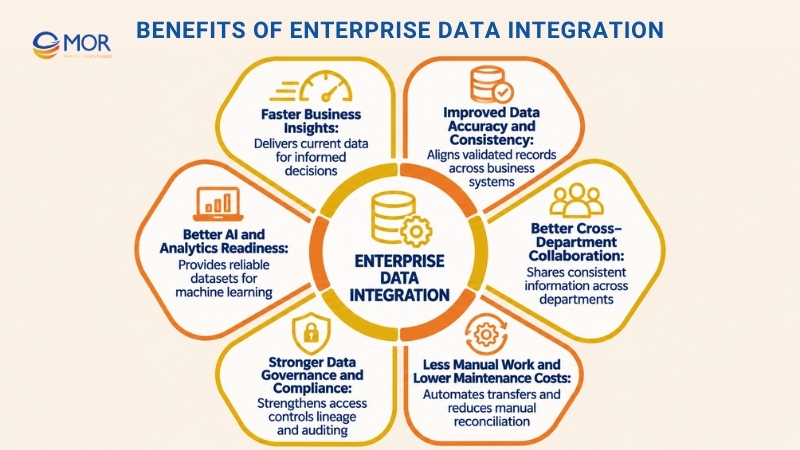
- Faster Business Insights: Connected datasets give analysts current information for financial reporting, sales dashboards, and operational decisions. Instead of collecting separate exports from departments, teams can work with standardized data that follows agreed refresh schedules and business definitions.
- Improved Data Accuracy and Consistency: Validation, transformation, and synchronization help control mismatched customer IDs, product records, and transaction values. The need is well documented: dbt Labs' 2025 State of Analytics Engineering Report found that over 56% of respondents cited poor data quality as a major challenge when preparing information for analysis.
- Better Cross-Department Collaboration: Finance, sales, operations, and customer service teams can share aligned business information. A consistent customer or order record limits disputes caused by different numbers appearing in separate systems.
- Less Manual Work and Lower Maintenance Costs: Scheduled pipelines and automated transfers replace repeated spreadsheet exports and manual reconciliation. Teams can then focus on exception handling, business analysis, and integration improvements instead of routine data copying. Related AI workflow automation for businesses can support downstream operational tasks.
- Stronger Data Governance and Compliance: Central access controls, lineage, audit records, and consistent data-handling rules improve accountability. Enterprises dealing with sensitive records should also assess enterprise data integrity solutions for large datasets that support validation, reconciliation, and traceable changes.
- Better AI and Analytics Readiness: Machine learning systems depend on reliable records with clear definitions and known origins. Connected datasets support customer predictions, demand planning, risk analysis, and other enterprise AI applications. Data quality remains a requirement even when the underlying models become more capable.
These advantages are most useful when integration requirements come from real business workflows. Connecting systems without agreed data ownership, quality rules, and measurable outcomes can create another layer of technical work.
How to Choose Enterprise Data Integration Solutions
Selecting enterprise data integration solutions requires a clear understanding of the systems, workloads, and operational limits involved. Compare platforms against your actual requirements rather than connector counts or feature lists alone.
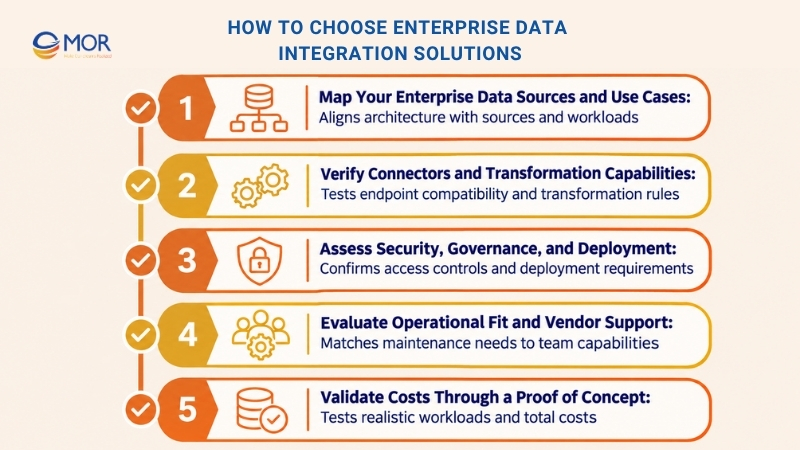
Map Your Enterprise Data Sources and Use Cases
Start with the applications and data stores that must communicate. Your integration design will differ according to whether the main objective is analytical reporting, operational synchronization, or real-time event processing.
- Source inventory: List ERP, CRM, SaaS, databases, files, and legacy systems, including software versions.
- Business requirements: Separate warehouse ingestion needs from application-to-application workflows.
- Data freshness: Document acceptable batch intervals, CDC delays, and real-time response requirements.
A source inventory also reveals systems that cannot support standard APIs or scheduled extraction. These constraints should influence platform selection early.
Verify Connectors and Transformation Capabilities
A vendor's connector catalog doesn't confirm that your exact configuration will work. Test the required endpoints and transformation rules before accepting a platform's advertised coverage.
- Native connectors: Verify source versions, destination support, authentication methods, and endpoint restrictions.
- Transformation functions: Test joins, record matching, masking, schema changes, and business rules.
- Pipeline reliability: Review retry logic, recovery procedures, backfills, and failure notifications.
For example, a platform may connect to an ERP database yet lack the business-level extraction methods your team needs.
Assess Security, Governance, and Deployment
Security requirements affect where data can travel, who can view it, and which processing methods are acceptable. Review governance controls alongside connectivity rather than treating them as a later configuration task.
- Access control: Check role-based permissions, single sign-on, secrets management, and audit logging.
- Data governance: Examine lineage, data quality rules, masking, and sensitive-record handling.
- Deployment: Confirm cloud, hybrid, on-premises, and data residency requirements.
The strongest enterprise data integration solution is the one that fits your security and deployment rules without costly workarounds.
Evaluate Operational Fit and Vendor Support
Integration platforms require ongoing maintenance as source APIs, schemas, and business requirements change. Select a development model your existing team can support.
- Development model: Match low-code or code-first tools to your engineers' skills.
- Operations: Review monitoring, incident recovery, upgrades, and support agreements.
- Vendor dependence: Assess portability and the effort required to replace proprietary components.
When teams expect long-term ownership, operational transparency matters as much as initial development speed.
Validate Costs Through a Proof of Concept
A proof of concept should use representative source systems, realistic data volumes, and the most difficult transformations. Small demonstrations built around sample data rarely expose actual integration costs.
- Representative workload: Test demanding connectors, incremental updates, and peak volumes.
- Total cost of ownership: Include licenses, processing, implementation, infrastructure, and maintenance.
- Acceptance criteria: Set UAT targets for latency, accuracy, recovery, and operating cost.
An accurate enterprise data integration solutions cost assessment should also include projected growth in records, API calls, and processing frequency. Review pricing against those projections before committing to a long contract.
Enterprise Data Integration Use Cases Across Industries
Enterprise integration requirements differ across retail, manufacturing, finance, healthcare, and logistics. The following use cases show how businesses connect information sources to solve operational and analytical problems.
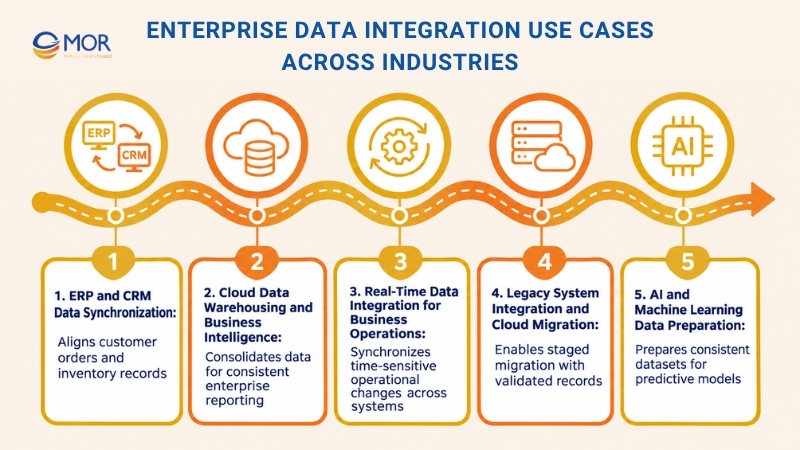
ERP and CRM Data Synchronization
Manufacturers and retailers often manage inventory, purchasing, and finance in ERP software, while customer activity sits in Salesforce or another CRM. Connecting SAP ERP, Oracle ERP, or Odoo with CRM systems helps synchronize customers, orders, invoices, and product availability.
For example, a sales order entered in Salesforce can trigger an update in the ERP after validation. Teams planning this type of project can review salesforce ERP integration and Odoo ERP integration in US for related implementation considerations.
Cloud Data Warehousing and Business Intelligence
Enterprises combine transactional databases, SaaS applications, and legacy records in Snowflake, Databricks, or another analytical platform. Data pipelines apply consistent schemas and business rules before information reaches reporting tools.
For example, a retail group can join sales, returns, marketing, and inventory data to compare store performance. Reliable pipelines also make it easier to trace unexpected numbers back to their original sources.
Real-Time Data Integration for Business Operations
E-commerce and logistics systems need timely updates about stock levels, orders, and shipments. CDC, event streaming, and APIs can move changes between operational platforms according to defined latency requirements.
A warehouse event might update an order management system after an item is packed. In manufacturing, the best SAP enterprise solutions IoT data ERP integration designs map equipment readings to assets, production orders, and maintenance records. Teams building these connections can also examine iot solutions development.
Legacy System Integration and Cloud Migration
Many organizations keep core business records in older databases and on-premises applications. Replacing these systems in one project can interrupt operations and create avoidable migration risks.
A staged approach connects existing data to new applications through APIs, middleware, or controlled extraction. Mapping, reconciliation, and parallel testing allow teams to confirm record accuracy before switching dependent systems.
AI and Machine Learning Data Preparation
AI applications need well-defined, accessible, and current information. According to McKinsey's 2025 State of AI survey, 88% of respondents reported that their organizations used AI in at least one business function, raising the need for dependable enterprise data foundations.
A demand forecasting system, for example, may combine sales history, stock levels, and seasonal patterns. The pipeline must address missing values and inconsistent records before model training. Related topics include data preprocessing in machine learning and AI CRM integration services.
Enterprise Data Integration Challenges and Solutions
Enterprise integration projects often encounter problems that remain hidden during early demonstrations. Legacy system limits, inconsistent records, hybrid infrastructure, and growing processing costs can affect long-term reliability.
Integration challenge | Enterprise impact | Practical solution |
Legacy system compatibility | Older applications may lack modern APIs or supported connectors, delaying data exchange. | Use middleware, custom APIs, CDC where supported, or controlled extraction. Map dependencies before development. |
Inconsistent data quality | Duplicate customers, missing fields, and conflicting values create inaccurate reporting. | Apply validation, standardization, record matching, and reconciliation at defined pipeline stages. |
Hybrid infrastructure | Private databases and cloud applications introduce network, authentication, and access constraints. | Deploy supported integration runtimes, secure network connections, and controlled credentials. |
Security and compliance | Sensitive information may be exposed during transfer, storage, or troubleshooting. | Apply least-privilege permissions, encryption, audit logs, masking, and data residency controls. |
Pipeline scalability | Growing data volumes and frequent changes increase processing time and failure risk. | Use incremental processing, workload scheduling, capacity testing, and recovery procedures. |
Unpredictable costs | Consumption charges, custom connectors, and maintenance work can exceed early estimates. | Monitor data volume, job execution, processing costs, and connector upkeep. Review forecasts regularly. |
Data governance deserves particular attention. IBM's 2025 Cost of a Data Breach Report put the global average cost of a data breach at $4.44 million. Although this figure isn't specific to integration projects, it reinforces the financial stakes of protecting enterprise information.
Data quality failures can also spread through connected systems. An incorrect product identifier may travel from an ERP into a warehouse, dashboard, and forecasting model before anyone identifies the original issue.
A practical response begins with clear data ownership and validation rules. Teams evaluating data cleaning solutions enterprise integration requirements should test duplicate handling, schema changes, reconciliation reports, and error recovery using actual business records.
Drive Fast Insights via Enterprise Data Integration Solutions
Reliable business reporting depends on well-designed connections between existing systems and modern data platforms. At MOR Software, we help organizations assess their integration needs, design suitable architectures, and develop solutions aligned with business requirements.
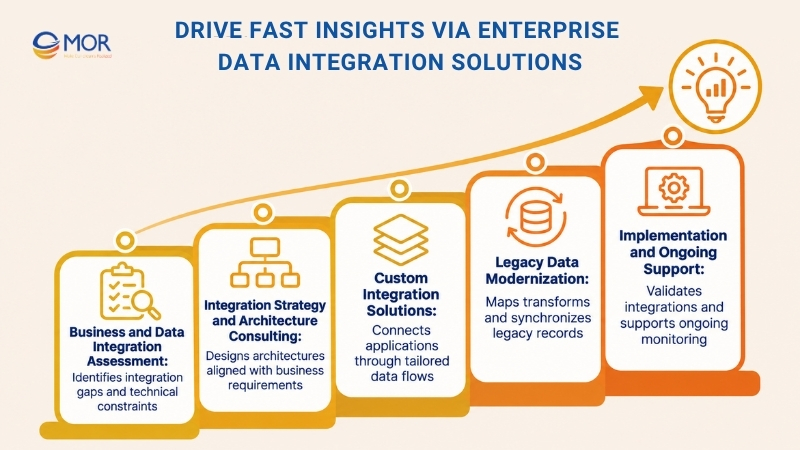
Our consulting and technical work covers the following areas:
- Business and Data Integration Assessment: We review ERP, CRM, databases, legacy applications, and operational dependencies to identify integration gaps and technical constraints.
- Integration Strategy and Architecture Consulting: Our team evaluates APIs, ETL/ELT, middleware, and CDC against data volume, latency, security, and deployment needs.
- Custom Integration Solutions: We design system connections based on the organization's existing applications and planned data flows.
- Legacy Data Modernization: Our engineers support data mapping, transformation, migration, and synchronization between older and newer platforms.
- Implementation and Ongoing Support: We develop integration components, validate transferred records, test system behavior, and support monitoring and improvements.
Our project experience includes a Japanese workforce management solution that integrated Salesforce with a legacy system. The work involved API Gateway development, ETL-based migration, and bidirectional data synchronization.
Organizations planning similar architectures can also review our guide to API gateway Salesforce connectivity.
If your business is dealing with disconnected applications or complex data movement requirements, MOR Software can help assess the existing architecture and discuss a suitable integration plan.
Conclusion
Choosing the right enterprise data integration solutions starts with your systems, data requirements, and business goals. Informatica, Fivetran, MuleSoft, Airbyte, and the other platforms reviewed serve different integration needs, so the right choice depends on the architecture you need to build. MOR Software supports businesses through integration consulting, solution design, development, and technical validation.
Contact us to discuss your current systems, integration constraints, and plans for connected business data.
"Learn from the past, embrace the present, and look forward to the future. The key is to never stop questioning."
Le Manh Hung


CTO MOR Software
MOR SOFTWARE
Frequently Asked Questions (FAQs)
What are enterprise data integration solutions?
Enterprise data integration solutions are tools and platforms that connect, move, transform, synchronize, or provide access to information across business systems. They support data exchange between ERP, CRM, databases, cloud services, and analytical platforms. Common categories include ETL/ELT, managed replication, iPaaS, CDC, and data virtualization.
Which enterprise data integration solution is best for large organizations?
The best choice depends on existing architecture and operational requirements. Informatica suits governed data management, Qlik Talend supports complex movement and quality tasks, and MuleSoft focuses on reusable APIs. Large enterprises should compare connector compatibility, data volume, security, deployment, and long-term operating costs.
What is the difference between ETL, ELT, and iPaaS?
ETL transforms information before loading it into a destination. ELT moves data into the target platform and performs transformations there. iPaaS connects business applications through APIs, mappings, and workflows. ETL/ELT commonly supports analytics, whereas iPaaS frequently handles operational application exchange.
Can enterprise data integration solutions connect legacy ERP systems?
Yes. Legacy ERP systems can connect to modern platforms through supported connectors, custom APIs, middleware, or CDC. The approach depends on database access, source-system restrictions, and required data freshness. Older systems may need staged extraction and careful mapping before broader integration.
Which enterprise data integration tools support real-time synchronization?
Qlik Talend, Informatica, Fivetran, and selected other platforms support CDC or low-latency replication for compatible sources. MuleSoft and Boomi support event-driven application communication. Actual synchronization speed depends on the connector, source database, deployment configuration, and processing workload.
Are open-source data integration tools suitable for enterprises?
Open-source tools can suit enterprises that need custom connectors and deployment control. Airbyte Core is one example. Teams must account for hosting, upgrades, monitoring, security, and recovery procedures. Commercial support or managed editions may be preferable when uptime and operational response times are contractual requirements.
How much do enterprise data integration solutions cost?
Pricing depends on the platform and workload. Vendors may charge for data volume, active rows, compute time, execution credits, messages, or annual licenses. Enterprise buyers should include setup, connector development, cloud processing, support, and maintenance in their total cost estimates.
What security features should enterprise data integration platforms provide?
Look for encryption in transit and at rest, role-based access control, single sign-on, audit logging, and secure credential management. Enterprises should also assess sensitive-data masking, access policies, network restrictions, and residency controls. Available protections may differ between product editions.
How long does enterprise data integration implementation take?
Implementation time depends on system complexity, connector availability, data mapping, and testing requirements. A narrow connection between supported cloud applications may be simpler than a legacy ERP migration involving custom APIs and historical records. A proof of concept helps establish a realistic schedule.
Can enterprise data integration solutions support AI and machine learning?
Yes. Integration pipelines gather information from operational systems, apply transformations, and prepare datasets for model training or inference. Reliable AI applications also need current records, consistent definitions, and governed access. Data integration provides the foundation, though model development requires additional tools and processes.
Share


Make Our-Dreams Realized


© 2023 . MOR Software. All Rights Reserved
Sitemap
Privacy Policy
Terms of Use

Rate this article
0
over 5.0 based on 0 reviews
Your rating on this news:
Name
*Email
*Write your comment
*Send your comment
1