


Legacy Systems Integration: Upgrade Without Disruption
Your legacy ERP still handles daily operations, but connecting it to AI tools or cloud applications can be difficult. Legacy system integration bridges that gap, allowing older software to exchange data with modern technologies without a complete replacement. In this guide, MOR Software will explain the benefits, common challenges, and practical ways to connect your existing systems.
Key Takeaways
- Legacy system integration connects older ERP, CRM, databases, and business applications with modern technologies through APIs, middleware, and data pipelines without requiring immediate system replacement.
- Successful integration depends on system compatibility, data quality, security, and a suitable architecture that protects existing business operations.
- Businesses can connect legacy ERP data to AI analytics, intelligent automation, and cloud platforms through gradual integration, supported by experienced engineering teams.
What Is Legacy System Integration?
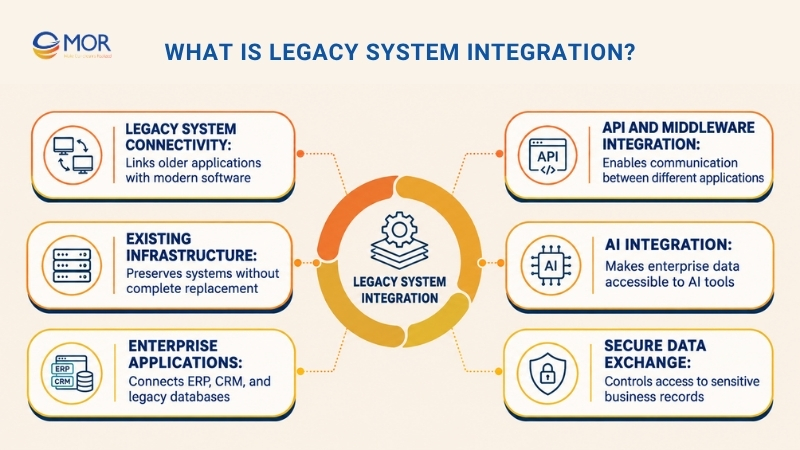
Legacy system integration is the process of connecting older business applications with modern software, databases, and cloud platforms so they can exchange data and support shared workflows. It allows organizations to retain existing infrastructure while adding new capabilities without rebuilding their entire IT environment.
Common examples include SAP ERP, Oracle E-Business Suite, IBM mainframes, older CRM platforms, and custom enterprise databases. These applications often store years of business information and run core operations, yet their outdated interfaces make connecting to modern technology difficult.
The need to retain these systems is evident in public-sector IT spending. According to the U.S. Government Accountability Office, 79% of planned federal IT spending for fiscal year 2025 went toward operating and maintaining existing systems, including legacy infrastructure.
Legacy system application integration typically uses Application Programming Interfaces (APIs), middleware, or ETL/ELT data pipelines to establish communication between older and newer applications. For example, a manufacturer may connect an aging ERP database to a cloud analytics service through an API layer.
For companies integrating legacy systems with AI, the same methods can make ERP records available to machine learning models, intelligent assistants, and automated reporting tools. A secure integration layer controls data access while the original ERP continues handling transactions.
The process differs from system replacement. Integration preserves existing applications, while modernization may involve refactoring, upgrading, or moving them to new infrastructure. Businesses considering legacy software upgrades can also examine legacy solution options and broader legacy data modernization strategies before deciding how much change their systems need.
Benefits of Legacy System Integration
Legacy systems integration gives businesses access to modern technologies while protecting their investment in established applications. The business case is growing stronger as older infrastructure creates limits on new projects.
A 2024 NTT DATA study found that 80% of surveyed organizations agreed that inadequate or outdated technology was holding back progress and innovation. Connecting existing systems can address some of these barriers without requiring immediate replacement.
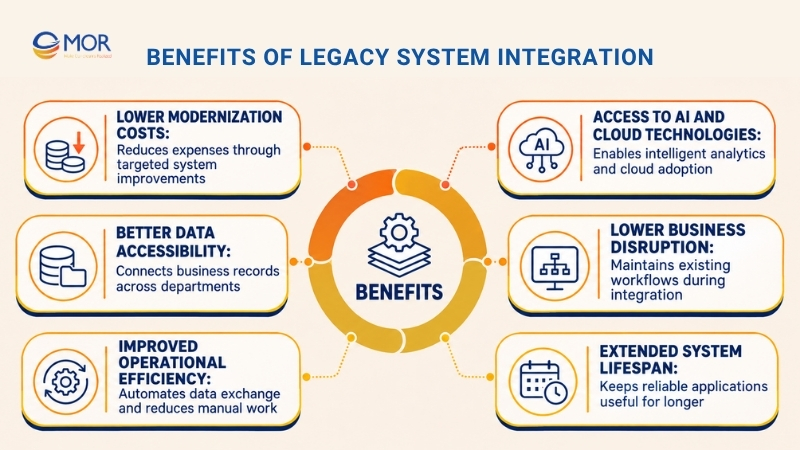
The main benefits include:
- Lower Modernization Costs: Retaining functional ERP and CRM applications avoids the upfront expense of replacing entire systems. Companies can direct their budgets toward targeted improvements, including API development, data connectivity, and cloud adoption. This approach also spreads investment across manageable project phases.
- Better Data Accessibility: Older platforms frequently store business records in separate databases. Integration connects these records to modern applications, allowing employees to access information across departments. Shared data also improves reporting consistency and supports informed business decisions.
- Improved Operational Efficiency: Automated data exchange cuts repetitive entry and manual reconciliation between applications. Teams seeking to automate legacy system integration can use APIs, scheduled synchronization, and workflow tools to handle routine information transfers with less manual effort.
- Access to AI and Cloud Technologies: Connected enterprise data creates opportunities for AI forecasting, intelligent document processing, and business assistants. Organizations can introduce these capabilities alongside existing applications and gradually extend them as requirements grow.
- Lower Business Disruption: Integration keeps existing workflows operational during technical changes. Instead of requiring an immediate system switch, teams can test new connections with selected users, monitor performance, and expand deployment after confirming system stability.
- Extended System Lifespan: Reliable software can remain useful when modern applications handle newer business needs. This also creates time to plan future upgrades. Teams considering AI-powered legacy code modernization can assess which components require deeper changes.
These benefits depend on careful planning. Poorly designed connections can create new dependencies, raise maintenance costs, and make future upgrades harder.
Challenges of Integrating Legacy Systems
Legacy system integration involves technical and operational risks that standard application connections may not face. Older platforms often contain undocumented business rules, proprietary interfaces, and data structures that newer applications cannot process directly.
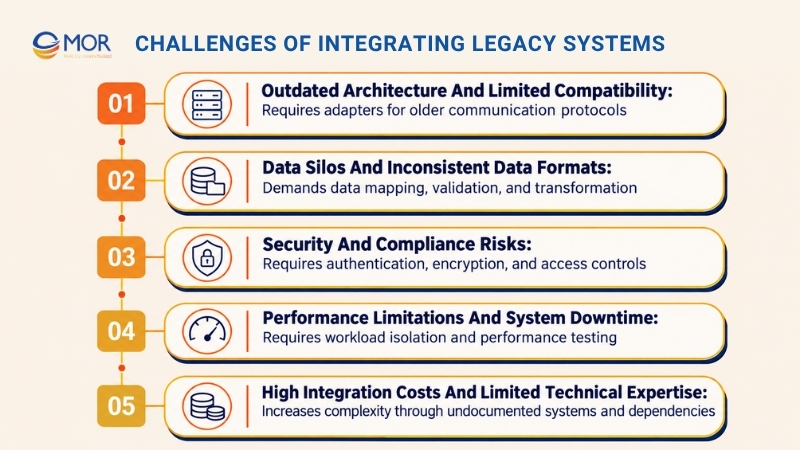
Outdated Architecture and Limited Compatibility
Many enterprise systems were developed before REST APIs, modern authentication standards, and cloud-native applications became common. They may depend on custom protocols, proprietary databases, or tightly connected software components that limit external access.
For example, integrating modern systems with legacy equipment in manufacturing may require an adapter that translates older communication protocols into formats supported by cloud services. API wrappers and middleware can provide this connection without changing the entire system.
Integration architects must also account for enterprises' legacy and modern messaging systems integration, especially when older IBM MQ environments communicate with cloud applications. Solutions built around mulesoft integration patterns may support message routing, protocol translation, and centralized connection management where the chosen platform is compatible.
Data Silos and Inconsistent Data Formats
Disconnected databases make it difficult to establish a consistent view of customers, inventory, orders, and financial transactions. Older applications may store the same information using different field names, formats, or business rules.
The scale of this problem appears in Salesforce's 2025 Connectivity Benchmark findings. The research found that organizations had connected just 29% of their applications on average, leaving substantial gaps between enterprise systems.
Data mapping, validation, and transformation address these gaps before information reaches downstream applications. AI models also need consistent records, since duplicated or outdated inputs can produce unreliable predictions and reports.
Security and Compliance Risks
Legacy platforms may lack current encryption methods, modern identity controls, or regular security updates. Connecting them to external services introduces additional access points that require close management.
AI adoption adds another concern. IBM's 2026 Cost of a Data Breach research reported that more than 20% of surveyed organizations experienced a breach targeting AI models or applications.
Security teams should place APIs behind authentication controls, restrict permissions, encrypt data transfers, and maintain audit trails. Sensitive ERP transactions also need validation and approval controls before an AI agent can change business records.
Performance Limitations and System Downtime
Older systems were designed around the processing requirements of their original environment. New API requests, AI data queries, and frequent synchronization tasks can place unexpected pressure on databases and servers.
For example, a legacy ERP that runs overnight accounting jobs may struggle when a new analytics application continuously queries its production database. Scheduled extraction, database replication, message queues, and workload isolation can limit that extra load.
Test the integration under realistic traffic before expanding access. Teams should also prepare retry mechanisms, monitoring alerts, and rollback procedures to protect normal operations during deployment.
High Integration Costs and Limited Technical Expertise
Undocumented business logic, old programming languages, and vendor restrictions can make integration more expensive than expected. Engineers may need to investigate existing code and data flows before identifying a safe connection point.
These are common IT decision maker pain points in legacy systems integration, particularly when internal teams lack specialists familiar with older ERP platforms. Maintenance costs can rise further if each new application requires a custom connector.
A technical assessment should identify hidden dependencies, interface restrictions, and long-term ownership costs. Targeted legacy modernization techniques, including API encapsulation and selective refactoring, can make future integrations easier to maintain.
When to Implement Legacy System Integration
Legacy system integration makes sense when existing applications still perform their main functions but cannot support new business requirements. Integration is often preferable when replacing a working ERP would create unnecessary costs, data migration risks, or lengthy disruption.
Timing depends on what your organization needs to achieve. The following scenarios can guide the decision.
Business Scenario | Signs Integration Is Needed | Recommended Approach |
Cloud adoption | Legacy ERP data cannot reach cloud applications | APIs or hybrid middleware |
AI implementation | AI tools lack access to reliable enterprise data | ETL/ELT, CDC, or controlled APIs |
Manual data processing | Employees repeatedly copy records between applications | APIs or workflow automation |
Business expansion | Systems cannot share information across departments or locations | Middleware or iPaaS |
Mergers and acquisitions | Different ERP and CRM platforms contain disconnected records | Data mapping and integration platforms |
High-risk ERP replacement | Core systems remain reliable but are difficult to extend | Incremental API-based integration |
Organizations should pay close attention to systems that remain central to daily operations. Kyndryl's 2025 State of Mainframe Modernization Survey found that 56% of surveyed mainframe users had increased their use of the platform during the previous year.
That finding reflects a practical business reality: established infrastructure can remain valuable long after newer technologies become available. Integration gives organizations another route to extend functionality while maintaining core operations.
When comparing enterprise software investment options for integrating legacy systems, evaluate the cost of new connectors, existing software maintenance, security requirements, and the expected value of new capabilities. A small AI reporting pilot may require far less work than connecting an entire enterprise application portfolio.
Knowing how to integrate legacy systems also requires a suitable deployment model. Our comparison of on premise software vs cloud explains the main infrastructure choices that influence system connectivity.
If an application is unsupported, has severe unresolved security risks, or can no longer perform its core functions, integration alone may not be sufficient. A phased replacement strategy could be more suitable.
Examples of Legacy System Integration
Practical legacy system integration projects show how established enterprise applications can support modern analytics, automation, and connected business workflows. The right architecture depends on the data involved, the required response time, and the actions the new application must perform.
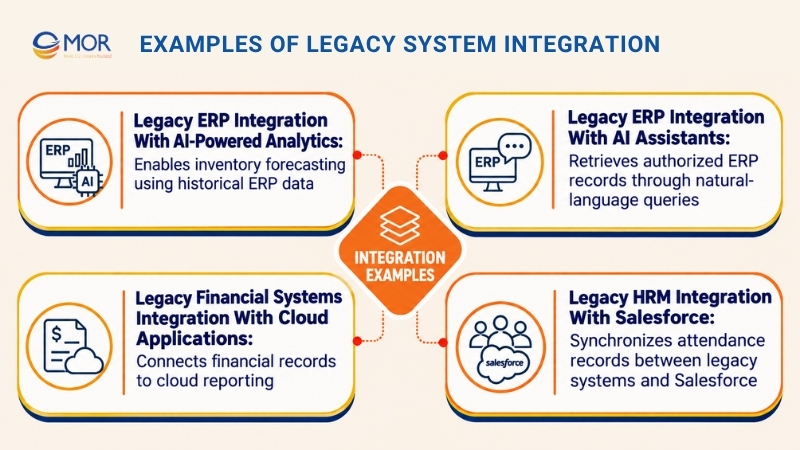
Legacy ERP Integration With AI-Powered Analytics
A manufacturing company may store years of production orders, supplier information, inventory balances, and purchasing records in an older ERP. That data holds useful patterns, but the ERP's original reporting tools may lack modern forecasting functions.
ERP legacy system integration can connect this information to a data warehouse through ETL/ELT pipelines or Change Data Capture (CDC). Engineers first standardize product identifiers, dates, and transaction records before preparing them for machine learning models.
For example, a demand forecasting model can analyze historical sales and stock movements to estimate future inventory needs. Procurement teams can review these estimates alongside supplier lead times and existing orders before making purchasing decisions.
The ERP remains responsible for core transactions. The AI application performs analysis using governed data copies, keeping resource-intensive workloads away from the production database.
Legacy ERP Integration With AI Assistants
Employees often spend time navigating ERP menus to find purchase orders, supplier details, and financial records. An internal AI assistant can make approved information easier to retrieve through natural-language questions.
For instance, a purchasing manager could ask, "Which supplier orders are still pending this week?" The assistant sends an authorized request through a controlled API, retrieves the relevant ERP records, and prepares a readable response.
SAP or Oracle environments can support this architecture through suitable integration interfaces and data access services. Retrieval-Augmented Generation (RAG) may also connect the assistant to approved policies, contracts, and support documents when those sources are relevant.
Access permissions remain central to the design. An employee authorized to view purchasing records shouldn't automatically gain access to payroll data, and actions that change ERP transactions must pass through business rules and approval controls.
A company planning this type of application should assess its existing CRM integration architecture and ERP interfaces to identify reusable integration components.
Legacy Financial Systems Integration With Cloud Applications
Banks and financial institutions often depend on established transaction-processing systems that contain valuable financial records and business logic. Replacing those platforms can introduce operational risk, especially when they support daily payments, account updates, and reporting.
A controlled integration layer can connect these systems to cloud-based analytics, reporting tools, or customer applications. APIs provide approved access to business functions, while ETL pipelines and database replication support analytical workloads.
For example, a financial institution may copy approved transaction data into a cloud reporting environment for reconciliation and analysis. The reporting system processes its own data copy while the legacy platform continues handling financial transactions.
This example of legacy modernization allows organizations to introduce new services in stages. The underlying financial system can remain operational until the business is ready for deeper architectural changes.
Legacy HRM Integration With Salesforce
MOR Software has completed a documented integration project connecting a Japanese company's legacy PitTouch time-clock system with Salesforce. The client wanted to improve employee attendance management and connect older workforce records to a modern HRM application.
The project required bidirectional data synchronization, historical data migration, and controlled communication between the systems. MOR Software developed an HRM solution on Salesforce AppExchange and used an API Gateway alongside ETL processes to manage data exchange.
The integration supported employee time tracking and gave managers access to more consistent workforce information. It also simplified data handling between the legacy attendance system and Salesforce.
You can read how we integrated Salesforce with a legacy system for the technical approach and reported outcomes. This is a documented enterprise integration case rather than an ERP-to-AI deployment.
The project illustrates a practical principle for organizations planning AI adoption: establish reliable data connections and clear business rules before introducing more complex automation. Similar considerations apply to Salesforce ERP projects that connect customer-facing applications with older enterprise platforms.
Choose MOR Software for Your Legacy System Integration
Connecting older enterprise applications to modern technologies requires careful assessment, reliable data exchange, and software engineering expertise. MOR Software brings experience in enterprise software development, system integration, application modernization, and AI-related engineering to support these requirements.
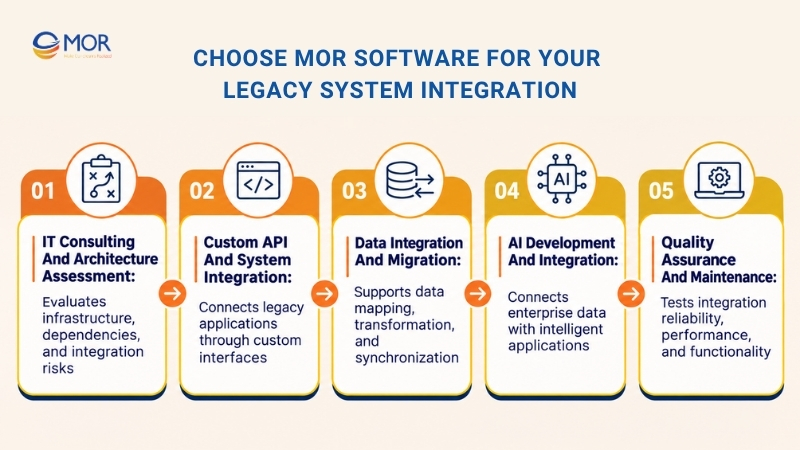
Our approach begins with understanding your current infrastructure and identifying the most suitable way to connect it to new business applications. MOR Software's legacy system integration services can address the following areas, depending on project scope:
- IT Consulting and Architecture Assessment: Our team reviews current applications, data flows, technical dependencies, and business requirements before proposing an integration approach. The assessment helps identify risks, available interfaces, and suitable technologies.
- Custom API and System Integration: MOR Software develops application interfaces and integration components that connect existing platforms with modern business systems. These connections support controlled data access and cross-application workflows.
- Data Integration and Migration: Our engineering teams work on data mapping, transformation, and synchronization for systems that need to exchange records or transfer historical information. The technical approach depends on source-system access and data requirements.
- AI Development and Integration: MOR Software supports AI-related application development, including opportunities to connect enterprise data with intelligent search, analytics, and business automation. Each project starts with an assessment of data readiness and technical feasibility.
- Quality Assurance and Maintenance: Functional testing, integration testing, performance checks, and ongoing support help businesses identify problems before they disrupt users. These activities also form part of practical legacy system integration best practices.
Our Salesforce and legacy HRM integration project demonstrates experience working with established applications, API Gateway architecture, ETL processes, and data synchronization.
Companies planning a broader modernization program can also review our enterprise software development work and IT consulting services at MOR Software.
Conclusion
Legacy system integration allows organizations to connect established ERP and business applications with modern AI tools, cloud services, and automated workflows without immediately replacing existing infrastructure. The right approach protects core operations while improving access to enterprise data and supporting future upgrades. MOR Software brings software engineering, integration, and consulting experience to these projects.
If your business needs a practical integration plan, contact us to discuss your current systems, technical requirements, and next steps.
"Learn from the past, embrace the present, and look forward to the future. The key is to never stop questioning."
Le Manh Hung


CTO MOR Software
MOR SOFTWARE
Frequently Asked Questions (FAQs)
What is legacy system integration in ERP?
Legacy ERP integration connects older enterprise resource planning applications with modern software, databases, and cloud services. APIs, middleware, and data pipelines allow information to move between systems while existing ERP applications continue supporting core business operations.
Can you connect a legacy ERP to AI without replacing it?
Yes. Organizations can connect existing ERP data to AI models and assistants through secure APIs, data pipelines, and governed data services. The ERP remains operational, while the new AI application handles approved tasks like forecasting, document processing, or information retrieval.
How do you integrate AI with SAP or Oracle ERP?
Start by identifying the ERP data and business processes the AI application needs. Use supported SAP or Oracle interfaces, integration platforms, or approved data pipelines to establish access, then configure authentication, data transformation, testing, and monitoring.
What is the best method for legacy system integration?
The most suitable approach depends on the existing architecture and business requirements. APIs support controlled application access, ETL/ELT pipelines work for analytical data, and middleware helps connect complex systems. CDC is useful when downstream applications need frequent data updates.
Can AI tools access legacy ERP databases directly?
Direct database access is technically possible in some environments, but unrestricted access creates security and performance risks. A controlled API, read-only replica, or governed data service is generally safer because it limits permissions and protects production operations.
How can legacy ERP data be prepared for AI?
Begin with data profiling to identify missing records, duplicates, and inconsistent formats. Map business fields, validate data quality, and define access permissions before connecting the information to AI models, analytical databases, or document retrieval systems.
Can AI agents update records in legacy ERP systems?
AI agents can request ERP updates when supported APIs and business rules permit those actions. The integration should validate inputs, enforce permissions, record transactions, and require human approval for sensitive changes involving payments, inventory, or financial records.
How long does legacy ERP integration take?
Project duration depends on ERP complexity, available interfaces, data quality, security requirements, and deployment scope. A limited proof of concept may involve fewer dependencies than a company-wide integration connecting several ERP modules and external applications.
How much does legacy ERP-to-AI integration cost?
Costs depend on technical assessment, connector development, data preparation, AI services, infrastructure, testing, and maintenance. Older platforms with undocumented interfaces or extensive customizations may require more engineering work. A scoped assessment provides a more reliable estimate.
When should a legacy ERP be replaced instead of integrated?
Replacement becomes more suitable when the ERP is unsupported, carries security risks that cannot be managed, or no longer supports core business needs. Compare long-term maintenance costs, integration complexity, migration risks, and operational requirements before making the decision.
Share


Make Our-Dreams Realized


© 2023 . MOR Software. All Rights Reserved
Sitemap
Privacy Policy
Terms of Use

Rate this article
0
over 5.0 based on 0 reviews
Your rating on this news:
Name
*Email
*Write your comment
*Send your comment
1