


ERP Implementation Life Cycle: Proven Practical Action Guide
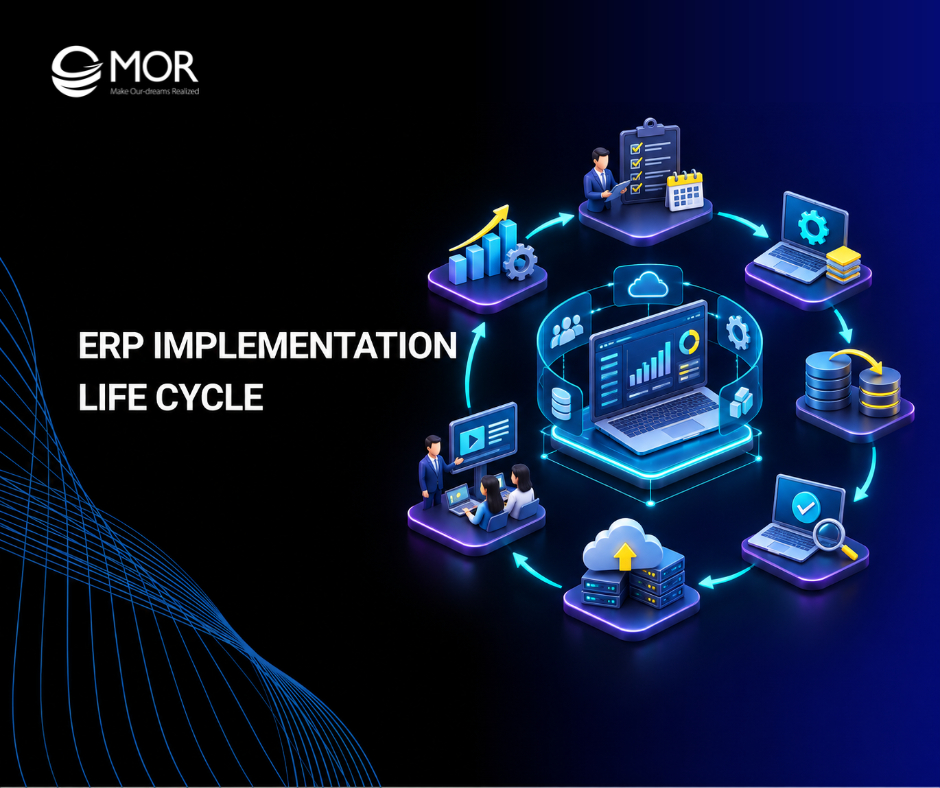
ERP implementation can disrupt daily operations when businesses overlook data migration, system integration, or employee training. A clear ERP implementation life cycle helps teams manage these risks and track progress from planning to deployment. Each phase requires defined tasks, responsible teams, and measurable results. In this guide, MOR Software will explain the eight ERP implementation phases, typical timelines, project costs, rollout strategies, and practical ways to keep your deployment on track.
Key Takeaways
- The ERP implementation life cycle includes eight phases, starting with requirements discovery and ending with go-live and ongoing system improvements.
- Implementation timelines and costs depend on business size, customization, data migration, integrations, and the chosen ERP platform.
- Clear project ownership, early data preparation, thorough testing, and employee training help businesses avoid costly deployment problems.
What Is ERP Implementation Life Cycle?
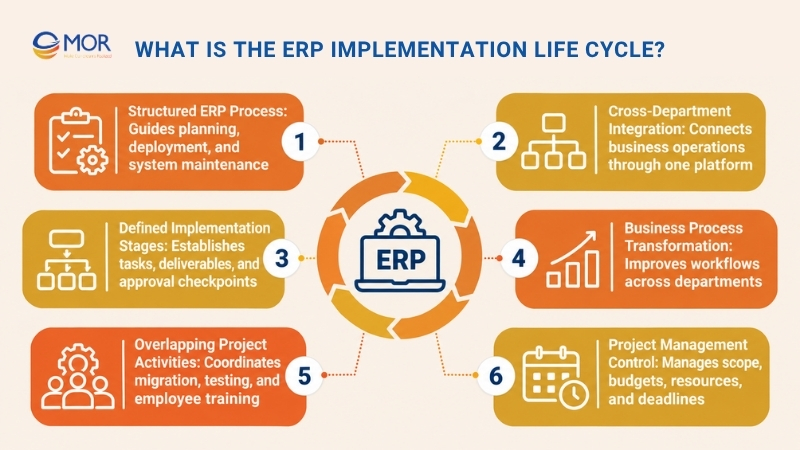
The ERP implementation life cycle is a structured process businesses follow to plan, configure, test, deploy, and maintain an Enterprise Resource Planning (ERP) system. It covers the technical work and business changes required to connect departments through one platform.
The process typically starts with requirements assessment and ends with system monitoring after deployment. Each stage has its own tasks, deliverables, and approval requirements.
ERP adoption continues to grow across industries. According to Eurostat's 2025 enterprise software data, ERP usage reached approximately 89% among large EU enterprises, compared with 41% of small enterprises.
The ERP implementation project life cycle also involves changes to business processes. Finance teams may adopt new approval workflows, warehouse staff may switch to barcode-based inventory tracking, and managers may gain access to shared operational reports.
The different phases of ERP implementation life cycle projects can overlap. Data cleansing may begin during system design, and employee training can continue through testing and deployment.
A defined process gives project managers better control over scope, budgets, resources, and deadlines. It also creates clear checkpoints before the business moves to the next stage.
8 Key Phases of the ERP Implementation Life Cycle
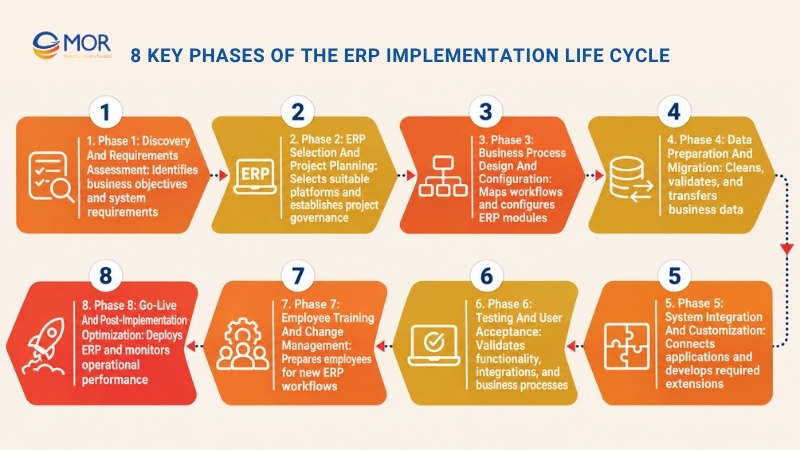
The ERP implementation life cycle consists of eight main phases: discovery, planning, configuration, data migration, integration, testing, training, and go-live. Each phase addresses a different part of the deployment process.
An ERP implementation life cycle diagram typically shows these phases in sequence. Yet some activities run in parallel, particularly data preparation, system integration, testing, and change management.
Phase 1: Discovery and Requirements Assessment
Discovery establishes what the ERP system must accomplish and which business problems need attention. Teams assess existing workflows, interview stakeholders, and document requirements before selecting software.
This stage determines the direction of the entire project. Gartner predicts that by 2027, more than 70% of recently implemented ERP initiatives will fail to fully meet their original business case goals, highlighting the need for clear objectives and business alignment.
- Business objectives: Identify measurable goals, including shorter financial closing periods, better inventory accuracy, or faster order processing. Each objective should have a baseline KPI and a target result.
- Current-state assessment: Review existing workflows, software, reporting processes, and operational bottlenecks. Determine which activities depend on manual spreadsheets or disconnected applications.
- Requirements gathering: Collect functional, technical, security, and regulatory requirements from department leaders. Separate mandatory capabilities from optional improvements to control project scope.
- Expected deliverables: Produce a business case, requirements matrix, baseline KPIs, and initial gap assessment. Obtain stakeholder approval before moving into platform selection.
For example, a growing retailer may discover that its accounting software cannot track stock across several warehouses. Comparing ERP vs accounting software helps the company determine whether it needs a broader business management platform.
Phase 2: ERP Selection and Project Planning
ERP selection connects business requirements to a suitable platform and delivery plan. The project team evaluates software capabilities, implementation costs, technical constraints, and vendor support.
A defined ERP implementation methodology helps organize the work. Agile, Waterfall, and hybrid approaches differ in how teams manage requirements, development, testing, and approvals.
- Vendor evaluation: Compare SAP S/4HANA, Oracle NetSuite, Microsoft Dynamics 365, and Odoo against approved requirements. Assess industry modules, integration capabilities, deployment options, licensing, and long-term support.
- Project governance: Appoint an executive sponsor, ERP project manager, business process owners, and technical leads. Define decision rights, escalation paths, and approval responsibilities.
- Scope and resources: Establish budgets, milestones, team capacity, and project boundaries. Identify dependencies involving legacy applications, third-party vendors, and internal departments.
- Expected deliverables: Finalize the ERP selection, project charter, implementation roadmap, resource plan, and risk register. Confirm that the selected platform supports the agreed business priorities.
For businesses comparing cloud ERP options, our Odoo vs NetSuite guide examines their capabilities and suitability.
Project managers should also review the Waterfall vs Agile methodology before selecting a delivery approach. The ERP implementation methodology and framework must reflect the project's scope, technical complexity, and approval requirements.
Phase 3: Business Process Design and Configuration
Business process design turns approved requirements into working ERP workflows. Teams map future operations, configure standard modules, and identify where custom development is necessary.
The goal is to make the system fit real business activities without adding unnecessary complexity. Standard ERP functions should remain the starting point for configuration decisions.
- Process mapping: Define future workflows for procurement, finance, inventory, manufacturing, sales, and human resources. Document approval steps, data ownership, and dependencies between departments.
- Fit-gap analysis: Compare business requirements with the ERP platform's standard capabilities. Classify gaps as configuration changes, process adjustments, integrations, or custom development needs.
- System configuration: Set up company structures, accounting rules, approval workflows, user roles, permissions, and reporting structures. Validate each configuration against the approved business process design.
- Expected deliverables: Complete the solution blueprint, configured test environment, process maps, and customization specifications. Obtain approval from business process owners before full development.
For example, a manufacturer using Odoo may configure the Odoo manufacturing module to manage bills of materials, production orders, and work centers.
Inventory teams can apply Odoo inventory management to track stock movements and warehouse operations. Finance departments can configure Odoo accounting for invoices, payments, and financial reporting.
These configurations should reflect approved workflows rather than assumptions about how employees work.
Phase 4: Data Preparation and Migration
Data migration transfers business records into the new ERP environment. Poor data quality can create incorrect financial balances, duplicate customer records, and unreliable inventory reports after deployment.
Start data preparation early in the ERP implementation life cycle. Waiting until the system is nearly ready leaves little time to resolve errors or reconcile historical information.
- Data assessment: Inventory customer, supplier, financial, inventory, and operational records. Identify source systems, data owners, duplicate entries, and records that no longer serve a business purpose.
- Data cleansing: Standardize formats, remove duplicates, correct incomplete records, and validate business identifiers. Agree on which historical transactions and master data must move to the new system.
- ETL and migration: Extract, transform, and load records according to approved mapping rules. Run trial migrations, check data relationships, and document rejected records before production cutover.
- Expected deliverables: Produce approved migration mappings, data quality reports, reconciliation results, and migration sign-off. Confirm that record counts and financial totals match agreed source-system figures.
For instance, a distributor replacing a legacy system may need to combine customer records from its sales database with outstanding invoices stored in accounting software.
A trial migration helps the team identify mismatched customer IDs before the final transfer. Finance and operations should approve the results independently.
Phase 5: System Integration and Customization
ERP integration connects the new platform with applications that remain part of business operations. Common integrations include CRM, warehouse management, payroll, e-commerce, payment gateways, and external reporting systems.
ERP implementation technology decisions should account for data exchange frequency, security, error handling, and future maintenance. Custom development should address documented business needs.
- Application integration: Identify which systems exchange information with ERP modules. Define data ownership, integration direction, update frequency, and dependencies between applications.
- API and middleware: Configure secure APIs, authentication, data mapping, and synchronization rules. Add logging, retries, and alerts to detect failed transactions or inconsistent records.
- Custom development: Build approved extensions when standard ERP configuration cannot meet a business requirement. Review the effect of custom code on upgrades, testing, and support costs.
- Expected deliverables: Complete tested integrations, approved custom modules, interface specifications, and technical documentation. Verify data consistency across connected applications.
Security controls also require attention during integration. IBM's 2025 Cost of a Data Breach Report recorded a global average breach cost of $4.44 million, reinforcing the financial risks tied to weak data protection.
At MOR Software, our Salesforce and legacy system integration project involved API Gateway development, ETL migration, and bidirectional data synchronization. The project demonstrates the type of technical work businesses may need when connecting ERP systems with existing applications.
Phase 6: Testing and User Acceptance
ERP testing confirms that configured modules, migrated records, and connected systems work according to approved requirements. Testing must cover complete business processes rather than isolated screens.
The ERP testing lifecycle includes functional checks, integration tests, performance validation, security testing, and User Acceptance Testing (UAT). Teams should document defects and retest corrections before approving deployment.
- Functional testing: Check individual modules, calculations, workflows, and permissions. Confirm that business rules produce the expected results across common and unusual scenarios.
- Integration and performance testing: Validate data exchange between ERP and connected applications. Test transaction volumes, concurrent users, response times, and recovery procedures.
- User Acceptance Testing: Ask department representatives to complete realistic tasks in a controlled environment. Finance users might test invoice posting, while warehouse teams verify receiving and stock transfers.
- Expected deliverables: Prepare test reports, defect logs, resolved issue records, and formal UAT sign-off. Record any accepted limitations and assign owners before go-live.
For example, an order-to-cash test should cover order creation, stock allocation, shipment, invoicing, and payment recording. A successful test confirms that data remains consistent throughout the process.
Testing should include failure scenarios, too. Teams need to know what happens when an API stops responding or a transaction contains invalid data.
Phase 7: Employee Training and Change Management
Employee training prepares teams to work within the new ERP environment. Users must understand their daily tasks, updated responsibilities, and the processes that connect departments.
Training should begin before go-live and continue during early production use. Employees learn faster when sessions use familiar business scenarios and actual role-based workflows.
- Role-based training: Create separate learning paths for finance, procurement, warehouse, sales, and management teams. Include practical exercises, reference guides, and task-based assessments.
- Change communication: Explain why processes are changing, what employees must do differently, and where they can get help. Share updates through department leaders and internal project champions.
- Readiness assessment: Evaluate user knowledge, access permissions, operating procedures, and support arrangements. Identify departments that need further training before deployment approval.
- Expected deliverables: Complete training materials, attendance records, user competency checks, and organizational readiness approval. Assign support contacts for each department.
Consider ERP implementation in service industry settings. Employees may need training on project billing, timesheets, service orders, and resource allocation rather than warehouse or manufacturing processes.
Training content should reflect these differences. A generic product demonstration rarely prepares every department for its daily responsibilities.
Phase 8: Go-Live and Post-Implementation Optimization
Go-live moves the ERP system into production and starts real business operations. Teams execute the cutover plan, complete final migration activities, and verify that users can process transactions.
The ERP implementation life cycle continues after launch. Production monitoring, user support, and system improvements help the business stabilize operations and measure results.
- Deployment execution: Complete final data transfers, verify system access, and approve the go/no-go checklist. Follow the selected rollout strategy and maintain a documented rollback procedure.
- Hypercare support: Provide close technical and functional support during the initial production period. Monitor transaction errors, integration failures, user questions, and system performance.
- Performance measurement: Track KPIs established during discovery, including transaction accuracy, order processing time, financial closing speed, and employee adoption.
- Expected deliverables: Establish a stable production environment, issue tracking process, support handover, and continuous improvement roadmap. Confirm ownership of maintenance and future updates.
For example, a retail business may launch its finance and purchasing modules before adding more complex store operations. This approach gives employees time to adapt and allows the team to correct problems within a smaller scope.
After stabilization, review the original business case. Compare actual results against planned benefits and prioritize improvements that address measurable gaps.
How Long Does ERP Implementation Take?
ERP implementation timelines range from a few months for focused deployments to several years for complex multinational programs. Project duration depends on functional scope, data readiness, custom development, integrations, and available resources.
Panorama Consulting Group's 2026 ERP Report, covering 170 organizations, reported a median project timeline of nine months. This figure describes its survey sample and should not be treated as a guaranteed schedule.
The following ranges are directional planning estimates. Actual timelines require a requirements assessment.
Organization Profile | Estimated Timeline | Main Complexity Drivers | Planning Considerations |
Small businesses | 3–6 months | Limited modules, fewer users, standard workflows | Prioritize core finance, sales, or inventory functions |
Mid-sized businesses | 6–12 months | Departmental integrations, data migration, moderate customization | Coordinate business owners and technical teams |
Large enterprises | 12–24 months | Complex processes, legacy systems, high data volumes | Plan phased testing and cross-department approvals |
Multinational organizations | 18–36+ months | Multi-country operations, tax rules, currencies, local requirements | Use regional rollout plans and centralized governance |
Several activities can run in parallel. Data cleansing may start during platform selection, and training materials can be prepared during configuration.
Yet parallel work requires clear dependencies. Integration testing cannot finish until the connected applications and required data are ready.
Projects with limited customization often move faster. Extensive process redesign, complex migrations, and delayed business approvals can extend schedules beyond initial estimates.
What Does ERP Implementation Cost?
ERP implementation costs depend on the selected platform, user count, business requirements, integrations, and delivery model. Companies should calculate total cost of ownership (TCO) rather than relying on software licensing fees alone.
The ERP implementation life cycle includes one-time expenses and recurring costs. Planning, configuration, migration, testing, and training usually require upfront investment, while licensing, support, hosting, and updates continue after launch.
Cost Component | Estimated Cost ($) | Main Cost Drivers | Potential Hidden Costs | Cost Control Measures |
ERP licensing | 15,000–100,000/year
| Users, modules, hosting model, subscription terms | Extra modules, storage, premium support | Review licensing tiers and future user growth |
Configuration and customization | 20,000–150,000
| Process complexity, workflow changes, custom modules | Rework, upgrades, technical debt | Prioritize standard functions and approve custom changes |
Data migration | 5,000–50,000
| Data volume, source systems, cleansing needs | Repeated migration runs, manual corrections | Start profiling early and automate validation |
Third-party integrations | 10,000–80,000
| APIs, middleware, connected systems | Connector fees, maintenance, failed synchronization | Define interface requirements before development |
Testing and training | 5,000–40,000
| Test coverage, user groups, training materials | Additional test cycles, employee downtime | Plan realistic scenarios and role-based sessions |
Post-launch support | 10,000–50,000/year
| Hosting, monitoring, updates, technical support | Emergency fixes, new requirements, vendor changes | Establish support agreements and operating budgets |
Note: These figures are illustrative planning ranges, not verified industry averages or vendor quotations. Licensing and support costs are annual estimates, while the other figures represent initial project expenses. Actual costs may fall outside these ranges.
Budget estimates should include internal employee time. Department leaders, finance teams, and business users often spend substantial hours on workshops, testing, and training.
A contingency reserve can cover approved changes or unexpected technical work. Its size should reflect project risk rather than a fixed percentage applied to every implementation.
For long-term planning, compare the total three-to-five-year cost against measurable business benefits. Include recurring licensing, upgrades, support, and future integration needs in the calculation.
ERP Rollout Strategies: Big Bang, Phased, or Hybrid?
An ERP rollout strategy determines how the new system replaces existing processes. The chosen approach affects operational risk, deployment speed, testing requirements, and business continuity.
Four common strategies are big bang, phased, hybrid, and parallel deployment.
Rollout Strategy | Deployment Approach | Best Suited For | Main Advantage | Primary Risk |
Big Bang | All planned modules or locations go live together | Smaller, less complex organizations | One main transition period | Widespread disruption if major issues occur |
Phased | Deploy by module, department, or location | Mid-sized and large organizations | Smaller releases with controlled testing | Longer transition and temporary system dependencies |
Hybrid | Combine full releases with phased deployments | Businesses with varied operational needs | Flexible rollout across business units | More complex coordination |
Parallel | Run old and new systems together temporarily | Operations requiring close result verification | Easier comparison before full transition | Duplicate work and higher operating costs |
Big bang deployment works best when the implementation scope is manageable and teams have completed thorough testing. A single cutover avoids prolonged operation across two systems.
Phased deployment gives organizations more control over complex changes. Businesses can launch finance first, then introduce inventory, manufacturing, or additional locations.
Hybrid deployment combines these approaches. For instance, a company may launch finance across all offices but introduce warehouse functions region by region.
Parallel deployment allows teams to compare transactions between old and new systems. Yet maintaining two environments requires additional staff time and clear rules for data ownership.
Choose the rollout strategy based on operational risk, business dependencies, technical readiness, and available support resources.
Who Is Involved in the ERP Implementation Life Cycle?
ERP implementation requires coordination between business leaders, technical specialists, and end users. Each group makes decisions that affect the project's scope, system quality, and deployment readiness.
Clear accountability prevents approval delays and unresolved issues during the ERP implementation life cycle.
Project Role | Core Responsibilities | Primary Lifecycle Phases | Key Deliverables |
Executive sponsor | Approve business goals, funding, and major decisions | All phases | Business case approval, funding decisions |
ERP project manager | Coordinate scope, schedules, resources, and risks | All phases | Project plan, status reports, risk register |
Business analyst | Gather requirements and document workflows | Discovery, design, testing | Requirements matrix, process maps |
ERP consultant | Guide platform configuration and functional design | Selection, configuration, deployment | Solution blueprint, configured modules |
Technical and integration team | Build APIs, extensions, and system connections | Design, integration, testing | Integration interfaces, technical documentation |
Data migration team | Clean, map, transfer, and reconcile data | Discovery, migration, testing | Migration plan, validated records |
QA and testing team | Verify functions, integrations, and performance | Configuration, testing, go-live | Test cases, defect reports, QA approval |
Change management team | Prepare users, communications, and training | Planning, training, go-live | Training materials, readiness reports |
The executive sponsor provides direction and resolves major business conflicts. The project manager handles daily coordination, but department leaders remain responsible for approving their operational requirements.
Business process owners should participate throughout discovery, configuration, and UAT. Their input helps technical teams distinguish actual requirements from personal preferences.
External consultants or dedicated development teams may support architecture, customization, integration, and testing. Still, the business must retain ownership of process decisions and final acceptance.
Common ERP Implementation Risks and How to Avoid Them
ERP projects face risks related to unclear requirements, poor data quality, system integration, and employee adoption. Many problems begin early but become visible only during testing or deployment.
Track warning signs throughout the ERP implementation life cycle. Each risk should have an assigned owner, mitigation plan, and escalation process.
Implementation Risk | Affected Phase | Early Warning Signs | Mitigation Strategy |
Unclear business requirements | Discovery and planning | Conflicting priorities, repeated requirement changes | Conduct stakeholder workshops and approve a requirements baseline |
Scope creep | Planning and configuration | Unplanned modules, growing customization requests | Apply formal change control and prioritize business value |
Poor data quality | Migration and testing | Duplicate records, missing fields, reconciliation errors | Profile data early and run trial migrations |
Integration failures | Development and testing | Failed API calls, inconsistent records, delayed updates | Test interfaces early and monitor synchronization |
Insufficient testing | Testing and deployment | Unresolved defects, missing test scenarios | Set test coverage requirements and require UAT approval |
Employee resistance | Training and go-live | Low training attendance, continued spreadsheet use | Involve process owners and deliver hands-on training |
Budget and schedule overruns | All phases | Missed milestones, repeated rework, rising change requests | Review forecasts regularly and escalate deviations early |
Risk management should focus on early detection. A growing defect backlog or repeated data reconciliation failures may indicate that the planned go-live date is unrealistic.
For example, a manufacturer may complete ERP configuration but discover that production orders cannot exchange accurate stock information with its warehouse system. The team must correct the integration before approving deployment.
Business leaders should review risks at each major milestone. Problems affecting financial records, operational continuity, or system security require direct attention before release.
ERP Implementation Best Practices for Every Phase
Successful ERP projects follow consistent management practices throughout planning, development, testing, and deployment. These practices help teams maintain control over business requirements and technical delivery.
The following recommendations apply across the ERP implementation life cycle.
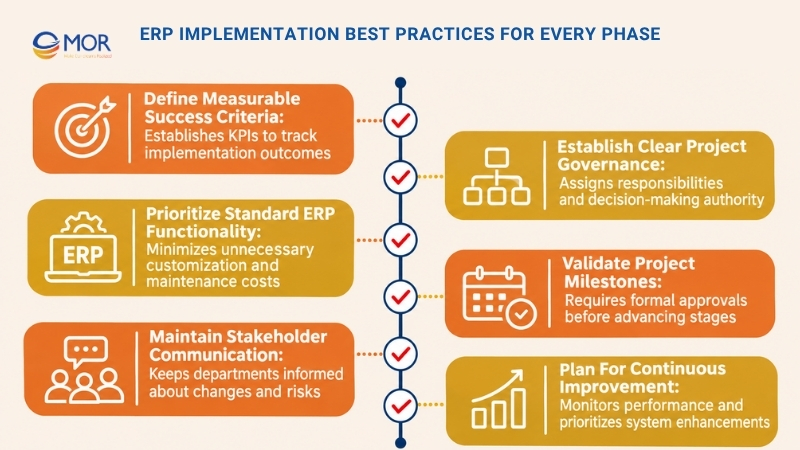
- Define measurable success criteria: Establish KPIs before configuration begins. Track improvements in financial closing time, inventory accuracy, transaction processing, or employee productivity.
- Establish clear project governance: Assign owners to business requirements, technical decisions, budgets, and approvals. Document escalation procedures so unresolved issues do not block progress.
- Prioritize standard ERP functionality: Use native capabilities whenever they meet business needs. Approve custom development only when the expected value justifies added maintenance and testing.
- Validate project milestones: Require formal approval of requirements, migration results, integration tests, UAT, and go-live readiness. Record open issues and their assigned owners.
- Maintain stakeholder communication: Share project progress, upcoming changes, risks, and training schedules. Department representatives should understand how each release affects their operations.
- Plan for continuous improvement: Review business KPIs after deployment and maintain a prioritized improvement backlog. Schedule updates, user training, and technical maintenance as part of normal operations.
Industry requirements also shape implementation priorities. For example, companies adopting Odoo for food and beverage distribution may need detailed lot tracking, expiry management, and inventory controls.
Retail businesses considering Odoo development retail should assess POS integration, stock synchronization, and store-level reporting before deployment.
These ERP implementation examples show why requirements must reflect daily business operations.
Accelerate ERP Implementation with MOR Software JSC
MOR Software supports businesses throughout the ERP implementation life cycle through IT consulting, enterprise system integration, custom software development, and quality assurance services. Founded in 2016, we have delivered more than 850 software projects across over 10 countries.
Our engineering experience spans manufacturing, finance, healthcare, retail, and other industries. We apply this technical knowledge to projects involving ERP integrations, legacy applications, and complex enterprise workflows.
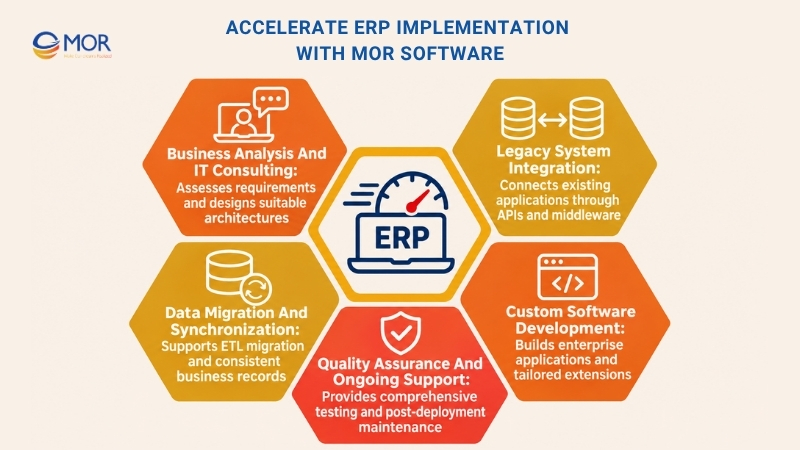
- Business Analysis and IT Consulting: We assess existing systems, map business requirements, identify technical gaps, and plan software architectures aligned with operational needs.
- Legacy System Integration: Our teams connect enterprise applications through APIs, middleware, and custom integration services. This supports organizations that need to retain existing systems during ERP deployment.
- Data Migration and Synchronization: We work with ETL processes, data mapping, and cross-system synchronization to support data transfers and consistent business records.
- Custom Software Development: Our engineers develop enterprise applications, extensions, and connected systems when standard software functions cannot address approved requirements.
- Quality Assurance and Ongoing Support: We support functional testing, integration testing, performance validation, DevOps activities, and post-deployment maintenance.
One relevant project involved a Japanese company's workforce management platform. Our 18-member team integrated Salesforce with the client's legacy PitTouch attendance system over a 15-month engagement.
The solution included API Gateway development, ETL-based migration, and real-time bidirectional synchronization. It improved data accuracy and simplified workforce data management.
This experience reflects our ability to manage complex enterprise integrations, which often form part of ERP implementation and modernization projects.
MOR provides project-based development and dedicated engineering teams. Businesses can select a delivery model based on their internal resources, technical requirements, and project scope.
If you're planning an ERP rollout or connecting existing applications to a new platform, our team can assess the technical requirements and discuss a suitable implementation approach.
Conclusion
A structured ERP implementation life cycle helps businesses control deployment risks, manage resources, and prepare employees for new workflows. Each phase requires clear ownership, tested deliverables, and approval before major decisions. MOR Software supports ERP-related projects through IT consulting, enterprise integration, custom development, and QA services.
If your organization needs technical support for an upcoming ERP deployment, contact us to discuss your requirements and identify the right engineering approach.
"Evolution is not a destination, it is a disciplined journey of innovation."
Phung Van Tu


CEO MOR AI
MOR SOFTWARE
Frequently Asked Questions (FAQs)
What are the main stages of the ERP implementation life cycle?
The eight main stages are discovery, ERP selection and planning, business process configuration, data migration, system integration, testing, employee training, and go-live. Each stage has defined activities and deliverables. Some tasks overlap, particularly data preparation, integration, and testing.
What is the first phase of the ERP implementation life cycle?
Discovery and requirements assessment is the first phase. Businesses identify operational problems, review existing systems, gather stakeholder requirements, and establish measurable goals. The main deliverables include a business case, requirements matrix, baseline KPIs, and initial gap assessment.
How many phases does an ERP implementation typically have?
ERP implementation commonly follows six to eight major phases, depending on the methodology. Some models combine configuration and integration, while others separate deployment and post-launch support. The eight-phase approach provides detailed coverage of business, technical, and organizational activities.
How long does the ERP implementation life cycle take?
A focused ERP implementation may take three to six months. Mid-sized projects often require six to twelve months, while complex enterprise programs can take longer. Data quality, customization, integrations, organizational readiness, and approval delays influence the actual timeline.
Which ERP implementation phase is the most challenging?
Data migration and system integration frequently create technical difficulties, especially when businesses rely on outdated applications. Requirements discovery and change management can also delay progress. The most challenging phase depends on the organization's existing systems, data quality, and operational complexity.
How does ERP implementation differ from ERP development?
ERP implementation involves deploying, configuring, integrating, and adapting an ERP platform for business use. ERP development focuses on building software functions or creating a custom ERP application. Implementation projects may include development when standard capabilities cannot meet approved requirements.
What is gap analysis in ERP implementation?
Gap analysis compares existing business processes and requirements with the ERP platform's available capabilities. It identifies where configuration, workflow changes, integrations, or custom development are needed. The results guide solution design, project scope, and implementation costs.
What tests should be completed before ERP go-live?
ERP systems should pass functional, integration, performance, security, and User Acceptance Testing. Teams must also verify migrated data, user permissions, and complete business workflows. Production deployment should proceed only after major defects are resolved and responsible stakeholders approve readiness.
What is the safest ERP deployment strategy?
Phased deployment often provides better control for complex organizations because teams can validate smaller releases. Big bang deployment may suit simpler environments, while parallel operation supports transaction comparisons. The safest approach depends on operational dependencies, system complexity, and recovery capabilities.
What happens after ERP implementation is complete?
After go-live, teams monitor system performance, resolve production issues, support employees, and review business KPIs. Maintenance also includes security updates, new integrations, and process improvements. Organizations should continue measuring results against the goals established during discovery.
Share


Make Our-Dreams Realized


© 2023 . MOR Software. All Rights Reserved
Sitemap
Privacy Policy
Terms of Use

Rate this article
0
over 5.0 based on 0 reviews
Your rating on this news:
Name
*Email
*Write your comment
*Send your comment
1