


Odoo 20 Features: What's New Across AI, ERP Apps and Pricing

Odoo 20 brings AI-driven automation, smarter financial tools, and better workflows across core ERP applications. Released in September 2026, it allows AI agents to carry out tasks, improves production planning, and connects business operations more closely. The latest Odoo 20 features also bring changes to pricing and licensing. In this guide, MOR Software will examine the major updates, their business uses, and what companies should check before upgrading.
Key Takeaways
- Odoo 20 introduces action-oriented AI agents, MCP connections, and natural-language automation to handle repetitive business tasks.
- Major ERP improvements cover CRM, Accounting, Inventory, Manufacturing, eCommerce, POS, and Field Service, alongside offline access and a redesigned interface.
- The release adds Light User licensing and changes Custom plan pricing, making system compatibility and total upgrade costs worth reviewing before migration.
Odoo 20 at a Glance: Top Changes
The Odoo 20 new features focus on automation, connected data, and easier daily operations. This Odoo 20 features list highlights the changes businesses should examine first.
Feature Area | Key Odoo 20 Improvement | Business Benefit |
AI Agents | Natural-language workflow execution | Less repetitive administration |
AI Integration | MCP connections to external AI tools | Controlled access to ERP data |
Accounting | AI financial assistant and bill automation | Faster financial processing |
Sales and CRM | Smarter lead generation and routing | Better sales pipeline management |
Inventory | Demand-based stock replenishment | Better purchasing decisions |
Manufacturing | Continuous production and Gantt scheduling | Improved production flow |
Website and eCommerce | AI website creation and checkout updates | Easier store management |
Point of Sale | Improved restaurant and retail workflows | Faster customer service |
Field Service | Integrated Planning and location tools | Better technician scheduling |
User Experience | Offline editing and improved navigation | More flexible daily work |
The official Odoo 20 release notes provide the full technical breakdown. They also help distinguish shipped functionality from the Odoo 20 roadmap and earlier previews.
Before launch, lists of Odoo 20 expected features and Odoo 20 upcoming features included ideas still under development. Businesses should use the released version as their baseline.
How AI Agents and Automation Work in Odoo 20
Among the Odoo 20 features, agent-based automation represents one of the biggest changes. The platform now supports AI agents that work with business records, follow instructions, and carry out authorized actions within existing workflows.
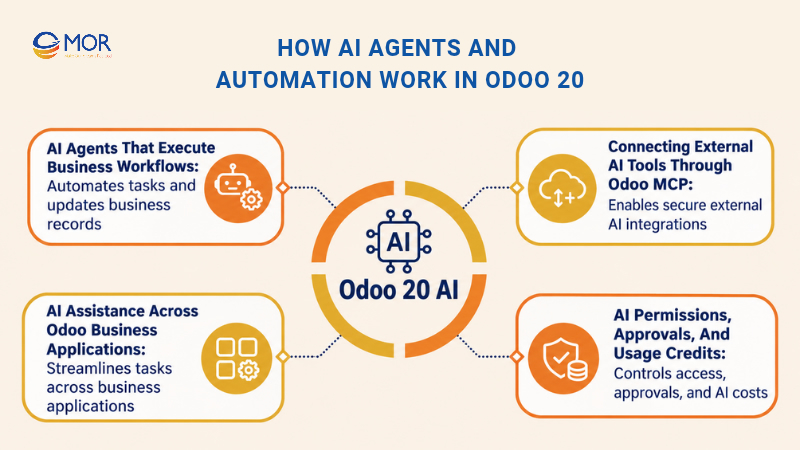
AI Agents That Execute Business Workflows
Earlier AI tools focused mainly on generating content, answering questions, and retrieving information. Odoo 20 AI expands that role through agents that can create records, update data, and participate in automated processes.
Users describe an action in everyday language. The system can then prepare and execute supported operations based on the available tools and permissions.
For example, a sales team may configure an agent to create a follow-up task when a contract is signed. Another workflow could assign incoming leads or notify purchasing staff when inventory reaches a defined threshold.
Automated and scheduled actions can also trigger agents. Teams can review the resulting conversations to understand how tasks were handled and identify actions that need correction.
This allows businesses to automate recurring work without building a separate tool for every routine process.
Connecting External AI Tools Through Odoo MCP
Odoo 20 introduces connectivity through the Model Context Protocol (MCP). This standard allows compatible external AI assistants to interact with an Odoo database through configured tools.
An MCP-connected assistant can search permitted records, retrieve business information, and perform authorized updates. For instance, a manager could request a list of unpaid invoices or ask an assistant to create contacts from an approved file.
The connection still requires authentication and suitable access permissions. Administrators must decide which tools and actions each integration can use.
MCP also creates new options for Odoo ERP integration in US businesses that already rely on external AI applications and automation services.
The advantage is direct access to relevant ERP workflows without building every integration around a separate custom interface.
AI Assistance Across Odoo Business Applications
The Odoo 20 AI features extend into Accounting, Helpdesk, Documents, Website, and Marketing applications.
Accounting teams can ask an assistant about receivables or cash flow using financial records stored in the database. Helpdesk staff can find similar support tickets and prepare responses based on previous cases.
Documents supports AI-assisted file organization, while marketing teams can receive help preparing campaigns and content. The website editor also accepts prompts for creating pages and changing layouts.
These tools work closest to the information employees already manage. For example, a support agent can review related tickets inside Helpdesk without manually searching through old conversations.
The practical value depends on clean business data, suitable permissions, and clear instructions for each agent.
AI Permissions, Approvals, and Usage Credits
AI agents need defined access to perform business actions. Odoo applies its permission system to agent operations, while sensitive changes may require user confirmation.
Administrators should review access rights before allowing agents to modify financial records, customer information, or other restricted data.
Odoo also allows users to inspect automation conversations. These records help teams review completed actions, correct mistakes, and adjust agent instructions.
According to Odoo's AI documentation, AI usage consumes In-App Purchase (IAP) credits. Companies should account for those charges when estimating operating costs.
Start with a controlled workflow and test its output against real business cases. A purchasing assistant, for instance, should demonstrate reliable recommendations before receiving broader access to procurement actions.
Odoo 20 Features Across Business Applications
The new release also changes how employees work across sales, finance, supply chains, production, and service delivery.
These Odoo 20 features address common operational problems, including repeated data entry, delayed approvals, disconnected schedules, and limited access to business information.
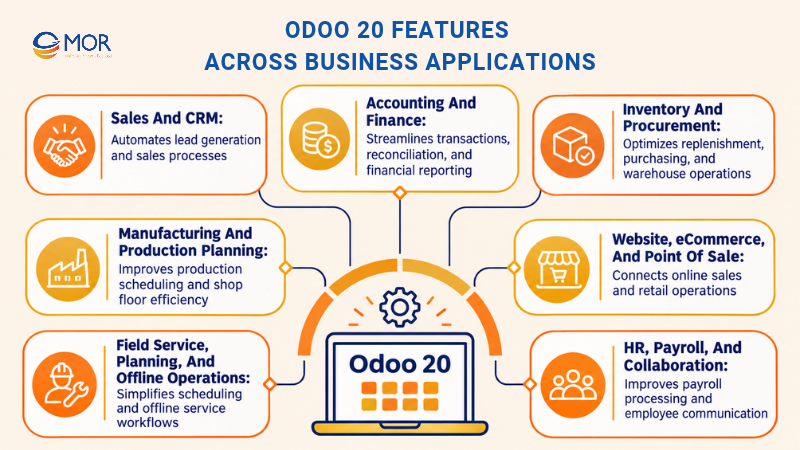
Sales and CRM
Sales teams gain new ways to find prospects, manage opportunities, and prepare quotations. The updates connect lead acquisition and sales execution more closely within Odoo CRM.
- AI-Powered Lead Generation: Odoo expands prospect discovery through business directory searches, website visitor identification, email integrations, and business card scanning. According to Odoo's official launch announcement, its lead generation directory covers more than 580 million entities.
- Automated Lead Assignment: Improved routing rules distribute incoming leads based on sales teams and defined conditions. This limits manual assignment and helps managers maintain consistent ownership.
- Sales Pipeline Management: A pipeline switcher lets users move between team pipelines without rebuilding views. Teams handling separate products or markets can manage opportunities more easily.
- Quotation Management: Sales representatives can save entire quotations or individual sections as reusable templates. Sales order lines may also contain descriptions without linked product records when the configuration permits.
- Pricing and Commissions: Periodic price rules, editable order-line margins, and payment-based commission calculations give sales managers more control over commercial terms.
- Marketplace Integrations: Connections with TikTok and Lazada support order retrieval and stock synchronization for eligible setups.
Businesses evaluating CRM changes can review our guide to Odoo CRM features. Companies comparing platforms may also find the Odoo CRM vs Salesforce CRM discussion useful.
Accounting and Finance
Accounting receives several updates aimed at improving transaction processing, reconciliation, and financial reporting.
The Odoo 20 features in finance give accounting teams more ways to work directly with financial data and limit repeated manual entries.
- AI Accounting Assistant: Finance staff can ask questions about cash flow, outstanding receivables, and other figures drawn from the company's accounting records. The assistant provides answers based on data available in Odoo.
- Bill Processing Automation: Bill line prediction suggests products, accounts, taxes, and analytic distributions based on earlier transactions. Matching purchase orders with vendor bills also becomes easier in supported workflows.
- Bank Reconciliation: Improved matching rules let accountants define reconciliation conditions and payment tolerances. Teams can investigate discrepancies before completing the accounting process.
- Bill Payments: Users can prepare and manage individual or batch payments through Odoo. This places payment handling closer to the records used for approval and reporting.
- Financial Reporting: Updates to accounting reports, depreciation management, and intercompany processes support more consistent financial controls. Actual capabilities depend on the installed modules and company setup.
- Tax and Payment Management: Users can switch between tax-inclusive and tax-exclusive prices on supported documents. Invoice reminders and changes to payment status labels also affect daily accounting workflows.
For a company managing several subsidiaries, synchronized purchase and invoice records can help limit manual checks between entities.
Businesses should review local accounting rules before adopting these functions. Tax reporting and electronic invoicing requirements differ by country.
Our guide to Odoo Accounting explains the wider application, including invoice management, financial reporting, and related workflows.
Inventory and Procurement
Odoo 20 connects purchasing decisions more closely with stock demand, supplier records, and warehouse activity.
The changes give procurement teams clearer information about replenishment needs and help warehouse staff manage incoming and outgoing goods.
- Demand-Based Replenishment: Odoo suggests minimum and maximum stock levels based on recent demand. Its official announcement describes calculations using the previous 30 days of sales, followed by draft purchase order creation. This helps buyers review replenishment needs before stock runs out.
- AI-Assisted Purchasing: AI agents can examine purchasing history and identify suppliers or purchasing patterns worth reviewing. Procurement staff still control final purchasing decisions.
- Vendor Quality Tracking: Supplier quality ratings draw on relevant quality checks. Buyers gain another reference point when comparing vendors and reviewing procurement performance.
- Purchase Planning: Expected arrival dates can be adjusted while preserving the supplier's original commitment. Vendor-specific Incoterms also support clearer purchasing terms.
- Inventory Operations: Simplified returns and improved intercompany replenishment help teams manage stock across warehouses and legal entities.
- Shipping and Barcode: Shipping connectors, redesigned labels, and warehouse tools support receiving, picking, packing, and dispatch operations.
For instance, a distributor selling through several channels can review incoming stock against confirmed customer demand. This supports better allocation decisions when popular items are in short supply.
Businesses working with suppliers that ship directly to customers can also review dropshipping in Odoo when assessing their fulfillment model.
Manufacturing and Production Planning
Manufacturers often need to change schedules after production has started. Odoo 20 adds greater flexibility to work orders, production planning, and shop floor operations.
These Odoo 20 features help production managers track progress and respond to material shortages, shifting priorities, and capacity limits.
- Continuous Production: Operators register completed quantities directly against work orders. Later production stages can begin processing available quantities before earlier operations finish the full order. This supports factories with linked production steps.
- Gantt-Based Scheduling: Work orders can be planned and rescheduled using Gantt views. Managers gain clearer visibility into workloads, production timing, and scheduling buffers.
- Kanban Production Management: Drag-and-drop tools let planners adjust work order priorities. Visual status indicators make urgent or delayed operations easier to identify.
- Bill of Materials Comparison: Side-by-side BOM comparison helps manufacturing teams examine differences between product structures. This supports decisions about material requirements and production changes.
- Manufacturing Order Flexibility: Users can split production orders in progress and manage certain order status changes. Simplified production actions also cut unnecessary steps in shop floor reporting.
- Shop Floor Operations: Barcode-assisted workflows and work center tracking help operators access relevant tasks and register production activity. Better links between manufacturing, inventory, and quality data support daily coordination.
Take a food manufacturer running mixing, filling, and packaging lines. Continuous production can allow packaging operations to start as completed quantities become available, rather than waiting for the entire preceding stage.
The same business may need detailed traceability, shelf-life controls, and quality checks. Those requirements should guide module configuration and testing.
Read our guide to manufacturing with Odoo for more details on production management. Our article on Odoo for food and beverage distribution covers related industry requirements.
Website, eCommerce, and Point of Sale
Online sellers and retail businesses receive improvements across website creation, product management, checkout, and in-store operations.
The updates connect more customer-facing tasks with existing Odoo records, helping teams manage sales channels within the same system.
- AI Website Builder: Users can describe a page, layout, or website element in natural language. Odoo's AI assistant can generate pages, create snippets, and help edit content directly in the website builder.
- Website SEO Improvements: Updates cover structured data, XML sitemaps, redirects, image handling, and multilingual URLs. These changes support more consistent technical SEO management.
- eCommerce Product Management: Product variant thumbnails, cross-selling suggestions, and stock-based publishing give merchants more control over their catalogs. Stores can also present Odoo featured products through suitable product display blocks.
- Checkout Improvements: Customers can select preferred delivery dates, request returns through their portal, and use Pay on Invoice where supported. Checkout changes also make shipping options easier to understand.
- Restaurant POS Management: Redesigned floor plans help restaurants arrange tables. Automatic combo suggestions and temporary product snoozing make menu management more practical during busy service periods.
- Customer Self-Ordering: QR code ordering supports customer requests and payment workflows. Notes entered by customers can appear on kitchen preparation screens.
- Retail POS Flexibility: Checkout supports more currency options, while simplified stock handling allows certain POS setups to operate without the full Inventory application.
For example, a restaurant can temporarily hide an unavailable dish, allowing staff to avoid accepting orders that the kitchen cannot prepare.
These changes are especially relevant for businesses managing physical stores alongside online sales.
Field Service, Planning, and Offline Operations
Odoo 20 brings Field Service functions into Planning and expands the work employees can perform without an active internet connection.
The changes are relevant to maintenance providers, on-site technicians, warehouse staff, and companies managing teams across different locations.
- Field Service Integration: Field Service capabilities now sit within Planning. Organizations that previously used the standalone Field Service application should review affected modules, workflows, and custom integrations.
- Centralized Scheduling: Planners can assign interventions through calendar and Gantt views. Drag-and-drop scheduling helps teams adjust appointments when staff availability changes.
- Location-Based Planning: Travel-time calculations and map views support technician scheduling. Managers can plan service visits with better information about customer locations and travel requirements.
- Connected Service Workflows: Service requests can connect with equipment records, maintenance history, worksheets, timesheets, and invoicing. This supports clearer records across the service lifecycle.
- Offline Record Management: Users can create, edit, archive, and delete supported records without connectivity. This helps staff continue certain tasks at remote customer locations or warehouses.
- Data Synchronization: Odoo queues supported offline changes for synchronization when connectivity returns. Available actions depend on the application, previously loaded data, and supported screens.
A maintenance technician, for example, may need to record work completed at a customer site where mobile coverage is weak. Offline access lets the employee continue supported record updates and synchronize them later.
The Odoo 20 features in this area should be tested against actual field conditions before deployment, particularly when teams depend on mobile devices.
Businesses in regulated industries can also review our guide to Odoo for healthcare when examining service workflows and access requirements.
HR, Payroll, and Collaboration
The release also improves employee administration, payroll processing, and communication between departments.
Payroll changes deserve attention because some existing workflows and data structures have been revised.
- Payroll Dashboard: A redesigned dashboard highlights configuration warnings and payroll tasks. Managers gain clearer visibility into issues that need review before processing.
- Payroll Simulation: Users can simulate salaries, work backward from target net pay, and test payroll runs before final approval. Test payslips help teams examine results in advance.
- Simplified Payroll Workflows: Work entries have been removed from the revised payroll structure. Organizations using custom payroll rules or Planning integrations should review how those changes affect their processes.
- Discuss and Communication: Call recording, transcription, polls, and improved channels support team collaboration. Relevant information can remain connected to business conversations.
- Phone System: Call routing rules, transfers, and device switching help teams manage business communication through Odoo.
- Document Management: AI-assisted organization and improved access controls support document processing and sharing.
- Sign and Productivity: Document signing workflows, interface updates, and multi-record drag-and-drop tools simplify routine administrative tasks.
For payroll teams, testing salary calculations is especially important when moving from a heavily customized setup.
Our Odoo payroll guide explains salary administration and related functions in more detail.
Odoo 20 vs Odoo 19: Key Differences
The Odoo 19 vs Odoo 20 comparison reveals changes in automation, production, financial processes, and everyday usability.
The table focuses on major differences rather than every application update.
Feature Area | Odoo 19 | Odoo 20 | Business Implication |
AI Automation | AI assistance and generated content | Agents can create records and execute authorized actions | Broader process automation |
External AI | More limited native agent connectivity | MCP server connections | Greater integration flexibility |
Accounting | Existing invoice and reconciliation tools | AI financial assistance and improved matching | Less manual financial processing |
CRM and Sales | Standard lead and quotation workflows | Expanded lead generation and routing | Better pipeline control |
Inventory | Existing reordering and procurement tools | Demand-based stock suggestions | More informed purchasing |
Manufacturing | Established work order planning | Continuous production and improved scheduling | Greater production flexibility |
Website | Existing AI-assisted content and editing | Prompt-based page and snippet generation | Faster website creation |
Field Service | Separate Field Service application | Service capabilities integrated into Planning | Changes to scheduling architecture |
Offline Access | More limited offline functionality | Broader supported record operations | Better support for remote teams |
Payroll | Work-entry-based processes | Revised payroll structure and simulations | New setup and testing requirements |
Several functions existed before the Odoo 20 release. The latest version often extends those capabilities rather than introducing entirely new applications.
For businesses running custom modules, the largest changes may involve underlying data structures and workflows. The comparison should guide technical testing as well as user training.
Odoo 20 Pricing and Light User Licensing
Pricing is another area businesses should review when evaluating Odoo 20 features and migration costs.
Odoo's September 2026 announcement introduced Light User licensing and a price adjustment to the Custom plan. The financial effect depends on subscription terms, user roles, and deployment requirements.
Licensing Option | Odoo 20 Change | Business Consideration |
One App Free | No announced change | Suitable for limited single-app use |
Standard Plan | No announced price increase | Supports standard business applications |
Custom Plan | 20% announced price increase | Relevant to custom modules, APIs, and more complex setups |
Light Users | New restricted-access licensing | May suit employees needing limited operational functions |
AI Credits | Consumption-based IAP charges | Adds usage costs for AI-powered workflows |
According to Odoo's official pricing announcement, the Custom plan rate increased by 20%. The announcement also introduced Light User access, with a European launch price of €7.90 per employee.
A Light User has access to a restricted set of applications or operations. Depending on the assigned role, these can cover expenses, time off, attendance, Planning, POS, manufacturing shop floor activities, and warehouse barcode operations.
Full users retain broader access based on their subscription and permissions.
Light User pricing requires Odoo 20 or a later version and an eligible new Enterprise agreement. Businesses should verify the terms before changing user licenses.
The official Odoo pricing page provides current regional pricing and subscription details.
Licensing is only part of total cost of ownership. Implementation work, integration, hosting, customization, AI consumption, and training can also change the final budget.
Should You Upgrade to Odoo 20 Now?
The Odoo 20 features create new options for automation and business operations. Still, an upgrade should address clear requirements rather than follow the release calendar alone.
Companies running older versions or planning new ERP deployments have different priorities. A stable Odoo 19 installation may need less urgent attention than a heavily customized system approaching the end of standard support.
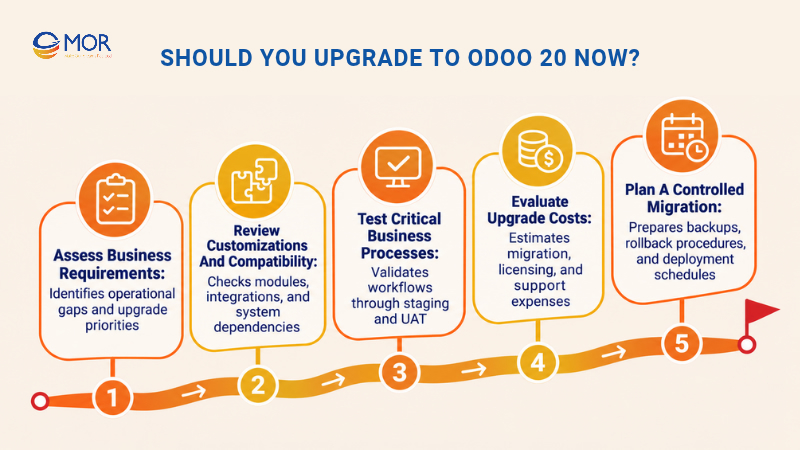
Odoo's support documentation lists September 2029 as the planned end of standard support for Odoo 20.0. This gives businesses a defined period for maintenance planning.
Before scheduling migration, review these areas:
- Assess Business Requirements: Identify operational issues that the new version can solve. Prioritize automation, reporting, production, or service functions based on business needs and expected results.
- Review Customizations and Compatibility: Audit custom Python modules, third-party applications, APIs, and existing integrations. Check access rights, Payroll changes, Field Service migration, and renamed or removed modules.
- Test Critical Business Processes: Create a staging database and validate Accounting, Sales, Inventory, Manufacturing, and related workflows. Complete integration tests and User Acceptance Testing (UAT) before deploying changes.
- Evaluate Upgrade Costs: Estimate work required for data migration, module changes, licensing, AI credits, training, and support. Compare the investment with expected operational improvements.
- Plan a Controlled Migration: Confirm upgrade-service availability for the current database and hosting model. Prepare backups, rollback steps, user training, and a deployment schedule.
An Odoo 20 readiness assessment should also check data quality and employee access permissions.
Businesses with strong reasons to adopt the new functionality can move ahead after testing. Those with stable operations and major customization dependencies may benefit from a later, planned upgrade.
Conclusion
The latest Odoo 20 features give businesses more control over automated workflows, financial operations, production planning, and customer-facing services. AI agents and updated ERP applications create practical opportunities, but implementation quality determines how well these tools support daily work. MOR Software helps businesses assess requirements, plan Odoo implementations, develop custom modules, and manage system changes.
Contact us to discuss your Odoo 20 project and identify a suitable approach for your business.
"Mr. Cong’s guiding philosophy is simplicity, believing that the simplest solutions are often the most powerful. He sees trust, empowerment, and the opportunity to demonstrate one’s abilities as the key elements that set MOR apart from traditional IT companies."
Mac Tien Cong


Division Manager (Hanoi Branch)
MOR SOFTWARE
Frequently Asked Questions (FAQs)
What are the most important new features in Odoo 20?
The main Odoo 20 features include AI agents that perform business actions, MCP connections, improved accounting tools, smarter inventory replenishment, continuous manufacturing, and broader offline functionality. Website creation, Point of Sale, Field Service, and Payroll also receive updates that affect daily workflows.
When was Odoo 20 officially released?
The Odoo 20 release date was September 24, 2026, during Odoo Experience 2026 in Brussels. The version introduced updated business applications and AI automation tools. Official documentation and release notes provide details about available functions, technical changes, and supported deployment options.
What is the biggest difference between Odoo 19 and Odoo 20?
Odoo 19 introduced several AI and usability improvements. Odoo 20 extends AI into workflow execution, allowing agents to create and modify records. The newer version also changes manufacturing planning, Field Service integration, offline operations, and parts of the Payroll system.
Are Odoo 20 AI features available in the Community edition?
Most native agent-based AI capabilities require Enterprise functionality and applicable usage credits. The Odoo 20 Community edition includes various core application improvements, but it doesn't contain every Enterprise AI, reporting, or productivity tool. Businesses should check module availability before selecting an edition.
Can Odoo 20 AI agents automate business processes?
Yes. Odoo 20 supports AI agents within automated and scheduled workflows. Agents can perform authorized operations, including creating records, updating information, and handling defined tasks. Administrators control available permissions, and certain actions require confirmation before execution.
Does Odoo 20 support offline operations?
Yes. Supported Odoo 20 screens allow users to create, edit, archive, and manage records without an active connection. Changes can synchronize after the connection returns. Offline availability depends on the application, cached information, and actions supported by the specific view.
What improvements does Odoo 20 bring to Accounting?
Odoo 20 introduces AI-based financial queries, bill line prediction, improved reconciliation rules, and updated payment workflows. Accounting teams also receive changes to reporting and intercompany processing. Available tax and financial functions depend on the company's localization and configuration.
How has Manufacturing changed in Odoo 20?
Manufacturing now supports continuous production across work orders, improved Gantt scheduling, Kanban-based planning, and Bill of Materials comparisons. Production managers can adjust priorities and certain manufacturing order states more easily, helping factories respond to changing schedules and material availability.
What is a Light User in Odoo 20?
A Light User is a restricted-access license for employees who need selected Odoo functions without full ERP access. Eligible operations include certain HR, Planning, POS, and warehouse tasks. Light User pricing requires a qualifying Enterprise agreement on Odoo 20 or later.
Should businesses upgrade from Odoo 19 to Odoo 20?
Businesses should upgrade when the new capabilities address clear operational needs and existing systems pass compatibility testing. Review custom modules, integrations, migration costs, and user training before making the decision. A stable Odoo 19 environment doesn't require an immediate upgrade solely because a newer version exists.
Share


Make Our-Dreams Realized


© 2023 . MOR Software. All Rights Reserved
Sitemap
Privacy Policy
Terms of Use

Rate this article
0
over 5.0 based on 0 reviews
Your rating on this news:
Name
*Email
*Write your comment
*Send your comment
1