


Odoo AI Agents: How to Use Them for Business Automation
Odoo AI agents help businesses work with ERP data, create records, and automate routine tasks through natural-language instructions. Odoo 20 expands these capabilities with agent-driven workflows, scheduled actions, and external AI connections. But how do these agents work inside Odoo ERP? This MOR Software guide will cover their core components, business use cases, setup process, and security requirements. It also covers practical ways to introduce AI into your existing ERP operations.
Key Takeaways
- Odoo 20 AI agents can retrieve business data, create and update records, and perform assigned tasks through natural-language requests.
- System Prompts, Skills, Knowledge Sources, and Triggers control how agents behave, which information they access, and when they perform actions.
- Businesses can use AI agents in CRM, Accounting, Inventory, Manufacturing, and other Odoo applications. Successful deployment depends on clear workflows, suitable permissions, and proper testing.
What Is Odoo AI Agent?
An Odoo AI agent is a virtual assistant that understands natural-language requests and interacts with Odoo ERP applications to retrieve information or carry out tasks. Unlike basic chat assistants, agents can use assigned tools to work directly with business records.
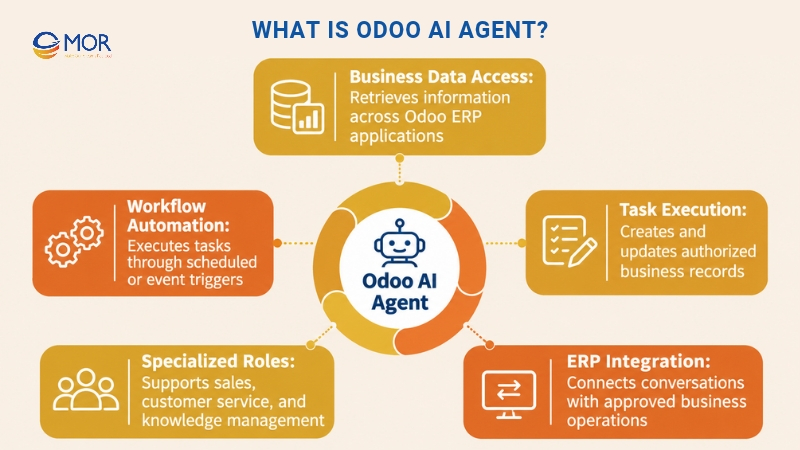
Odoo AI agents support daily operations through several capabilities:
- Business data access: Agents retrieve information from Odoo CRM, Sales, Accounting, Inventory, and other installed applications. A sales manager can ask an agent to identify open opportunities or summarize customer activities.
- Task execution: Authorized agents create records, update existing information, and perform predefined actions. The available operations depend on assigned Skills and user permissions.
- Workflow automation: Agents respond to scheduled actions or record events. For example, a new sales lead can trigger an agent to review its details and prepare a follow-up.
- Specialized roles: Businesses configure agents for specific tasks, including customer support, sales assistance, and internal knowledge management.
The difference between chatbot vs AI agent becomes apparent when the system needs to take action. A chatbot mainly handles conversations. An AI agent can connect its responses to approved business operations.
This approach is part of Odoo agentic AI, where assistants can select tools and complete assigned workflow steps.
According to McKinsey's 2025 State of AI survey, 62% of respondents said their organizations were at least experimenting with AI agents. For ERP teams, the practical starting point is choosing which daily tasks are suitable for agent-driven work.
Key Components of Odoo AI Agents
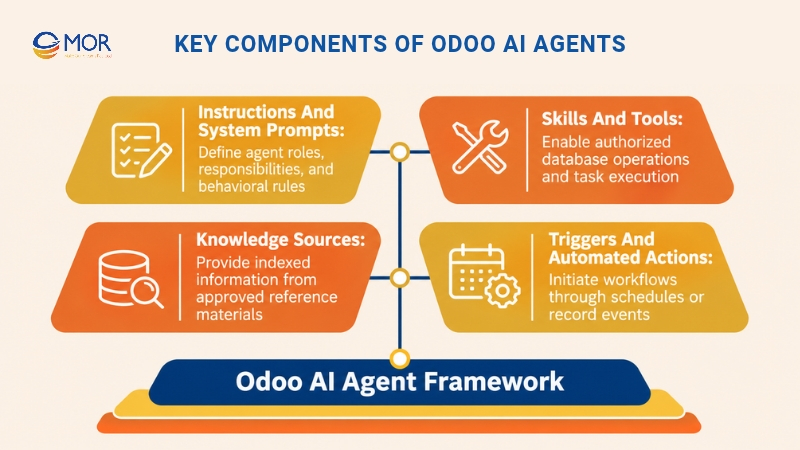
Odoo AI agents rely on four components that control their instructions, capabilities, information sources, and execution conditions. Each component serves a distinct purpose, giving administrators control over how agents operate inside business applications.
Instructions and System Prompts
A System Prompt defines an agent's role, responsibilities, and rules. It guides how the agent interprets user requests, selects tasks, and prepares responses.
For example, a company can create an Odoo CRM assistant instructed to review open leads, summarize customer records, and flag missing information. The prompt can also tell the assistant to request approval before changing lead ownership.
Odoo separates these general instructions from the instructions attached to individual Skills. The System Prompt defines the agent's overall behavior, and Skill instructions describe how to handle assigned tasks.
Clear instructions also help prevent unrelated actions. A sales assistant should follow its assigned CRM responsibilities rather than attempting tasks outside its approved scope.
Skills and Tools
Skills define what an agent can do inside Odoo. Each Skill contains instructions and may include tools that perform actual operations in the database.
Odoo 20 provides preconfigured capabilities for tasks including Information Retrieval, View Builder, Create Records, and Update Records. The available tools depend on the installed applications and the agent's configuration.
An agent without assigned executable Skills can answer questions, but it cannot directly change database records. This distinction matters when moving from an informational assistant to automated ERP operations.
For example, a View Builder Skill helps an agent find and display records. A record-update Skill lets it modify permitted fields, subject to the relevant access rights and configured actions.
Knowledge Sources
Knowledge Sources supply information that agents use when answering questions or completing tasks. Odoo supports uploaded files, web links, Documents app files, and Knowledge articles.
The system indexes these sources so agents can retrieve relevant information. A customer support assistant, for instance, can use approved product guides and internal FAQ documents when preparing answers.
Odoo also provides a Restrict to Sources setting. When enabled, the agent uses its assigned active sources for responses rather than drawing on general knowledge.
Source management requires regular updates. If an internal policy changes, administrators should reprocess the related document so the agent can use its latest indexed content.
Triggers and Automated Actions
Triggers determine when an agent starts working. Users can interact with agents through AI chat or configure them to run when specific events occur.
Odoo 20 supports scheduled triggers, date-field conditions, record creation, and record updates. An agent may run every morning or respond when a new CRM opportunity enters the system.
AI server actions connect agent decisions to executable Odoo tools. The agent selects an appropriate action based on its instructions, and the selected tool performs the operation.
For example, a new lead can trigger an agent that reviews customer details and assigns the record according to approved routing rules. The underlying tool must enforce any required business checks.
What Can Odoo 20 AI Agents Do?
Odoo 20 expands Odoo AI agents with record operations, automated workflows, file-based assistance, and external integrations. These capabilities make it possible to connect AI requests to actual ERP tasks.
Odoo 20 capability | What it enables | Business benefit |
Record creation and updates | Create or modify permitted CRM, Sales, and other Odoo records | Less manual data entry |
Agentic automation | Run agents through scheduled actions or record events | Faster routine task handling |
File-aware assistance | Read uploaded files and use previewed documents as chat information | Faster document review |
ERP data retrieval | Search, filter, and group business records through natural language | Quicker data access |
Specialized agent configuration | Assign System Prompts, Skills, Knowledge Sources, and Triggers | Better control over assigned tasks |
External MCP connectivity | Connect supported AI clients to exposed Odoo tools | More integration options |
The official Odoo 20 release notes confirm these changes, including record updates, agentic automation, and file-based interactions.
Earlier versions already supported AI assistance. An Odoo 19 AI agent could work with assigned instructions and tools, but Odoo 20 provides more options for agent-driven tasks.
Odoo 19 AI agents used the term 'Topics' for collections of instructions and tools. Odoo 20 renamed these collections 'Skills'. The Odoo AI 19 experience also focused heavily on assistance within existing ERP workflows.
Some teams want to embed AI agent in Odoo dashboard views. Odoo's built-in AI interface already provides assistance across applications, while deeper dashboard behavior depends on the available tools and configuration.
A Microsoft Work Trend Index report found that 81% of leaders expected AI agents to become moderately or extensively integrated into their companies' AI strategies within 12–18 months.
Still, Odoo's capabilities aren't automatically available to every user. Administrators must configure the relevant Skills, permissions, and access to business data.
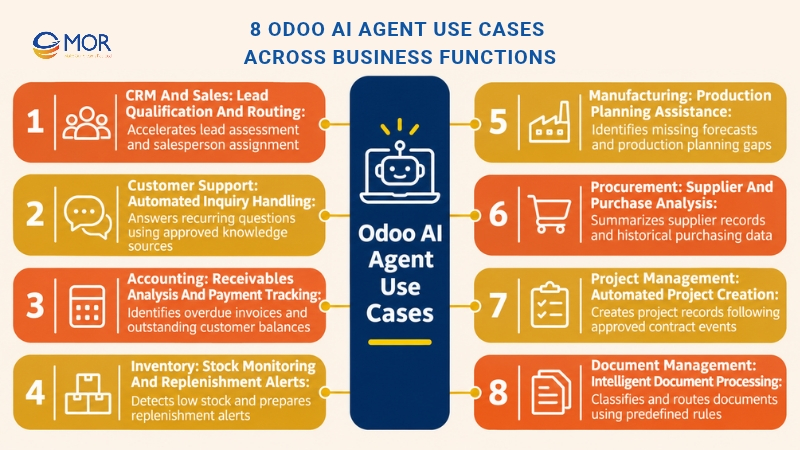
8 Odoo AI Agent Use Cases Across Business Functions
Odoo AI agents support business processes that involve frequent data checks, customer requests, and record updates. Companies can configure agents for different Odoo applications based on their daily workflows and automation goals.
The following table summarizes eight practical applications.
Business function | AI agent use case | Example workflow | Expected benefit |
CRM and Sales | Lead qualification and routing | Review new leads, check customer details, and suggest or assign sales ownership | Faster lead processing and follow-ups |
Customer Support | Automated inquiry handling | Answer common customer questions using approved Knowledge articles | Shorter response times and less repetitive work |
Accounting | Receivables analysis | Review overdue invoices, identify outstanding balances, and prepare follow-up summaries | Faster payment tracking |
Inventory | Stock monitoring | Check available stock and prepare alerts when products reach defined thresholds | Earlier replenishment decisions |
Manufacturing | Production planning assistance | Examine demand forecasts and identify missing production information | Better production planning |
Procurement | Purchase analysis | Review supplier records, purchase history, and pending orders | Better purchasing decisions |
Project Management | Project creation | Create a project after an approved contract event | Less administrative work |
Document Management | Intelligent document processing | Read, categorize, and route incoming documents according to approved rules | Faster document organization |
CRM and Sales: Lead Qualification and Routing
Sales teams often spend hours reviewing incoming leads, checking customer records, and deciding which opportunities deserve attention. An Odoo AI agent can examine lead information inside Odoo CRM and prepare qualification summaries based on predefined criteria.
For example, a company using Odoo CRM features can configure an agent to analyze new inquiries, identify missing contact details, and recommend the appropriate salesperson. Once authorized, the agent can update lead records or assign ownership through approved tools.
Businesses with customer information spread across different platforms may need AI CRM integration services to connect their data. The expected result is faster lead assessment, more consistent routing, and less time spent on administrative tasks.
Customer Support: Automated Inquiry Handling
Customer support agents can handle recurring questions about products, service policies, and order information. They retrieve answers from approved Odoo Knowledge articles, uploaded documents, and other assigned sources.
For instance, an online retailer can deploy an agent through Odoo Live Chat to answer questions about delivery policies or product availability. When a request requires account-specific actions or falls outside approved information, the workflow can direct the conversation to a human representative.
A structured AI customer care process helps businesses maintain consistent responses and manage support workloads. In its 2025 State of Service research, Salesforce reported that service teams estimated AI handled 30% of cases, with a projected increase to 50% by 2027. These are industry estimates, not measured Odoo results.
Accounting: Receivables Analysis and Payment Tracking
Accounting teams regularly check outstanding invoices, payment deadlines, and customer balances. An Odoo AI agent can retrieve relevant financial records and summarize accounts that require attention.
For example, an accountant can ask the agent to identify unpaid customer invoices that are more than 30 days overdue. The agent can group the results by customer, show outstanding amounts, and prepare a list for the collections team.
Scheduled checks can also support recurring receivables reviews. A properly configured workflow may draft payment reminders based on invoice status, while employees approve messages or actions involving sensitive financial information.
These capabilities help accounting staff review payment issues earlier and spend less time preparing routine reports. Accurate results depend on current records, assigned access rights, and properly configured accounting tools.
Inventory: Stock Monitoring and Replenishment Alerts
Inventory managers need accurate stock information to prevent shortages and avoid unnecessary purchases. Odoo AI agents can retrieve product quantities, review stock movements, and identify items that meet predefined replenishment conditions.
For example, a retail company can configure an agent to check warehouse inventory every morning. When available stock falls below a specified threshold, the agent can prepare an alert containing the product name, current quantity, and relevant replenishment information.
The workflow relies on inventory data and rules already established in inventory management Odoo. Additional tools may be required if the business wants agents to prepare purchase requests or update stock-related records.
This approach gives inventory teams earlier visibility into potential shortages. Managers can then verify the information and decide whether to initiate purchasing activities.
Manufacturing: Production Planning Assistance
Manufacturing teams manage production schedules, material availability, and demand forecasts across different ERP records. Odoo AI agents can help review this information and identify gaps that need attention before production begins.
For example, a production manager can ask an agent to examine the Master Production Schedule and identify products with missing forecast information. The agent can retrieve the relevant records and prepare a summary for planning review.
Agents can also support checks involving production orders, inventory availability, and planned demand when the necessary tools are available. This helps employees detect incomplete information before it affects scheduling decisions.
Production adjustments still require valid business rules and suitable authorization. The main benefit is faster access to planning data and better visibility into issues that could interrupt manufacturing operations.
Procurement: Supplier and Purchase Analysis
Procurement teams often compare supplier records, past purchases, and pending orders before making purchasing decisions. An Odoo AI agent can organize this information and prepare summaries for supplier evaluations.
For instance, a purchasing manager can request a report showing recent orders for a particular product, including supplier names, quantities, and historical purchase prices. The agent can retrieve the available data and identify patterns that deserve further review.
A configured workflow may also flag incomplete purchase records or highlight orders awaiting approval. More complex supplier scoring requires defined evaluation rules and reliable purchasing data.
The benefit is a shorter review process and more consistent access to supplier information. Purchasing teams retain responsibility for contract terms, supplier selection, and final purchase approvals.
Project Management: Automated Project Creation
Project teams often repeat the same setup tasks after a customer signs a contract. These activities may include creating project records, assigning ownership, and preparing initial tasks.
Odoo 20 supports agent-driven workflows that can respond to automated actions. For example, an approved contract event can trigger an agent to collect relevant customer details and create a project using assigned tools.
The company can define rules for naming projects, linking customer records, and preparing standard task structures. Employees can review the generated project before work begins, especially when the contract involves unusual requirements.
This process limits repeated data entry and helps project managers start work with consistent information. The setup depends on properly connected Sales and Project applications and the business rules governing project creation.
Document Management: Intelligent Document Processing
Businesses handle invoices, contracts, receipts, and other documents that require classification and routing. Odoo AI agents can examine document information and help organize files according to predefined categories.
For example, a finance department can configure an agent to review incoming documents and determine whether each file belongs to an invoice, receipt, or contract category. Depending on the available tools, the workflow can apply tags or move files to the appropriate location.
Odoo's AI document sorting capabilities support this type of work through configured server actions. Agents can also retrieve information from indexed documents when users need quick answers about stored files.
Sensitive documents still require suitable access restrictions and validation. For teams processing large document volumes, automated classification can shorten routine handling time and improve consistency across departments.
How to Create an Odoo AI Agent Step by Step
Creating Odoo AI agents starts with defining a clear business task and configuring the right permissions. The Odoo AI application provides the main tools for setting instructions, assigning Skills, adding sources, and testing agent behavior.
The following process follows Odoo's official agent documentation.
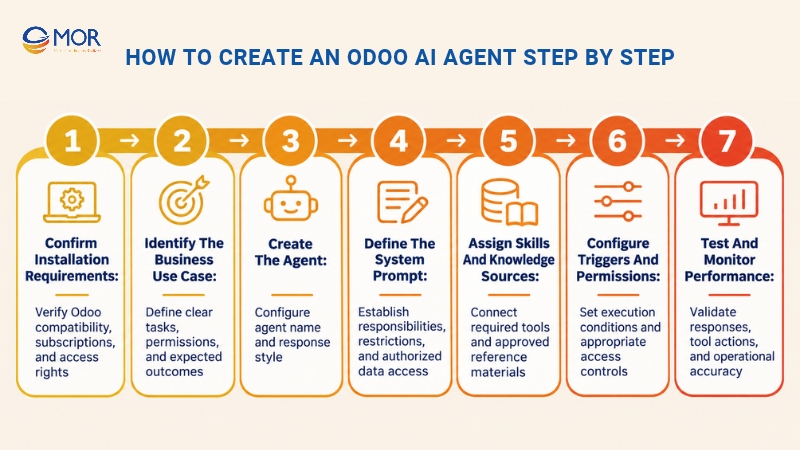
- Step 1: Confirm installation requirements. Check your Odoo version, subscription, hosting setup, and user access rights. Odoo 20 requires the AI app for creating and customizing agents. Installing this app on Odoo's Standard plan triggers an upgrade to Custom. AI requests also consume IAP credits.
- Step 2: Identify the business use case. Select a task with clear inputs, permitted operations, and an expected result. For example, a CRM agent might review new leads, detect missing information, and prepare an assignment recommendation. Define who reviews the outcome.
- Step 3: Create the agent. Open the AI app and select New. Enter a descriptive name and configure its response style. Names like "Sales Lead Assistant" or "Internal Knowledge Agent" help employees identify the correct assistant.
- Step 4: Define the System Prompt. Explain the agent's purpose, responsibilities, allowed data access, and restrictions. Keep instructions tied to business tasks. Broad prompts can lead to inconsistent results when agents have access to several tools.
- Step 5: Assign Skills and Knowledge Sources. Select the Skills required for the workflow. Add Documents, Knowledge articles, or web links when the agent needs reference material. Activate sources after indexing and use source restrictions when appropriate.
- Step 6: Configure Triggers and permissions. Decide if the agent starts through employee requests, scheduled actions, or record events. Review which users and tools can create, update, or access information. Add approval steps for sensitive operations.
- Step 7: Test and monitor performance. Use the Test function and realistic records to review responses. Check incorrect answers, denied operations, and unexpected tool choices before introducing the agent into daily work.
A sales team can start with a focused System Prompt:
You are a CRM assistant responsible for reviewing new sales leads in Odoo. Check available customer information, summarize the lead's requirements, and identify missing fields. Suggest the appropriate sales representative based on approved assignment rules. Do not delete records, change lead ownership, or modify financial information without authorization.
This prompt creates a clear starting point. The assigned Skills and server-side permissions determine which actions the assistant can perform.
Teams planning custom workflows may also need Odoo application development to create tools that aren't available in the standard configuration.
An Odoo AI agent module should follow the same testing and maintenance standards as other custom Odoo components.
Research from Gartner predicts that over 40% of agentic AI projects will be canceled by the end of 2027, citing factors including rising costs, unclear business value, and weak risk controls.
Start with a small workflow whose results employees can verify. Expand the agent's responsibilities once its accuracy and operational value meet your requirements.
How to Connect External AI Agents Through Odoo MCP
Odoo AI agents can run inside the ERP, but businesses may also connect external AI assistants through Model Context Protocol (MCP). This standard allows supported AI clients to discover and call tools exposed by an Odoo database.
A native AI agent uses Odoo's built-in AI application. An external assistant communicates through an MCP connection and operates under the permissions granted to that client.
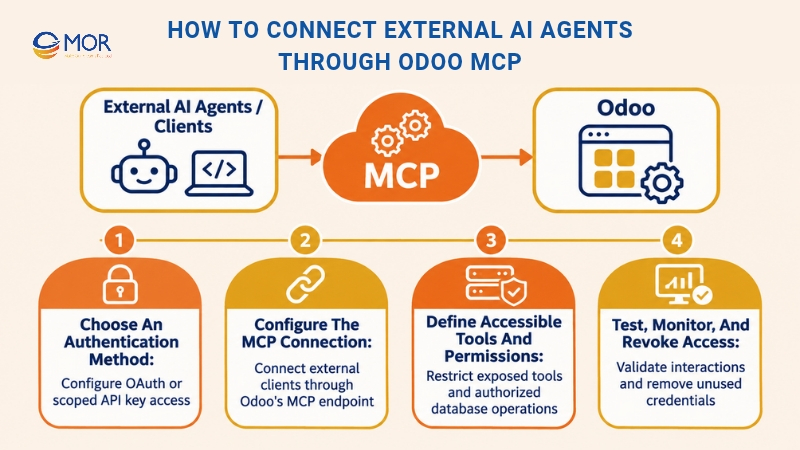
Choose an Authentication Method
Odoo 20 supports OAuth and API key authentication for MCP clients. OAuth is the recommended option for supported internal users because it allows them to approve access without manually sharing static keys.
Portal users must use API key authentication. Administrators can create an MCP-scoped key through My Preferences, then Security, and define its expiration.
Every connection needs appropriate access rights. A valid key doesn't grant unrestricted authority over ERP records.
Configure the MCP Connection
The MCP client connects to an endpoint formed by adding /mcp to the Odoo database URL.
For example, a database hosted at https://example.odoo.com exposes its MCP endpoint at https://example.odoo.com/mcp when the supported server is configured.
After authentication, the external client discovers the available Odoo tools and uses them when processing requests.
The choice of the best AI agent platform for Odoo depends on client compatibility, security needs, available tools, and expected workloads.
Define Accessible Tools and Permissions
Odoo exposes a limited set of read-focused MCP tools by default. Administrators can make additional server actions available through the Available in MCP setting.
Read-only tools retrieve information without changing records. Write-capable tools can modify information according to their implementation and the user's access rights.
The official Odoo MCP documentation explains how to expose tools and configure access.
Businesses planning Odoo ERP integration should distinguish MCP connections from direct API-based development. Each approach has different technical and maintenance requirements.
Test, Monitor, and Revoke Access
Begin Odoo AI integration testing with read-only requests. Confirm that the external assistant retrieves the expected records and refuses actions outside its authorized scope.
After validation, test approved record changes using a staging environment. Review tool outputs, access permissions, and error handling before enabling production writes.
Administrators should also monitor credentials and revoke unused connections. Odoo allows MCP access to be revoked through the associated API key.
Odoo AI Agents Security Risks and Best Practices
Odoo AI agents work with business information that may include customer details, invoices, contracts, and internal documents. Their security depends on user permissions, tool configuration, and the controls applied to automated actions.
IBM's 2025 Cost of a Data Breach report found that 13% of studied organizations reported breaches involving AI models or applications. Among those affected organizations, 97% lacked proper AI access controls.
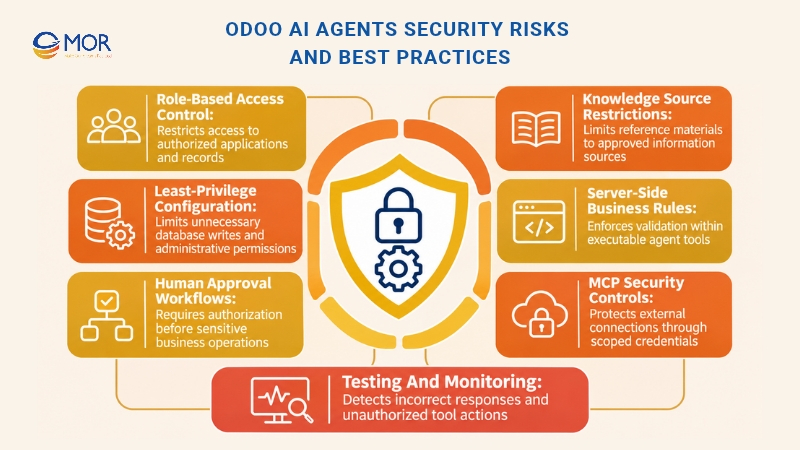
Businesses should apply the following practices before using agents with production ERP data:
- Role-based access control: Assign agents access only to the Odoo applications and records needed for their tasks. A customer support assistant generally doesn't need permission to modify accounting entries.
- Least-privilege configuration: Limit database write access and administrative rights. Avoid assigning broad Create Records or Update Records capabilities without a defined business requirement.
- Human approval workflows: Require employee approval for payments, sensitive record updates, and other high-impact actions. Separate information gathering from final authorization.
- Knowledge source restrictions: Connect approved reference documents and review their content regularly. Source restrictions help control answers, but they don't replace database permissions.
- Server-side business rules: Implement validation directly in executable tools. Odoo's AI server action documentation states that tools execute when selected unless their code prevents the action.
- MCP security controls: Use approved clients, scoped credentials, and limited tool exposure. Review whether each external connection needs read or write access.
- Testing and monitoring: Review automation conversations, incorrect responses, permission failures, and unexpected tool calls. Retest agents after changing Skills, business rules, or custom modules.
Pay particular attention to automated workflows. A poorly configured agent may repeat an incorrect action across many records before an employee notices.
A controlled rollout provides time to identify these problems. Start with read-only tasks, add approved write operations, and expand automation after successful testing.
MOR Software - Your Partner for Odoo AI Agent Integration
MOR Software JSC provides Odoo consulting, ERP implementation, custom module development, and Application Management Services. Our experience in enterprise software and system integration gives businesses a technical foundation for planning AI-enabled ERP workflows.
We have announced MOR Software's strategic partnership with Odoo, strengthening our work in business-focused ERP solutions.
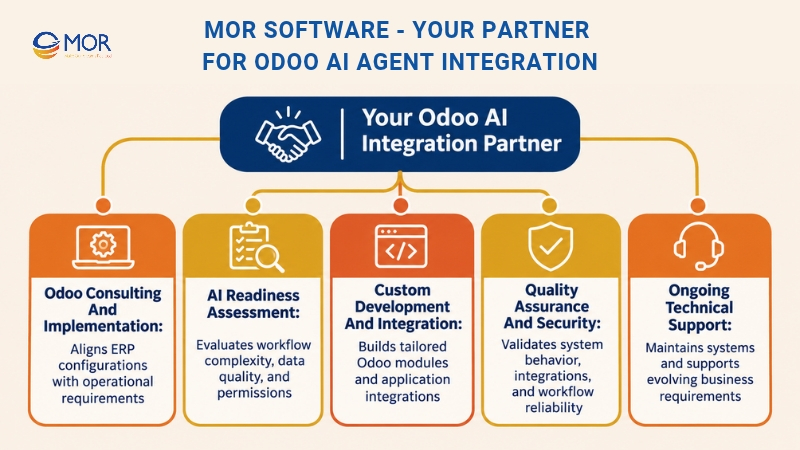
Odoo development services at MOR Software cover several areas relevant to AI adoption:
- Odoo consulting and implementation: We examine existing business processes, identify system requirements, and plan suitable ERP configurations before introducing new automation.
- AI readiness assessment: Our team can evaluate workflow complexity, data quality, user permissions, and the technical requirements for agent-based tasks.
- Custom development and integration: We develop Odoo modules and integrate external applications to support business-specific needs across Sales, CRM, Inventory, Accounting, and Manufacturing.
- Quality assurance and security: Our testing practices support the validation of custom workflows, integrations, and system behavior before deployment.
- Ongoing technical support: Our Application Management Services cover maintenance, troubleshooting, system updates, and further development as business requirements change.
Businesses comparing top companies adding AI agents to Odoo ERP should examine actual Odoo implementation skills, integration experience, and long-term support capabilities. An AI agents development company also needs to understand how AI-driven actions interact with existing business rules.
Our approach focuses on matching technology decisions to operational needs. We can help you assess suitable agent use cases and plan the development work required for your Odoo environment.
Conclusion
Odoo AI agents give businesses practical ways to automate ERP workflows, access operational data, and perform approved tasks. Their value depends on clear instructions, accurate information, suitable permissions, and reliable integrations. MOR Software supports Odoo consulting, development, and system integration for businesses planning AI-enabled operations. Our team can help assess suitable workflows and define the technical requirements for implementation.
Contact us to discuss your Odoo AI Agent project and identify the right starting point for your business.
"Mr. Cong’s guiding philosophy is simplicity, believing that the simplest solutions are often the most powerful. He sees trust, empowerment, and the opportunity to demonstrate one’s abilities as the key elements that set MOR apart from traditional IT companies."
Mac Tien Cong


Division Manager (Hanoi Branch)
MOR SOFTWARE
Frequently Asked Questions (FAQs)
What is the difference between Odoo AI Agents and Ask AI?
Ask AI provides natural-language assistance within Odoo, including answering questions and retrieving information. Configurable agents can have specialized instructions, Skills, and tools for business tasks. Their ability to create or modify records depends on the assigned capabilities and permissions. The standard Ask AI experience doesn't automatically grant write access.
Are Odoo AI Agents available in Odoo Community Edition?
Native agent availability depends on the Odoo version, edition, installed applications, and deployment setup. Businesses evaluating an Odoo AI agent community edition solution should distinguish built-in Odoo features from third-party modules and external API connections. Self-hosted Community installations may connect to external AI through supported integrations.
What can Odoo AI Agents automate in business workflows?
Agents can assist with lead routing, document processing, stock monitoring, project creation, and scheduled data checks. Each workflow requires appropriate Skills, available tools, and permissions. Some tasks can use standard Odoo operations, while others need custom development or integration with existing applications.
Can Odoo AI Agents create and update ERP records?
Yes. Odoo 20 supports agents that create and update permitted records through assigned tools. Administrators control which operations are available and which users can perform them. Sensitive updates should pass through business validation rules and approval procedures before execution.
Do Odoo AI Agents work without human intervention?
Agents can run through scheduled or event-based triggers without requiring a new manual request each time. Their degree of independence depends on the configured workflow and tools. Businesses should keep human approval requirements for actions involving payments, sensitive data, or major operational changes.
Can ChatGPT or Claude connect to Odoo AI Agents?
ChatGPT and Claude can connect to supported Odoo databases through MCP-compatible connections. These external assistants access tools exposed by the Odoo MCP server rather than becoming native agents inside the AI app. Authentication, client support, available tools, and database permissions determine what they can do.
What is the difference between Skills and Knowledge Sources in Odoo AI?
Skills define tasks and executable capabilities, while Knowledge Sources provide reference information. For example, a support agent can retrieve answers from Knowledge articles through its sources. A separate Skill and tool would be needed to create or update a support record.
How are Odoo AI Agents priced?
Odoo 20 AI requests consume In-App Purchase credits. Businesses must also consider their Odoo subscription, since installing the AI app on the Standard plan triggers an upgrade to Custom. External model services, custom development, integrations, and ongoing maintenance may add costs.
How can businesses protect sensitive data when using Odoo AI Agents?
Apply role-based access rights, restrict available tools, review knowledge sources, and require approvals for sensitive changes. External MCP clients should use secure authentication and controlled credentials. Regular testing and monitoring help identify unexpected operations before they affect production data.
Can businesses create custom Odoo AI Agents for specific industries?
Yes. Companies can configure specialized prompts, Skills, Knowledge Sources, and automated actions for industry workflows. Labels like 'Odoo turbo AI agent' may appear in third-party products, but their capabilities require separate verification. Custom agent development should follow Odoo's supported APIs, access controls, and testing practices.
Share


Make Our-Dreams Realized


© 2023 . MOR Software. All Rights Reserved
Sitemap
Privacy Policy
Terms of Use

Rate this article
0
over 5.0 based on 0 reviews
Your rating on this news:
Name
*Email
*Write your comment
*Send your comment
1