


Commercial Real Estate CRM: Top Picks for Business in 2026
Managing deals, tracking leads, and keeping client data organized can quickly become overwhelming without the right commercial real estate CRM in place. Many teams struggle with scattered tools and missed opportunities. This MOR Software’s guide will walk you through the best CRM for commercial real estate and help you choose a solution that fits your business needs.
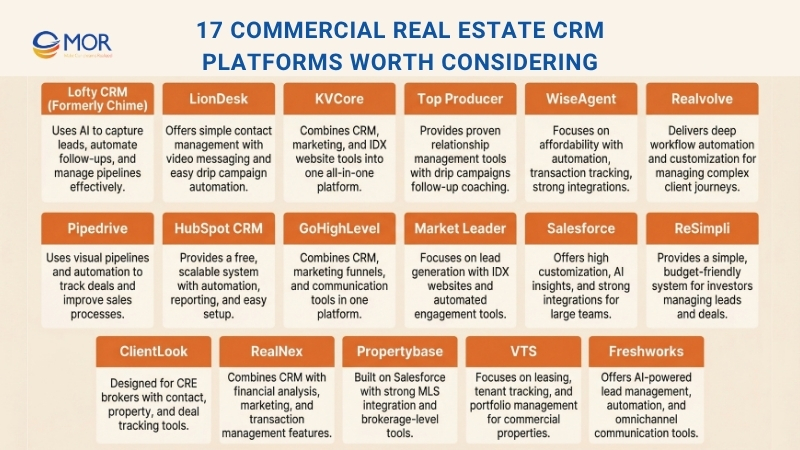
17 Commercial Real Estate CRM Platforms Worth Considering
Choosing the best CRM for commercial real estate depends on how you manage leads, track deals, and grow your client base. Each platform below offers different strengths, from automation to pipeline visibility, helping property professionals run their operations more smoothly.
Lofty CRM (Formerly Chime)
Lofty CRM is an advanced commercial real estate CRM built to simplify lead handling, automate daily tasks, and improve teamwork. With its AI automation tools and wide feature set, this platform suits agents, teams, and brokerages that want to grow while still delivering a tailored client experience.
Lofty CRM connects easily with AgentFire, so you can sync leads from your website straight into the system. The direct integration allows inquiries, property searches, and sign-ups to move into the platform automatically, so no opportunity gets missed. This setup supports quicker follow-ups and better lead care, helping you handle contacts without manual input.
Features
- Smart Lead Capture With AI Support: This best CRM for real estate investors includes advanced tools such as customizable IDX sites and landing pages, along with AI automation suggestions that help you focus on high-value prospects.
- Automated Lead Follow-Up And Engagement: Set up email, SMS, and personalized sequences so you can stay in touch with leads at every stage without doing everything manually.
- Flexible Sales Pipeline Tracking: View and control each step of your sales process with adjustable pipelines, making it easier to move deals forward and close them faster.
- Custom Dashboards And Performance Reports: Build dashboards and reports that track key metrics like lead activity, conversions, and sales outcomes.
- Built-In Marketing Features: Launch email campaigns, social media promotions, and SMS outreach directly from the platform to connect with clients across channels.
- Mobile Application Access: Work from anywhere using the mobile app, which gives full access to contacts, communication tools, and reports.
Pros & Cons
Pros:
- AI-Based Workflow Support: The system uses AI to rank leads and suggest next steps, helping improve conversion rates.
- Built For Growing Teams And Brokerages: It supports collaboration, tracking, and performance insights, making it suitable for larger groups.
- Strong Lead Capture Capabilities: Includes IDX sites, landing pages, and ad integrations to collect leads from many sources.
- Flexible Process Customization: You can adjust workflows, reports, and campaigns to match your business needs.
Cons:
- Higher Cost: Pricing may not suit smaller teams or solo professionals.
- Learning Time Required: The wide feature set can take time to understand.
- Setup Complexity: Initial setup may need support, especially for bigger teams.
Pricing:
- Core Plan: Starts at $99/month per user. Includes lead capture tools, pipeline tracking, and email automation.
- Pro Plan: Starts at $299/month per user. Adds AI lead scoring, deeper reporting, and marketing tools.
- Enterprise Plan: Custom pricing for large teams, with full customization, dedicated support, and advanced integrations.
LionDesk
Let’s begin with LionDesk. Like many tools in this list, it was designed specifically for real estate professionals.
With its wide range of features, it can act as a complete solution for agents, brokers, teams, and lenders who want to improve operations, manage campaigns, and improve how they interact with clients.
Features
- LionDesk allows you to track and store every interaction with your contacts, including emails and calls, all in one place. The interface is simple and easy to use, so you can start working with it quickly.
- It also includes unique tools like video emails and video texting. You can create these directly inside the platform without needing extra editing tools.
- The platform helps you automate drip campaigns quickly and monitor their results in real time.
- If you are moving from another system or using spreadsheets, LionDesk offers tools to import contacts easily from other platforms or files.
Pricing
These plans share core CRM functions but differ in monthly credits and extra features. Here is a quick overview:
- Free Trial: Lets you test the system and explore the interface. Includes 15 texts, 5 video texts, 150 emails, and 5 lead assists.
- Starter: Costs $25 per month and includes standard features plus 1,000 emails and 15 texts.
- PRO+: Costs $49 per month and includes starter features plus 5,000 emails, 1,000 texts, and 100 video texts.
- Elite: Costs $99 per month and includes PRO+ features plus 15,000 emails, 3,000 texts, and 300 video texts.
KVCore
KVCore is a cloud-based platform created for modern brokerages that need flexibility and strong performance. As a cloud solution, it gives users access from anywhere while offering higher security compared to traditional office servers. It also reflects how custom real estate software industry platforms are shifting toward fully online systems.
While the focus is on its CRM functions, KVCore also works as a full real estate marketing platform. Its wide set of tools connects your website and CRM into one system, making it easier to capture leads and automatically store their details without extra steps.
The platform lets agents monitor all client interactions and referrals within one dashboard. It also helps you stay updated on local market changes through its property alert feature.
Another key strength is its advanced behavior-based automation. Emails and text messages are sent automatically, each with a personalized tone. Over time, this helps you build stronger relationships with clients and improve long-term engagement.
Pricing for KVCore starts at about $500 per month for small teams and can reach around $1200 per month for larger groups. This may seem high compared to other tools, but it is important to remember that this platform combines many functions in one place.
It also includes its own website system, so you do not need to create a separate site with an IDX integration.
Features
- Lead Capture And Engagement Tools: KVCore includes built-in lead capture features such as customizable IDX websites, landing pages, and lead routing. It also supports automated email and text campaigns to keep leads engaged.
- Advanced Workflow Automation: Automate follow-ups, alerts, and communication tasks so no opportunity is missed. You can set triggers and action plans to ensure timely responses.
- Custom Dashboards And Reporting Tools: Track business performance using dashboards and detailed reports that show lead activity, conversion rates, and sales results across each pipeline stage.
- AI-Driven CRM Insights: The platform uses AI tech stack to rank leads, measure engagement, and provide insights that help improve conversion and refine marketing efforts.
- Transaction Management Tools: Manage the full transaction process, from creating contracts to closing deals, all within one system.
- Mobile Application Access: Stay connected while working remotely with a mobile app that allows you to manage leads, follow deals, and communicate with clients.
- Built-In Marketing Tools: Includes email campaigns, social media automation, and SMS marketing features to help you stay in touch with your audience.
Pros & Cons
Pros:
- Complete All-In-One System: Combines lead capture, CRM, cloud marketing automation, and transaction handling into a single platform, making it highly efficient for property professionals.
- Strong Automation Capabilities: Helps save time through automated workflows and consistent lead engagement.
- Suitable For Large Teams And Brokerages: Offers collaboration tools and performance tracking that support growing organizations.
- IDX Website Compatibility: Works smoothly with IDX websites, helping you capture and convert leads directly from your online presence.
- AI-Based Decision Support: Uses AI to prioritize leads and provide insights, helping improve strategy and results.
Cons:
- Higher Pricing Level: Costs may be too high for individual agents or smaller teams with limited budgets.
- Time Needed To Learn: The wide feature set may require time to fully understand and use effectively.
- Customization Complexity: Adjusting the system to match your exact workflow may need training or external support.
Pricing
- Core Platform: Starts at $500 per month for teams. Includes lead capture, automation tools, IDX website, and mobile access.
- Add-Ons: Extra features such as advanced reports or marketing tools can be added at an additional cost.
- Custom Plans For Brokerages: Larger brokerages can request tailored pricing with added features, support, and scaling options.
Top Producer
If you have worked as a real estate agent for some time, you have likely come across Top Producer at some point. This commercial real estate CRM, owned by Move Inc. which also operates Realtor.com, has been in the market since 1982, giving it a long and established presence.
Features
- As one of the earliest CRM tools built for real estate agents, its main strength lies in its wide range of proven features that support daily tasks and simplify workflows.
- It includes drip campaigns, marketing assets, and the Market Snapshot tool, which helps keep homeowners engaged even after a deal is completed.
- Users can also rely on a built-in follow-up coach that guides them through lead nurturing using simple actions and smart recommendations. This aligns well with many realtor CRM programs designed to support long-term client relationships.
Pros & Cons
Pros:
- This platform works well if you want to build lasting relationships with new leads and maintain strong connections with your current clients.
Cons:
- One major drawback, which has been an issue for many years, is its outdated interface. While other platforms focus on modern and user-friendly design, this system still feels old in comparison.
- Although updates have been made in recent years and there are some improvements, it is still clear that the platform was originally developed decades ago.
So why does it remain high on the list? Because it offers a large number of features, strong integrations, and affordable pricing.
Pricing
- In terms of cost, it is one of the more budget-friendly options available. The starter plan includes core CRM tools and costs $40 per month.
- The professional plan is priced at $70 per month and adds the Market Snapshot feature, which delivers local market insights to support follow-ups.
- The advanced plan costs $80 per month and includes FiveStreet, a premium lead response and management tool.
WiseAgent
WiseAgent is known as a reliable and efficient platform for real estate professionals. It focuses on making your workflow simpler while helping you stay connected with leads and clients throughout every stage of the process. This best CRM for commercial real estate brokers is designed to keep operations organized without adding complexity.
Features
WiseAgent includes a wide set of tools that help you manage your business smoothly:
- Transaction Tracking Tools: Monitor deals using templates, commission reports, and property lists so every transaction stays organized in one place.
- Automated Drip Campaigns: Nurture leads easily with customizable email and text automation.
- Contact Management System: Keep track of birthdays, notes, and categorize contacts by source or type to improve follow-ups.
- Power Dialing Feature: Contact multiple leads quickly and reduce time spent on manual calls.
- Social Media Data Integration: Enrich lead profiles automatically with social media information.
- Unlimited Document Storage: Store contracts and other important files without worrying about limits.
Pros & Cons
Pros:
- Affordable pricing makes it a strong option for agents working with limited budgets.
- Includes advanced automation tools such as AI-based responses and drip campaigns.
- Connects with over 100 tools, making it easy to integrate with your current setup.
- Offers unlimited 24/7 customer support and training, so you always have help when needed.
- Works well on mobile devices, allowing you to manage tasks while on the move.
Cons:
- Does not include visual pipeline tools that some users may prefer.
- Some advanced features may take time for new users to fully understand.
>>> Finding the right AI automation agency can mean the difference between scaling fast or falling behind. Let's compare the top AI automation agencies trusted in 2026, so you can invest wisely and grow with confidence.
Pricing
WiseAgent stands out for professionals who want a cost-effective solution with solid features:
- Standard Plan: $49 per month or $499 per year, which equals about $41.58 per month when billed annually. Includes lead automation, transaction tracking, and drip campaigns.
- Custom Enterprise Plan: Designed for teams with 15 or more agents, with pricing based on specific requirements.
- Add-On Options:
- WiseText SMS: $11 per month plus an $80 setup fee.
- Additional Team Members: $20 per month for every 5 users.
- Lead Enhancement: $5 per month for unlimited credits.
For agents looking for an affordable system with strong functionality, this platform offers a practical balance between cost and performance.
Realvolve
When it comes to CRM platforms, Realvolve stands out because of its strong workflow automation and deep customization options. Built for real estate professionals, this CRM commercial real estate software is one of the most capable tools for building and maintaining client relationships while keeping your processes organized.
Features
- Custom Workflow Automation Tools: Realvolve allows you to design workflows that match your business process, helping you automate lead capture, follow-ups, and transaction steps. It works like a digital assistant that keeps tasks on track.
- Contact Tagging System: Organize your contacts using tags to group your database. Whether you separate buyers, sellers, or past clients, this feature makes searching simple.
- Behavior-Based Triggers: Set up automatic reminders or tasks based on client actions, helping you respond quickly and maintain engagement.
- Pre-Built Communication Templates: Use ready-made email, text, and task templates to save time while keeping communication clear and consistent.
- Mobile Access Support: The Realvolve mobile app helps you stay connected, allowing you to manage deals, send messages, and track workflows wherever you are.
- Third-Party Tool Integration: Connect easily with tools like Google Workspace, Zapier, and other platforms to improve productivity.
- Analytics And Reporting Tools: Get clear insights into team performance, lead conversions, and areas that slow down your sales process.
Pros & Cons
Pros:
- Designed for real estate workflows, making it easy for agents and brokers to use.
- Strong workflow customization helps automate repetitive work.
- Mobile app allows you to manage your business anywhere.
- Connects well with other tools and CRM solutions, keeping everything in one system.
Cons:
- Setup and learning can be difficult for new users.
- Pricing is higher than some budget CRM options, but it offers strong value for serious users.
Pricing
- Solo Agent Plan: $49 per month, billed annually. Suitable for individual agents who need strong lead tracking and automation.
- Team Plan: $119 per month for up to three users. Designed for small teams that need collaboration features.
- Enterprise Options: Custom pricing for larger teams or brokerages with more advanced needs.
The mix of automation, customization, and strong features makes Realvolve a solid choice for professionals who want to scale their business and manage leads, clients, and transactions in one place.
Pipedrive
Pipedrive is designed for sales-focused users, making it a strong option among CRM tools used in real estate today. With visual pipelines, automation tools, and flexible setup, it works well for agents who want a clear and simple system. It also reflects how a CRM system real estate approach can adapt general sales tools for property businesses.
Features
- Visual Pipeline Tracking System: Pipedrive uses visual pipelines that make it easy to track leads and deals. You can see where each prospect is in your process, from first contact to closing. The drag-and-drop layout keeps everything organized.
- Lead Generation Tools: The LeadBooster add-on includes chatbots, live chat, web forms, and a prospecting tool to find high-quality leads based on your criteria. Leads are added directly into the platform and ready for follow-up.
- Task Automation Features: Set automated workflows for tasks like sending emails, assigning leads, and updating deal stages. This helps you focus more on closing deals instead of handling routine tasks.
- Built-In Scheduling Tool: Clients can book meetings based on your availability using the scheduler. Appointments sync directly with your calendar, reducing back-and-forth communication.
- Custom Workflows And Integrations: With over 300 integrations, including email, marketing, and finance tools, Pipedrive fits into your current system easily. You can also adjust pipelines to match your sales process.
Pros & Cons
Pros:
- Easy-to-use interface that supports quick navigation.
- Affordable pricing suitable for agents looking for a budget-friendly solution.
- Strong automation tools that help save time and improve efficiency.
- Flexible workflows and many integration options.
Cons:
- Not built specifically for real estate, so it lacks features like property listing management.
- Some tools, such as LeadBooster, require extra fees.
Pricing
Pipedrive offers different plans to match your needs:
- Essential Plan: $9.90 per month, billed annually, for basic pipeline and contact tracking.
- Advanced Plan: $19.90 per month, billed annually, with automation and email tracking features.
- Professional Plan: $39.90 per month, billed annually, with advanced reporting and multiple pipelines.
- Enterprise Plan: $59.90 per month, billed annually, with higher security and customization options.
For agents who want a simple but effective system, Pipedrive offers a strong balance between cost and features, helping you manage leads and deals more efficiently.
HubSpot CRM
HubSpot CRM is a strong choice for real estate professionals who want a platform that is powerful, affordable, and simple to use. Whether you are just starting out and need a low-cost option or you are growing your team, this system offers solid features along with a free plan that stands out. It is often seen as one of the best CRM software for commercial real estate thanks to its flexibility and ease of use.
Features
- Simple Contact Organization System: Keep all buyers, sellers, and leads well organized using detailed profiles. You can group clients based on status or deal stage to support more targeted follow-ups.
- Easy Deal Tracking Tools: View your sales pipeline with a drag-and-drop interface. Move deals between stages and track progress toward closing in a clear way.
- Email Campaign Automation: Set up outreach using ready-made templates and automated sequences. Track open rates, clicks, and replies to improve your approach.
- Task Automation System: Create triggers that assign leads, send reminders, or update deal stages automatically, helping reduce manual work.
- Built-In Meeting Scheduler: Let clients book meetings directly through your calendar, removing unnecessary back-and-forth communication.
- Performance Reports And Analytics: Access live data on lead activity, deal progress, and sales results to guide your decisions.
- Wide Integration Options: HubSpot CRM connects easily with Gmail, Outlook, and many other tools, making it easy to sync with your current systems.
Pros & Cons
Pros:
- Free plan with essential CRM for startups, making it a great option for agents looking for a no-cost solution.
- Easy-to-use interface that requires very little setup.
- Scalable features that support both individuals and growing teams.
- Strong automation tools that help improve efficiency.
Cons:
- Advanced features such as detailed reporting are only available in higher plans.
- Some workflows may take time for new users to learn.
Pricing
- Free Plan: Includes core tools such as contact management, deal tracking, and email templates. Suitable for agents who are just starting.
- Starter Plan: $15 per month per user. Adds marketing automation and custom branding features.
- Professional Plan: $90 per month per user. Includes advanced workflows, team tools, and performance tracking.
- Enterprise Plan: $150 per month per user. Designed for brokerages that need deeper customization and predictive lead scoring.
HubSpot CRM provides strong value for real estate professionals who want a balance of cost, growth potential, and powerful tools. Whether you manage a single pipeline or a full team, this platform supports your daily operations effectively.
GoHighLevel
GoHighLevel is an all-in-one platform that helps real estate agents and teams manage leads, automate marketing, and improve operations. This commercial real estate CRM brings together multiple tools such as email automation CRM marketing, SMS campaigns, funnels, and client management into one system. It works well whether you are an individual agent or managing a large team.
Features
- Lead Tracking And Pipeline Management: Capture, organize, and manage leads through customizable pipelines. You can follow each lead across the entire sales process to support timely follow-ups and conversions.
- Automated Marketing Campaign Tools: Use email and SMS automation to guide leads through each stage, from first contact to closing.
- Sales Funnel Creation Tools: Build funnels that convert visitors into leads using landing pages, forms, and clear calls to action.
- Appointment Scheduling System: Allow clients to book meetings directly through emails, websites, or messages, making scheduling easier.
- Unified SMS And Email Communication: Manage all communication in one place, ensuring that no lead is missed.
- Reporting And Performance Analytics: Track important metrics such as conversion rates, email performance, and pipeline progress using detailed reports.
- Mobile Application Access: Use the mobile app to manage leads, appointments, and campaigns while working remotely.
Pros & Cons
Pros:
- Complete All-In-One Platform: Combines CRM functions, marketing automation, funnel tools, and communication features into one system.
- Flexible Customization Options: Adjust workflows, pipelines, and automation to match your business needs.
- Strong Automation Features: Automate communication and follow-ups to save time and improve consistency.
- Cost Efficiency: Offers strong value compared to other platforms with similar features.
Cons:
- Learning Curve: The wide range of features can make it harder for new users to learn quickly.
- Limited IDX Support: Does not include built-in IDX tools, so you may need third-party integrations.
- Setup Complexity: Initial setup can take time, especially if you are new to CRM systems.
Pricing
- Agency Starter Account: Starts at $97 per month. Includes core CRM tools, email automation, SMS marketing, and funnel features.
- Agency Unlimited Account: Starts at $297 per month. Adds unlimited workflows, funnels, reports, and multi-account management.
- White Label Account: Custom pricing for agencies that want to rebrand the platform and manage clients under their own brand.
GoHighLevel is a strong option for professionals who want a complete system that combines CRM, marketing, and sales tools. While it may require some time to set up and does not include built-in IDX features, its flexibility, automation, and cost value make it a reliable choice for scaling your business.
Market Leader
Market Leader is mainly known as a lead generation service, but it also works as a strong commercial real estate CRM that deserves attention. This platform can connect with many lead sources, making it flexible for different business setups.
Features
- Lead Capture And Generation Tools: Market Leader provides customizable IDX websites, landing pages, and paid ad integrations to help you attract high-quality leads.
- Automated Lead Engagement: Set up email campaigns, drip marketing, and follow-up tasks so you can stay visible to prospects over time.
- Sales Pipeline Tracking: Monitor leads across each stage of the sales journey using detailed pipeline views and custom deal stages.
- Email And Marketing Automation Tools: Run targeted campaigns, create reminders, and send personalized messages to strengthen client relationships.
- Instant Alerts And Notifications: Receive real-time updates about lead activity so you can respond quickly.
- Performance Reporting And Analytics: Track business results through reports on lead conversions, marketing performance, and sales data.
Pros & Cons
Pros:
- Strong lead generation features and customizable IDX websites that help attract new clients.
- Full email marketing and automation tools for ongoing engagement.
- Simple interface that focuses on productivity and lead management.
Cons:
- Pricing can be high, especially for individual agents or smaller teams.
- Fewer advanced customization options compared to more flexible systems.
- Limited integration with some third-party tools.
Pricing
- Basic Plan: Starts at $25 per month. Includes lead capture, email campaigns, and automation features.
- Pro Plan: Starts at $49 per month. Adds more advanced marketing tools, lead nurturing, and reporting.
The overall cost depends on how many leads you purchase, not just the system itself. Access starts at $189 per month, and each lead costs an additional $25 per month. Most agents typically spend between $300 and $400 per month when getting started.
This lead-focused model helps you continuously add new contacts to your database and creates more chances to convert them through follow-up campaigns and sales activities.
Salesforce
Salesforce is widely used across many industries, including real estate. Many professionals choose this platform because of its strong flexibility and customization options. It is often seen as a leading commercial real estate CRM software for teams that need advanced control and scalability. You can easily set up drip campaigns, access the system through mobile apps, and build automation rules. The platform offers very few limits, with most constraints related to budget.
Features
- Lead And Contact Organization Tools: Store and manage client data in one central system, group leads based on criteria such as deal stage or buyer type, and ensure timely follow-ups.
- Advanced Lead Scoring And Engagement: Use AI tools to rank leads and automate follow-ups, helping you focus on the most valuable opportunities.
- Sales Pipeline Visualization Tools: View your pipeline with custom layouts, track deal progress, and manage each stage from first contact to closing.
- Custom Dashboards And Reporting Tools: Build reports and dashboards that track key metrics, monitor sales performance, and support data-based decisions.
- Team Collaboration Features: The Chatter tool allows team members to share updates, tasks, and documents in real time.
- Mobile Application Access: With the Salesforce mobile app, you can manage your business anywhere, whether you are responding to clients or reviewing important data.
Pros & Cons
Pros:
- Highly Flexible System: Customize salesforce workflows, reports, and dashboards to match your exact needs, whether you work alone or in a large team.
- Strong Automation Capabilities: Automate tasks such as follow-ups, marketing emails, and deal updates to save time.
- Wide Integration Support: Connect easily with many external tools, including MLS platforms, email systems, and marketing software.
- AI-Based Insights: Features like Salesforce Einstein help predict trends, improve lead conversion, and guide client engagement.
Cons:
- Learning Difficulty: The large number of features and customization options can take time to learn.
- Higher Cost: Pricing can be expensive, especially for smaller teams or individual agents.
- Complex Setup Process: Initial setup and customization may require training or support, which can be challenging for smaller businesses.
Pricing
- Essentials Plan: Starts at $25 per month per user. Includes basic lead management, email integration, and mobile access.
- Professional Plan: Starts at $75 per month per user. Adds more advanced tools such as custom reports and automation features.
- Enterprise Plan: Starts at $150 per month per user. Offers advanced customization, AI insights, and premium integrations for larger teams.
- Unlimited Plan: Starts at $300 per month per user. Includes full customization, round-the-clock support, and advanced reporting tools.
>>> Let's break down how custom salesforce development services help you work smarter in 2026.
ReSimpli
ReSimpli is an all-in-one platform designed mainly for property investors. This solution helps you handle large amounts of data, manage property deals, and organize sales activities more clearly. It includes useful tools such as list creation, drip campaigns, route planning, bulk SMS, and flexible lead assignment settings.
Features
- Lead Management Tools: Track and organize leads using detailed profiles and simple segmentation so no opportunity is missed.
- Automated Follow-Up Sequences: Set up custom email and text workflows to handle lead engagement and keep prospects active.
- Pipeline Tracking Interface: View and manage your deals through a clear drag-and-drop pipeline layout.
- Transaction Management Tools: Monitor contracts, deadlines, and documents in one system, helping you stay organized and compliant.
- Reporting And Analytics Tools: Review performance through reports that show lead activity, conversion rates, and sales results.
Pros & Cons
Pros:
- Budget-friendly pricing with a wide set of features, suitable for solo agents and small teams.
- Simple interface that requires very little setup.
- Strong automation tools that help save time and improve workflow.
- Built-in texting feature for quick communication with leads.
Cons:
- Fewer customization options compared to more advanced platforms.
- Missing some advanced reporting tools available in higher-end systems.
Pricing
- Basic Plan: $25 per month per user. Includes lead tracking, pipeline tools, and basic automation.
- Pro Plan: $49 per month per user. Adds advanced automation, reporting, and transaction features.
- Enterprise Plan: Custom pricing. Built for larger teams or brokerages that need more flexibility and full system support.
ClientLook
ClientLook is a commercial property CRM created for brokers and teams who want a simpler way to handle contacts, listings, deals, and daily activities in one place. It is positioned as a complete CRE platform with tools for contact management, property tracking, deal monitoring, reporting, and mobile use. This makes it a good fit for professionals who prefer industry-focused tools without a complicated setup process.
Features
- Contact And Relationship Management Tools: ClientLook helps you organize contacts, build client relationships, and store all information in a central CRE database.
- Property And Comparable Tracking Tools: The platform allows you to manage property records, follow listings, and turn closed deals into sales or lease comparables for later analysis.
- Deal And Pipeline Management Tools: ClientLook provides deal tracking, combined pipeline views, and activity tracking so you can monitor each stage of a transaction.
- Integrated Reporting Tools: Create professional reports and share updates or deal-room style materials with clients.
- Mobile Access Tools: ClientLook offers apps for iPhone and Android, along with browser access, so you can email, call, and update records from anywhere.
Pros & Cons
Pros:
- Built specifically for commercial real estate, making it more relevant than general CRM tools for CRE workflows.
- Strong mobile features that allow access to contacts, properties, deals, and communication tools from any location.
- Easier onboarding compared to many enterprise systems, with LightBox offering setup support and ongoing assistance.
Cons:
- Best suited for commercial real estate, so residential agents may find it too specialized.
- Monthly pricing is not very low compared to general CRM platforms.
- Teams that need full marketing tools similar to all-in-one residential systems may require additional solutions alongside it.
Pricing
- Annual Plan: $1,068 per user per year, equal to about $89 per month.
- Monthly Plan: $129 per user per month with a flexible contract.
- Free Trial: 10-day trial, then $129 per month if you continue.
RealNex
RealNex is a commercial real estate CRM platform designed for professionals who need more than a basic contact system. Instead of focusing only on contacts and follow-ups, it brings together CRM functions, financial analysis, presentations, marketing, transaction tools, and marketplace access within one connected system. This makes it a strong option for CRE brokers, leasing agents, and investment-focused teams.
Features
- Commercial Real Estate CRM Tools: RealNex provides a powerful CRM system that supports prospecting, client tracking, and business development tailored to commercial real estate workflows.
- Financial Analysis Capabilities: The platform includes investment and lease analysis features through MarketEdge, which supports teams working on data-heavy deals.
- Presentation And Marketing Tools: RealNex allows you to build presentations, create digital brochures, run email campaigns, and promote listings, with campaign activity linked back to the CRM for follow-up.
- Transaction Management Features: The system offers transaction tracking and virtual deal room collaboration tools to support deals from early stages to completion.
- Marketplace Access Tools: Users can list, search, and promote opportunities through the RealNex marketplace, adding another channel for deal exposure.
Pros & Cons
Pros:
- Built specifically for commercial real estate, with tools that go beyond contact tracking into financial analysis, marketing, and deal execution.
- Suitable for brokers and investment teams that want one system covering CRM, underwriting, and presentations.
- More focused than general CRM platforms, which can reduce the need for multiple CRE tools.
Cons:
- The wide range of features can make it feel more complex than simpler CRM platforms for individual users.
- Greater value is often seen by teams that use the full system rather than only the CRM features.
- Pricing details are less transparent compared to simpler SaaS CRM tools.
Pricing
- CRM Plan: Public pricing shows the CRM starting at $134 per month with a 12-month contract, or $159 per month on a monthly basis.
- Expanded Platform Plans: RealNex also offers Navigator and NavigatorPRO packages, though full details are not clearly listed in public pricing pages.
- Custom Evaluation Option: Teams with broader needs may need a demo or sales discussion to select the right package based on their workflow requirements.
Propertybase
Propertybase is widely recognized as a real estate CRM platform built on Salesforce, and it now connects closely with Lone Wolf Front Office for website tools, lead management, and branded communication features. It remains a strong option for brokerages that need a real estate-focused system with website support, CRM tools, lead routing, and transaction workflows, especially when scalability and customization are important.
Features
- Lead Capture And Routing Tools: Front Office gathers leads, captures new opportunities through property search tools and landing pages, and automatically assigns them to the right agents.
- Website And MLS Integration: The platform supports branded websites and live listings powered by MLS data, with integration across more than 300 MLS systems in the U.S. and Canada.
- CRM And Contact Management Tools: Propertybase stores contacts, tracks client activity, monitors conversions, and manages business relationships in one central system.
- Automated Lead Intake Tools: Front Desk by Propertybase collects leads from multiple online channels and creates new contacts or inquiries without manual input.
- Closing And Production Tracking Tools: The system includes features for managing tasks, tracking activities, handling commissions, and forecasting production results.
Pros & Cons
Pros:
- Well suited for brokerages that want websites, lead tools, CRM, and workflow management within one connected platform.
- Built on a Salesforce foundation, offering strong flexibility for teams that need customization.
- A good choice for teams that depend on MLS integration, automated lead routing, and brokerage-level control.
Cons:
- Better aligned with brokerages and teams rather than individual agents who need a simple CRM system.
- Setup and customization may take more time compared to plug-and-play CRM tools.
- Pricing is not fully transparent outside of official listings and sales discussions.
Pricing
- Salesforce Edition: Pricing starts at $79 per user, with a minimum of 10 licenses required.
- Brokerage-Focused Setup: Final costs may vary depending on how the platform is configured and which features are included.
- Custom Quote Option: For full Front Office or Lone Wolf packages, you need to contact the sales team instead of using a standard checkout process.
VTS
VTS is not a standard residential CRM platform. Instead, it works as a leasing and asset management solution for commercial property teams that need clear visibility into deals, tenants, leases, and overall portfolio performance. For office landlords and CRE operators, it can act as a commercial real estate CRM by supporting the full process from initial inquiry to lease renewal within one system.
Features
- Deal, Lease, Tenant, And Asset Tracking: VTS Lease gives real-time visibility into every deal, lease, tenant, and asset across your entire portfolio.
- Lead-To-Lease Workflow Tools: The platform helps teams move opportunities through the full lead-to-lease journey with greater efficiency.
- Portfolio Strategy Insights: VTS focuses on forward-looking data and portfolio performance insights to support better leasing decisions.
- Digital Marketing Capabilities: The system supports digital content and marketing workflows to help attract tenants and bring properties to market faster.
- Leasing Team Collaboration Tools: The platform allows marketing and leasing teams to work together around listings, tenant activity, and deal progress.
Pros & Cons
Pros:
- Strong fit for commercial landlords and leasing teams that need full portfolio visibility, not just contact tracking.
- Combines leasing execution, marketing, and asset planning, offering more value than a basic CRM platform.
- Well suited for organizations managing multiple properties, tenants, and renewals.
Cons:
- Not ideal for residential agents who want a simple lead-focused CRM system.
- More suited to enterprise users rather than budget-friendly needs for individuals.
- Pricing details are not publicly available on the main website.
Pricing
- Custom Pricing Model: VTS requires you to request a demo or contact sales instead of showing fixed pricing plans.
- Enterprise-Based Evaluation: Pricing usually depends on portfolio size, selected modules, and specific use cases.
Freshworks
Freshworks, through its Freshsales CRM, is a flexible option for real estate teams that want a modern sales system with AI support without relying on a real estate-specific platform. While it is not designed only for property professionals, it offers strong tools for lead capture, pipeline tracking, communication, automation, and AI support, which can work well if you are open to customizing your workflows.
Features
- AI-Based Lead Management Tools: Freshsales helps you capture, qualify, assign, and track leads using Freddy AI.
- Visual Pipeline Management Tools: The platform includes Kanban-style boards and drag-and-drop cards to organize deals and move prospects through each stage.
- Omnichannel Communication Tools: Freshsales includes built-in chat, email, and phone features, along with a full customer view for better communication.
- Automation And AI Support Tools: You can access workflow automation, AI lead scoring, AI-generated emails, and deal insights depending on your plan.
- Mobile Access And Reporting Tools: The system includes mobile apps and both ready-made and custom reports to help teams track activity and stay productive.
Pros & Cons
Pros:
- Low starting cost with a free plan for small teams.
- Modern interface with strong AI features compared to many older CRM tools.
- Good option for teams that need communication tools, automation, and flexible workflows.
Cons:
- Not built specifically for real estate, so features like property listings, transaction workflows, and IDX tools are not included by default.
- Advanced AI and customization features are available only in higher-tier plans.
- You may need extra setup or integrations to fully match real estate workflows.
Pricing
- Free Plan: $0 for up to 3 users.
- Growth Plan: $9 per user per month, billed annually.
- Pro Plan: $39 per user per month, billed annually.
- Enterprise Plan: $59 per user per month, billed annually.
Comparing The Leading Commercial Real Estate CRM Platforms
Choosing the best CRM for commercial real estate depends on your business size, workflow needs, and budget. The table below outlines key differences to help you compare features, pricing, and overall value across popular platforms.
CRM | Best For | Key Features | Starting Price | Main Pros | Main Cons |
Lofty CRM (formerly Chime) | Teams and brokerages that need AI-driven lead handling | AI-based lead scoring, IDX websites, deal pipeline tracking, marketing automation tools, mobile application | $99/user/month | Strong AI automation, effective lead generation tools, scalable for large teams | High cost, setup can be complex, requires time to learn |
LionDesk | Individual agents and small teams looking for a simple CRM with communication features | Contact tracking system, video email and texting tools, drip campaigns, data migration support | $25/month | Easy to use, includes video messaging, budget-friendly plans | Limited advanced analytics and automation features |
KVCore | Brokerages that need an all-in-one CRM software for real estate industry | Lead generation tools, IDX website, behavioral automation, transaction tracking, marketing features | ~ $500/month (team plan) | Complete marketing and CRM platform, includes AI insights, scalable | Expensive, customization can be complex |
Top Producer | Agents who want a long-standing CRM with proven tools | Drip campaigns, Market Snapshot, follow-up coaching tools, lead tracking system | $40/month | Affordable, reliable features, strong relationship tracking | Interface feels outdated, user experience is less modern |
WiseAgent | Cost-effective CRM tools for individual agents | Transaction tracking, drip campaigns, power dialer, document storage system | $49/month | Affordable, strong automation, over 100 integrations available | Limited visual pipeline features |
Realvolve | Agents focused on workflow automation and customization | Workflow automation tools, contact tagging, behavior-based triggers, analytics features | $49/month | Deep customization, strong automation capabilities | Setup may be complex, learning curve required |
Pipedrive | Sales-driven agents who need clear deal tracking | Visual pipeline system, lead capture tools, automation features, scheduling tools | $9.90/month | Very simple interface, flexible pipelines, affordable pricing | Not built specifically for real estate workflows |
HubSpot CRM | Agents looking for a free and scalable CRM platform for property businesses | Contact management system, email automation, reporting tools, wide integrations | Free plan available | Free entry plan, scalable features, easy setup | Advanced tools require paid upgrades |
GoHighLevel | Marketing-focused agents or agencies | CRM with funnel builder, SMS and email automation, pipeline tracking tools | $97/month | All-in-one marketing system, strong automation features | No built-in IDX support, setup can be complex |
Market Leader | Agents focused on lead generation and nurturing | IDX websites, lead capture tools, drip marketing, analytics system | $25/month (+ lead costs) | Strong lead generation system | Costs increase as lead volume grows |
Salesforce | Large teams that need flexible commercial real estate CRM software | AI-based lead scoring, automation tools, custom dashboards, wide integrations | $25/user/month | Highly customizable, powerful analytics tools | Expensive at scale, steep learning curve |
ReSimpli | Real estate investors looking for a simple system | Lead tracking, pipeline management, automated follow-ups, analytics tools | $25/month | Affordable, simple interface, strong texting features | Limited customization and reporting tools |
ClientLook | Commercial property brokers and teams | Contact tracking, property management, deal pipelines, reporting tools, mobile app | $89/user/month | Designed for commercial property CRM use, strong mobile access, effective deal tracking | More focused on CRE than residential, higher cost than basic systems |
RealNex | Commercial real estate professionals who need CRM tools plus financial analysis | CRE CRM tools, financial analysis, presentation tools, marketing, transaction tracking | $134/month | Strong for brokers and investment teams, combines CRM with analysis features | More complex than simple CRM tools, pricing is less transparent |
Propertybase | Brokerages and larger real estate teams | Lead capture system, MLS website integration, contact management, lead routing, closing tools | $79/user/month | Strong brokerage features, solid MLS support, flexible setup | Better suited for teams, setup may take longer |
VTS | Commercial landlords and leasing teams | Deal and lease tracking, tenant visibility, portfolio insights, marketing tools | Custom pricing | Excellent for leasing teams, strong portfolio tracking, built for CRE operations | Not suitable for residential agents, more enterprise-focused |
Freshworks | Real estate teams that want flexible real estate CRM solutions | AI-based lead tracking, visual pipelines, omnichannel communication, automation, reporting tools | Free for up to 3 users, paid plans from $9/user/month | Low-cost entry, modern interface, strong automation tools | Not designed specifically for real estate, may need extra setup |
Essential Features Of A Commercial Real Estate CRM
When you review different platforms, you will see that each one approaches core functions in its own way.
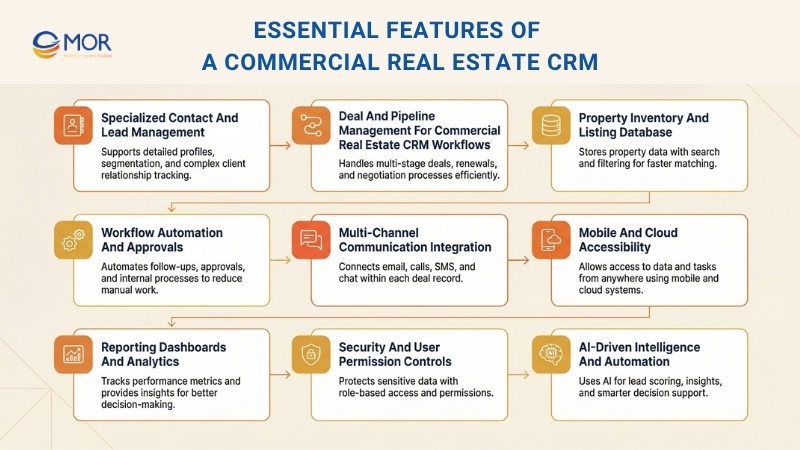
Still, the best CRM for commercial real estate needs to include these key features so it can support your business both now and as it grows:
Specialized Contact And Lead Management
Not every lead has the same value in CRE. You should look for systems that allow you to manage more than basic contact details. This includes investment profiles, property interests, past deal records, and custom notes that support real conversations. Segmentation and tagging features are very useful when you handle complex pipelines.
Deal And Pipeline Management For Commercial Real Estate CRM Workflows
A standard sales pipeline only covers basic needs. Real estate CRM solutions for commercial teams provide flexible deal stages, from early prospecting to final closing. They also support tracking multiple properties and managing detailed deal lifecycles such as lease renewals, negotiations, and due diligence steps. Many platforms include drag-and-drop Kanban boards, which make it easier for you to view and move deals through each stage.
Property Inventory And Listing Database
You can bring all your current, past, and future listings into one place using a structured property database. This feature helps you store and manage detailed property data in a clear way. Advanced search and filtering tools save time and help brokers connect buyers or tenants with the right spaces more efficiently.
Workflow Automation And Approvals
Automate routine activities such as client follow-ups, document collection, internal approvals, or commission tracking. Automated workflows help simplify daily operations and improve overall efficiency. With commercial real estate CRM software, you can set up automated processes for tasks like lead handling and deal monitoring. Automation within these systems helps reduce delays and limits human mistakes.
Multi-Channel Communication Integration
The most effective platforms connect email, phone calls, SMS, and chat directly to each deal record so every interaction stays organized and easy to access. Many solutions also support automated outreach through real estate text messaging, which allows you to send quick property updates, appointment reminders, and follow-ups that keep prospects interested throughout the deal process.
Mobile And Cloud Accessibility
Commercial real estate deals do not happen only in the office. Secure mobile apps and cloud-based access allow you to check property details, record calls, or update deal information anytime and from anywhere. A dedicated mobile application helps you manage tasks on the move and keeps your team connected even when working outside the office.
Reporting Dashboards And Analytics
From tracking deal progress to measuring marketing results, a real estate CRM system with strong analytics helps you monitor key metrics, spot new opportunities, and improve your business approach. You can access live dashboards and create detailed reports for deeper data insights.
Security And User Permission Controls
Commercial real estate transactions often require strict access control to protect sensitive information. A reliable platform allows you to set detailed permissions so only the right people can view or edit certain data, which is especially important for large teams and multi-location businesses.
AI-Driven Intelligence And Automation
Modern CRM platforms use artificial intelligence to support tasks such as lead scoring, suggesting the best times to follow up, identifying risks in your pipeline, and spotting market patterns. These features help you focus on the deals and clients that are most likely to deliver strong results.
>>> Highlight top wealth management software by category and show how the right tools help advisors work with more control and confidence.
Benefits Of Commercial Real Estate CRM Systems
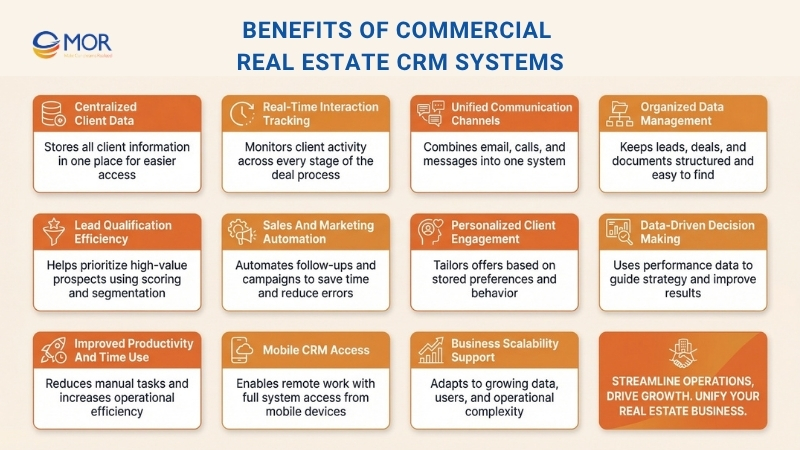
A commercial real estate CRM system is important because it brings all client data into one place, tracks interactions in real time, improves communication, organizes leads and documents, ranks opportunities, and automates daily tasks. It also helps you tailor offers, make informed decisions, save time, work remotely, and grow your business more effectively. Here is a closer look at these benefits:
Centralized Client Information And Preferences
Instead of storing client data across different files, a CRM keeps everything in one place. You can quickly view each client’s needs and past conversations. This makes your work easier and helps you provide better service.
Real-Time Visibility Into Client Interactions
With this platform, you can monitor your clients at every stage, from the first contact to closing a deal. This helps you always know what step comes next.
Unified Communication Across Multiple Channels
Clients may contact you through email, phone calls, or even social media. A real estate CRM system brings all these interactions together. This means you do not miss important messages and can reply more quickly.
Organized Lead, Deal, And Document Management
Managing leads, deals, and documents can become confusing without structure. A commercial real estate CRM keeps everything organized in one system. This helps you spend less time searching and more time closing deals.
Efficient Lead Qualification And Tracking
With this solution, you can score and group leads based on their level of interest. This makes it easier for you to focus on the most valuable opportunities first.
Automate Sales And Marketing Activities
A commercial real estate CRM helps automate routine sales and marketing tasks such as sending follow-up emails, reminders, or scheduling activities. Businesses rely on this because it saves time, reduces mistakes, and makes sure no lead or client interaction is overlooked. When repetitive work is handled automatically, teams can spend more time building relationships and closing deals.
Personalize Offers And Improve Client Engagement
Because this platform stores client preferences, you can create offers that match their actual needs. Clients feel appreciated when they see that you understand their expectations. This leads to stronger engagement and better long-term relationships.
Support Data-Driven Business Decisions
A commercial real estate CRM provides clear records about customers and sales performance. You can track what is working and what is not, which helps you make better decisions for business growth.
Improve Time Management And Productivity
Since tasks are automated and simplified, you gain better control over your schedule. You spend less time on routine work and more time on sales and client support.
Access CRM Anytime Through Mobile
You do not need to stay at your desk to manage your work. With mobile CRM access, you can check client records, send quotes, or update deals from anywhere. This makes daily operations more flexible and easier to handle.
Scale Easily As Your Business Expands
As your business grows, managing clients and deals becomes more complex. This system can scale with your operations by supporting more data, users, and features. You can continue using the same platform without needing to switch tools.
Selecting The Right Commercial Real Estate CRM For Your Business
When choosing a CRM for commercial real estate, it is important to consider several key factors, including scalability, ease of use, integration with MLS and other tools, budget, and support and onboarding. These factors help you select a system that can grow with your business, simplify daily tasks, and keep your clients satisfied.
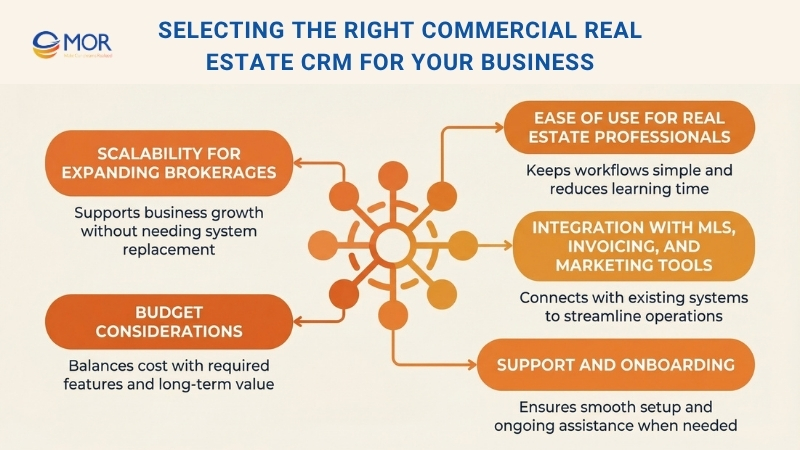
Scalability For Expanding Brokerages
When selecting a commercial real estate CRM, think about how your brokerage may expand over time. Your business needs a system that can support more clients, deals, and agents as it grows. This ensures you will not need to replace your platform later. A scalable solution grows alongside your business, so it remains useful even when your needs increase.
Ease Of Use For Real Estate Professionals
It is important that the platform is easy to use and not difficult to manage. You need a system that allows you to follow up with leads or send messages without confusion. When it is simple to operate, you can focus more on closing deals and spend less time learning how to use the software.
Integration With MLS, Invoicing, And Marketing Tools
A strong commercial real estate CRM should connect smoothly with the tools you already use, such as MLS listings, invoicing systems, or marketing platforms. This helps you avoid switching back and forth between different systems.
For example, you can pull property data from MLS automatically or send marketing emails straight from the platform. These integrations make your workflow simpler and help you work more efficiently.
Budget Considerations
Cost is always important, but it should not force you to accept fewer features. Look for a solution that fits your budget while still offering the tools you truly need. You should also consider setup costs and monthly subscription fees. This way, you are not just paying for software, you are investing in smoother operations and less daily pressure.
Support And Onboarding
Do not ignore the level of support that comes with your CRM. You need a provider that helps you set up the system and answers quickly when you have questions. A clear onboarding process allows you to start using the platform with confidence from the beginning. Reliable ongoing support also means you are never left without help if any issues appear.
Practical Ways To Maximize ROI From A Commercial Real Estate CRM
The most effective ways include keeping your property and client data accurate, automating follow-ups and reports, training your team to use the system correctly, and checking performance metrics on a regular basis. When you apply these steps, your commercial real estate CRM not only supports daily tasks but also improves your sales results.
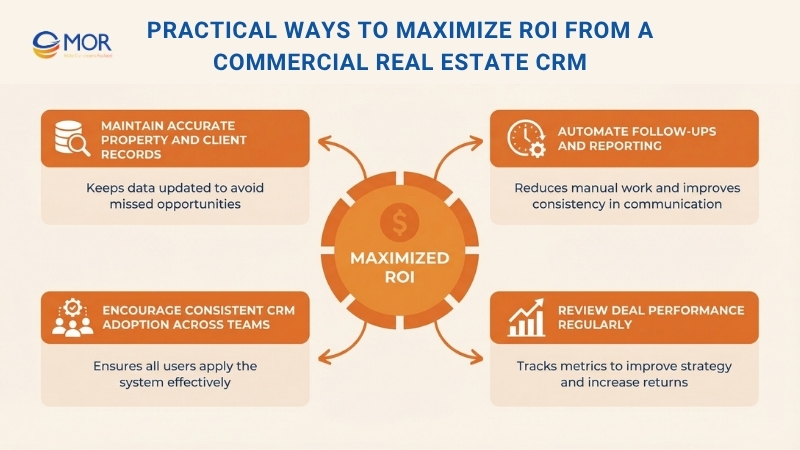
Let’s take a closer look at each one:
Maintain Accurate Property And Client Records
It is important to keep your client and property information updated in the system at all times. If not, you may miss opportunities or provide outdated details to clients. When you update data regularly, you can respond quickly and with the right information. This helps you stay organized and build trust with your clients.
Automate Follow-Ups And Reporting
A CRM platform can handle many routine tasks for you, such as sending reminders, follow-up emails, or creating reports. This helps save time and reduce errors.
For example, you will not forget to contact a potential client because the system alerts you. This keeps your clients engaged and supports better decision-making. Automation makes your work easier and more efficient.
Encourage Consistent CRM Adoption Across Teams
Even the most advanced commercial real estate CRM will not deliver results if your team does not use it properly. You should make sure everyone understands how to enter data, manage deals, and use the available tools. When you provide training sessions or simple guides, learning becomes easier and more convenient. Once your team feels confident with the system, you will see stronger results, better returns, and improved efficiency.
Review Deal Performance Regularly
You should track important CRM data, such as deal speed and how quickly leads receive responses. When you review these metrics, you can see what works well, find areas that need improvement, and make better business decisions.
Regular analysis also helps you improve sales performance and get more value from your CRM investment.
MOR Software Builds Custom Commercial Real Estate CRM
Many commercial real estate firms find that standard CRM platforms cannot fully handle the complexity of their deal pipelines, property data, and stakeholder management processes. This is where we support you. At MOR Software, we build custom commercial real estate CRM solutions and salesforce outsourcing designed to match the exact workflows of brokerages, investment firms, and property management companies.
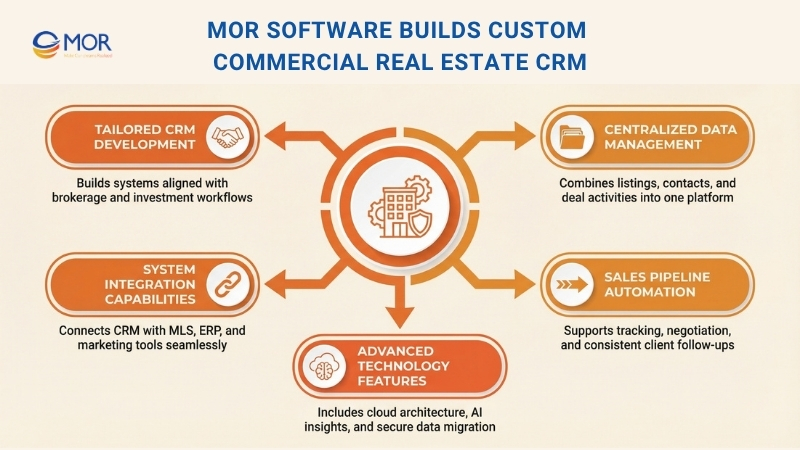
We create tailored systems that bring together property listings, investor contacts, and deal activities into one platform. Our team connects the CRM with MLS systems, salesforce ERP platforms, marketing tools, and other business software so your team can manage transactions without jumping between separate systems. We also set up automation for sales pipelines, helping agents track opportunities, handle negotiations, and keep consistent follow-ups with clients.
Our solutions include cloud-based CRM structures, AI-driven analytics for property and deal insights, and secure data migration from older systems into modern platforms.
If your brokerage needs a custom commercial real estate CRM platform built around your workflows, contact us to discuss your requirements.
Conclusion
The right commercial real estate CRM can significantly improve how your team manages deals, communicates with clients, and supports business growth. The right platform keeps your data organized, improves workflows, and supports smarter decisions over time. If you are looking for a solution tailored to your needs, MOR Software is ready to help. Contact us today to explore a custom CRM built for your business.
MOR SOFTWARE
Frequently Asked Questions (FAQs)
What is a commercial real estate CRM?
A commercial real estate CRM is specialized software used by brokers, agents, and property professionals to manage relationships, track property deals, and organize communications throughout the commercial property sales cycle. It centralizes contacts, property information, and deal activity so teams can monitor opportunities from the first inquiry to closing.
How is a commercial real estate CRM different from a regular CRM?
Unlike general CRM systems, commercial real estate CRM platforms include tools designed for property transactions. These often include property listing databases, lease management workflows, investor tracking, and deal pipeline visibility that reflects the longer and more complex CRE sales process.
Who typically uses a commercial real estate CRM?
CRM for commercial real estate is commonly used by brokerage firms, leasing agents, commercial property managers, investment groups, and developers who manage large property portfolios and multi-party transactions.
What features should a CRM platform for property businesses include?
Important features include contact and investor management, property databases, deal and pipeline tracking, document storage, automated follow-ups, analytics dashboards, and integrations with marketing platforms or MLS systems.
Can a commercial real estate CRM help manage long sales cycles?
Yes. Commercial property deals often take months or longer to finalize. A CRM helps track every interaction with prospects, monitor deal progress, and maintain consistent communication throughout extended negotiation periods.
Does CRM tools for property brokers support team collaboration?
Most CRM platforms allow multiple users to access shared deal pipelines, contact records, and property data. This helps brokerage teams collaborate more effectively and stay aligned on ongoing transactions.
Can a commercial real estate CRM automate marketing and follow-ups?
Many CRM systems include automation tools for email campaigns, SMS messages, reminders, and lead nurturing sequences. These features help agents maintain consistent engagement with prospects and investors.
Is a commercial real estate CRM useful for small brokerage firms?
Yes. Small brokerage teams can benefit from CRM platforms that help organize contacts, track deals, and automate follow-ups. Many systems offer scalable plans that grow alongside the business.
How much does a real estate CRM system cost?
Pricing varies depending on features and platform capabilities. Entry-level plans may start around $20 to $50 per month, while advanced platforms designed for large brokerage teams can cost several hundred dollars per month.
Can commercial real estate CRM platforms integrate with other tools?
Most modern CRM platforms connect with marketing tools, email platforms, accounting software, MLS systems, and document management platforms. These integrations help streamline operations and reduce manual data entry across systems.
Share


Make Our-Dreams Realized


© 2023 . MOR Software. All Rights Reserved
Sitemap
Privacy Policy
Terms of Use

Rate this article
0
over 5.0 based on 0 reviews
Your rating on this news:
Name
*Email
*Write your comment
*Send your comment
1